.webp)
What Is an IP Address? How It Works, Types & Examples
Every device connected to a network uses an IP address to communicate with other devices and online services. It works like an address that helps data know where it came from and where it needs to go.
Your computer, phone, router, printer, and other connected devices can all use IP addresses. Some are used within your local network, while others are used when communicating across the internet.
In this guide, you'll learn what an IP address is, how it works, the different types, the difference between IPv4 and IPv6, and how to find your own IP address.

 Updated: August 31, 2026 | 19 min read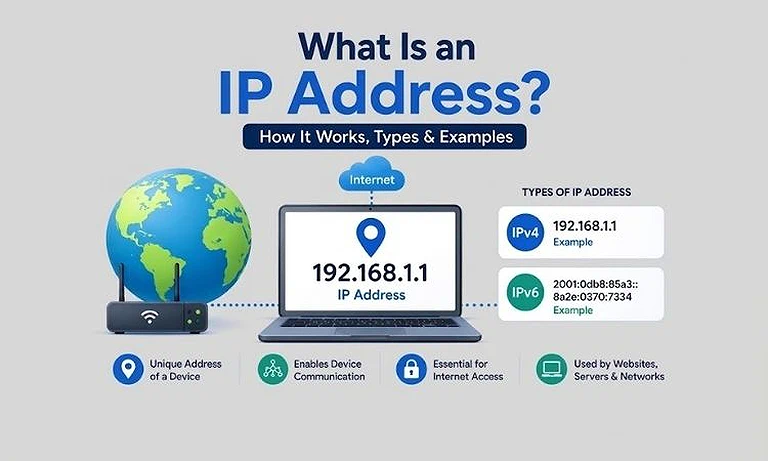
Cover photo What Is an IP Address? How It Works, Types & Examples
What Is an IP Address?
An IP address is a basic part of how devices communicate over a network. The sections below explain what an IP address is, what it does, how it helps data travel, and how to identify IPv4 and IPv6 addresses.
IP Address Definition
An IP address (Internet Protocol address) is a numerical or hexadecimal address assigned to a device or network interface that communicates over an IP network.
What Does an IP Address Do?
It serves two main purposes: identifying a network interface and helping route data to the correct destination.
How IP Addresses Help Data Travel
When you visit a website, send a message, or access an online service, data travels between networks. IP addresses help networking equipment determine where that data should be sent.
How Does an IP Address Work?
When you open a website, your device sends a request through several networks before the website sends the requested content back. Your IP address helps the network identify where the request comes from and where the response should go.
1. Connect to a Network: Your computer, phone, or other device connects to the internet through Wi-Fi, Ethernet, or a mobile network.
2. Get an IP Address: After connecting, your device gets the network information needed for communication, including an IP address.
3. Open a Website and Send the Request: You enter a website address in your browser, and your device prepares and sends a request toward the website's server.
4. Routers Forward the Data: As the request moves between networks, routers examine its addressing information and forward it toward the correct destination.
5. Reach the Website's Server: The request reaches the website's server, which processes it and prepares the requested webpage or content.
6. Receive the Response: The server sends the response back through the network until it reaches your device, and the website appears in your browser.
In simple terms, your IP address provides the addressing information needed for this communication. It helps networks identify the source and destination of data rather than physically locating a device like a street address.
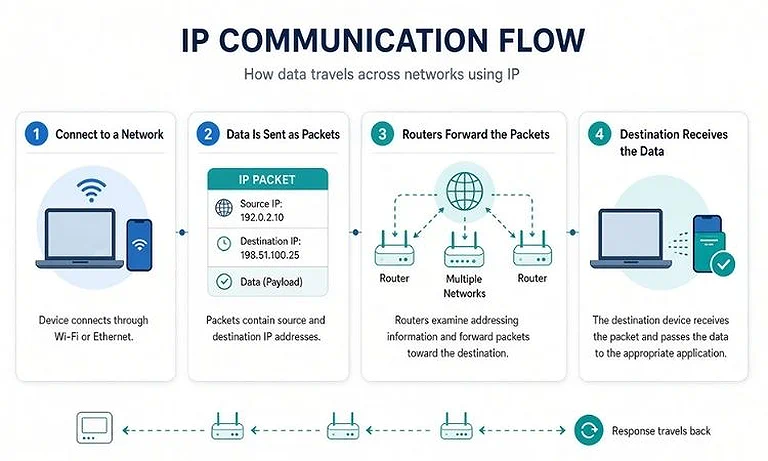
IP communication workflow showing how packets travel between source and destination devices.
What Are IPv4 and IPv6?
IP addresses come in two formats, depending on which Internet Protocol version they use: IPv4 or IPv6. You can usually identify the version just by looking at the address.
IPv4 Address Example
An IPv4 address uses four groups of numbers separated by periods. Each group can contain a number from 0 to 255.
For example:
192.168.1.25
Another common example is:
8.8.8.8
IPv4 uses 32 bits, allowing about 4.3 billion possible addresses. As more devices connected to the internet, this limited address space led to the development and wider adoption of IPv6.
IPv6 Address Example
An IPv6 address is much longer and uses numbers and hexadecimal letters separated by colons.
For example:
2001:db8:85a3::8a2e:370:7334
IPv6 uses 128 bits, providing about 340 undecillion possible addresses. This enormous address space allows for far more unique addresses than IPv4.
Difference Between IPv4 and IPv6
They use different address formats and provide different amounts of address space. The key differences between IPv4 and IPv6 are shown below
| Feature | IPv4 | IPv6 |
| Address size | 32-bit | 128-bit |
| Format | Decimal | Hexadecimal |
| Example | 192.168.1.1 | 2001:db8:85a3::8a2e:370:7334 |
| Address space | About 4.3 billion addresses | About 340 undecillion addresses |
| NAT | Widely used | Generally less necessary |
| Address notation | Four decimal sections separated by periods | Eight hexadecimal groups separated by colons, with shortening rules |
NAT (Network Address Translation) lets multiple devices on a private network share a single public IP address. It is widely used with IPv4 to conserve its limited number of available addresses.
IPv4 remains widely used, while IPv6 continues to expand as networks and internet-connected devices grow. A device or network can also support both protocols at the same time.
What Are the Different Types of IP Addresses?
IP addresses come in different types based on how they are used and assigned. The main types you'll encounter are public, private, static, dynamic, dedicated, and reserved IP addresses.
Public IP Address
A public IP address is used for communication between your network and services available over the internet. Your internet service provider typically assigns a public IP address to your internet connection.
For example, your home network may use one public IP address to communicate with websites, while your computer, phone, and other devices use private IP addresses inside the network.
Private IP Address
A private IP address is used within a local network, such as a home, office, school, or business network. It allows devices on the same network to communicate without requiring a separate public IP address for every device.
Private IP addresses aren't directly accessible from the public internet and are commonly assigned by a router using DHCP. They identify your device within a local network and can be found through your computer's network settings. For specific instructions, see how to find a private IP address on Mac or check the steps for finding a private IP address on Windows.
Common private IPv4 ranges include:
10.0.0.0 to 10.255.255.255
172.16.0.0 to 172.31.255.255
192.168.0.0 to 192.168.255.255
For example, a computer might use 192.168.1.25, while a router uses 192.168.1.1 on the same network. Private IP addresses aren't directly routable across the public internet. See in detail difference between public and private IP address
Static IP Address
A static IP address is configured to remain the same unless the network administrator or service provider changes it. It is useful for devices and services that need a predictable address.
Servers, network equipment, remote-access systems, and some business services commonly use static IP addresses. A static IP address can be public or private depending on where it is used.
Dynamic IP Address
A dynamic IP address is assigned automatically and may change over time. Home networks commonly use dynamic addressing because devices can receive their network settings without manual configuration.
For example, a router can receive a dynamic public IP address from an internet service provider, while devices inside the network can receive private addresses through DHCP.
Dedicated IP Address
A dedicated IP address is assigned exclusively to one customer, website, server, or service rather than being shared with other customers or services.
It is commonly used for business services, websites, servers, remote access, and other situations where having an address dedicated to one service is useful.
Reserved IP Address
A reserved IP address is an IP address set aside for a specific device on a local network. A router can use a DHCP reservation to ensure that the same private IP address is assigned to that device whenever it connects.
For example, you can reserve 192.168.1.50 for a network printer so other devices can consistently connect to it using the same address.
Why Do We Use IP Addresses?
IP addresses are involved in many everyday network activities. They help devices communicate, allow data to reach the right destination, and make it easier to identify and troubleshoot network connections.
Identifying Devices on a Network: An IP address provides an address that helps identify a device or network interface when it communicates over an IP network.
Routing Data: When data travels between networks, routers use IP addresses to determine where packets should go next. This allows data to move from its source toward the intended destination.
Accessing Websites and Online Services: When you open a website or use an online service, your device communicates with a remote server. IP addresses provide the addressing information needed for this communication.
Connecting Devices on a Local Network: Private IP addresses allow devices on the same local network to communicate with each other. For example, your computer can use a printer's private IP address to send it a print job.
Troubleshooting Network Problems: IP addresses can also help identify and troubleshoot connectivity problems. Network administrators and users can check addresses, test whether devices are reachable, and diagnose communication issues using tools such as ping. For a practical way to scan a local network and identify connected devices, see our guide to Advanced IP Scanner.
Can a Device Have More Than One IP Address?
Yes, a device can have multiple IP addresses at the same time. A device can have more than one network cards, network interfaces such as Wi-Fi, Ethernet, or a cellular connection. Each network interface or network card can have its own IP address.
For example, a laptop may have a Wi-Fi network card and an Ethernet network card. If both are connected to networks, each network card can be assigned a different IP address.
A device can also have both an IPv4 and an IPv6 address on the same network interface. Therefore, having multiple IP addresses on one device is normal and depends on its network interfaces, connections, and configuration.
Can Two Devices Have the Same IP Address?
Yes, two devices can have the same private IP address if they are connected to different networks. Private IP addresses can be reused because they only need to be unique within their own local network.
For example, your home router might assign your computer the private IP address 192.168.1.10. Another person's computer can also use 192.168.1.10 on their separate home network without causing a conflict.
However, two devices on the same local network generally cannot use the same private IP address at the same time. If they do, an IP address conflict can occur and may cause communication problems.
Public IP addresses are used for communication over the internet and need to be unique for proper routing. However, NAT (Network Address Translation) allows multiple devices on the same network to share one public IP address when accessing the internet.
What Is Difference Between an IP Address and a MAC Address?
IP addresses and MAC addresses are both used to identify devices in networking, but they work at different levels and serve different purposes. An IP address helps move data between networks, while a MAC address helps deliver data within a local network.
| Feature | IP Address | MAC Address |
| Main purpose | Identifies a device on an IP network and helps route data | Identifies a network interface on a local network |
| Used for | Sending data between networks | Delivering data within a local network |
| Format | IPv4 or IPv6 | Hexadecimal |
| Example | 192.168.1.25 | 00:1A:2B:3C:4D:5E |
| Can it change? | Yes | No* |
| How is it assigned? | Automatically by the network or manually | Assigned to the network interface by the manufacturer |
* A MAC address is normally fixed to the network interface, although some devices can use MAC address randomization.
Can an IP Address Reveal Your Location?
An IP address can provide an approximate location, but it usually can't pinpoint where a person is physically located. IP geolocation services compare the address with databases to estimate where the network connection is being used.
Depending on the available information, an IP lookup may show:
- Country
- Region or state
- City
- Internet service provider (ISP)
- Organization or network
The accuracy can vary significantly. Mobile networks, VPNs, proxies, corporate networks, and ISP infrastructure can make the estimated location less precise.
An IP address also doesn't normally reveal your exact home address, name, or identity by itself. It identifies a network connection, while additional information held by an ISP or other service may be needed to associate that connection with a specific person.
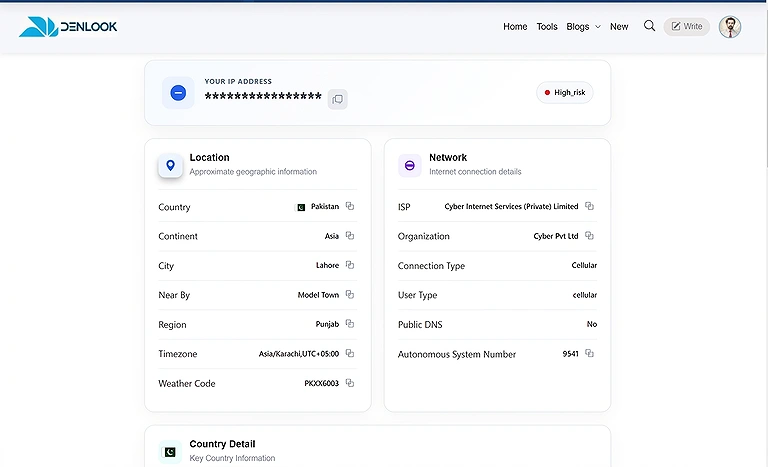
A detailed network, location, and security risk data provided by an IP lookup tool with the IP address
Can an IP Address Identify You?
An IP address can identify a network connection, but it doesn't directly reveal your name or personal identity.
Your internet service provider (ISP) may keep records showing which customer was assigned a particular IP address at a specific time. Websites and online services may also record the IP addresses that connect to their servers.
However, an IP address alone generally isn't enough to identify a specific person. Additional information, such as records held by an ISP or account details provided to a service, may be needed to connect an IP address with an individual.
Can an IP Address Change?
Yes, an IP address can change depending on the type of address and how the network assigns it.
A public IP address can change when your ISP assigns a new address, your router reconnects, you switch to a different internet connection, or you connect through a VPN or proxy.
A private IP address can also change when your router automatically assigns a different address to a device through DHCP. For example, your computer might receive a different private IP address after reconnecting to your home network.
A static IP address is configured to remain the same, while a dynamic IP address can change when the network assigns a new address.
What is an IP conflict?
An IP conflict happens when two devices on the same local network are assigned the same IP address. Because the network can't reliably determine which device should receive the data, both devices may experience connection problems.
An IP conflict can cause:
- Devices to become unreachable
- Internet or network connections to drop intermittently
- Problems accessing shared devices such as printers
- Communication failures between devices
Often, you can fix an IP conflict by restarting the affected device or reconnecting it to the network. If the problem keeps coming back, check the router's DHCP settings and any manually assigned IP addresses.
What Are IP Address Classes?
IP address classes were part of an older IPv4 addressing system that divided IP addresses into different groups based on the size of the network and the number of devices it could support.
- Class A: Designed for very large networks with a large number of host addresses.
- Class B: Designed for medium-sized networks with more host addresses than Class C.
- Class C: Designed for smaller networks with fewer host addresses.
- Class D: Used for multicast communication, where data is sent to multiple devices.
- Class E: Reserved for experimental and research purposes.
What Is CIDR?
Classless Inter-Domain Routing (CIDR) is a modern IPv4 addressing method that allows networks to use IP address ranges more flexibly. Unlike the traditional Class A, B, and C system, CIDR does not rely on fixed address classes.
CIDR uses prefix notation, such as 192.168.1.0/24, where the /24 indicates how many bits identify the network portion of the address. You can use a CIDR calculator to quickly determine network ranges, subnet masks, and related IP information.
CIDR replaced the older class-based system because it provides more efficient IP address allocation and reduces address waste. For a detailed explanation of CIDR notation, prefix lengths, and subnetting, see our complete guide to CIDR.
What Is an Interface IP Address?
An interface IP address is an IP address assigned to a specific network interface, such as Ethernet, Wi-Fi, or a virtual adapter. A device can have multiple interfaces, each with its own IP address. Learn more about interface IP addresses to understand how they work, how they're assigned, and how to find them.
What Is a Router's IP Address?
A router provides multiple IP addresses because it connects different networks. On a home network, its private IP address acts as the default gateway that devices use to communicate with the router and reach other networks.
For example, a router may use a private IP address such as:
192.168.1.1
If you need to identify your router's private IP address, see How to Find Your Router's IP Address for step-by-step instructions on Windows, Mac, Android, iPhone, iPad, and Linux.
What Is a Printer's IP Address?
A printer's IP address is a network address that identifies the printer on your local network. Computers, phones, and other connected devices can use this address to communicate with the printer.
For example, a printer's private IPv4 address may look like:
192.168.1.26
The address is usually assigned automatically by your router through DHCP, although some printers can use a manually configured static IP address. If you need to find the current address assigned to your printer, see our detailed guide on How to Find Printer's IP Address.
How to Test an IP Address?
One of the simplest ways to test whether an IP address is reachable is by using the ping command. It sends small test packets to the address and checks whether a response comes back.
For example:
ping 192.168.1.1
If the device responds, ping can show that it is reachable and provide basic information about the response time. This makes it useful for finding common network connection problems.
However, a successful ping doesn't mean that every service on the device is working. A device can respond to ping while a specific website, application, or network port remains unavailable.
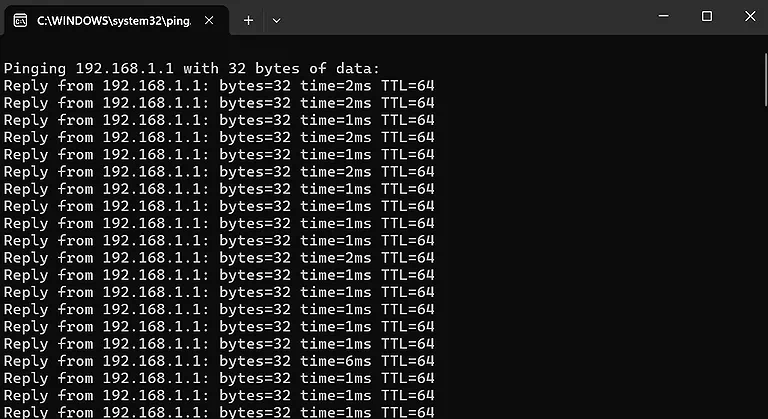
Ping test showing a successful response from the IP address 192.168.1.1.
FAQ
What is an IP address made of?
An IPv4 address contains four decimal numbers separated by periods, while an IPv6 address uses hexadecimal groups separated by colons. The format and number of sections depend on the IP version.
Who assigns an IP address?
The organization managing the network typically assigns an IP address. An internet service provider can assign a public address, while a router can assign private addresses to devices on a local network.
Where is an IP address stored?
An IP address is part of a device's network configuration while it is connected to a network. The operating system and network equipment use this information to manage communication and data delivery.
What is an IP address used for in Wi-Fi?
When a device connects to Wi-Fi, it uses an IP address to communicate with the router and other devices. The router also uses IP addressing to provide access to internet services.
What is difference between an IP address and a website address?
An IP address identifies a network destination, while a website address, such as a domain name, gives people an easier way to access a website. DNS connects the domain name to its IP address.
What is DNS and how does it relate to IP addresses?
DNS, or Domain Name System, translates domain names such as example.com into IP addresses. This allows browsers to find the correct server without users having to enter or remember its IP address.
Can a device connect to the internet without an IP address?
A device communicating over an IP-based network needs an appropriate IP address. Without one, it generally can't exchange data normally with other devices or internet services using that network.
What is a network interface?
A network interface is the component that allows a device to connect to a network. Wi-Fi and Ethernet are common examples. Each interface can have its own network configuration and IP address.
Why are there IPv4 and IPv6 addresses?
IPv4 was developed first but provides a limited number of addresses. IPv6 was introduced to provide a much larger address space as the number of connected devices and networks continued to grow.
What is an IP address range?
An IP address range is a group of IP addresses that share a defined starting and ending point or network prefix. Networks use ranges to organize and allocate addresses to connected devices.
What is a subnet mask?
A subnet mask helps determine which part of an IPv4 address identifies the network and which part identifies a device. It allows devices and routers to understand whether destinations are on the same network.
What is a default gateway?
A default gateway is usually the router that a device uses to send data to destinations outside its local network. On a typical home network, the router acts as the default gateway.
What is localhost or the loopback IP address?
Localhost refers to the device itself rather than another computer on the network. In IPv4, the commonly used loopback address is 127.0.0.1, while IPv6 uses ::1.
What is a reserved IP address?
A reserved IP address is set aside for a specific purpose or device. In a local network, a router can reserve a private IP address for a particular device through a DHCP reservation.
Can an IP address be traced?
An IP address can sometimes be used to estimate a network's general location and identify its internet service provider. However, an IP address alone doesn't normally reveal someone's exact physical location or identity.
Conclusion
An IP address is a key part of how devices communicate over networks. It provides the addressing information needed to send data between computers, phones, routers, printers, websites, and other connected devices. IP addresses can be IPv4 or IPv6 and may also be public, private, static, dynamic, dedicated, or reserved, depending on how they're used and assigned. Understanding these different types makes it easier to understand how devices communicate on local networks and across the internet.