.webp)
What Is CIDR? Understanding CIDR Notation, Subnets, and IP Ranges
CIDR, or Classless Inter-Domain Routing, is a system that makes IP address allocation and network routing more flexible. Unlike the older class-based approach, CIDR allows networks to use different prefix lengths based on their actual address requirements.
If you've seen an IP address written like 192.168.1.0/24, the number after the slash is CIDR notation. It identifies the network portion of the address and determines how many IP addresses the network contains. Understanding this notation makes subnetting, IP ranges, and network configuration much easier.
In this guide, you'll learn what CIDR means, how CIDR notation works, how to calculate subnet sizes, and how CIDR relates to subnets and IP ranges. You'll also see practical examples that make common CIDR prefixes easier to understand.

 Updated: September 20, 2026 | 17 min read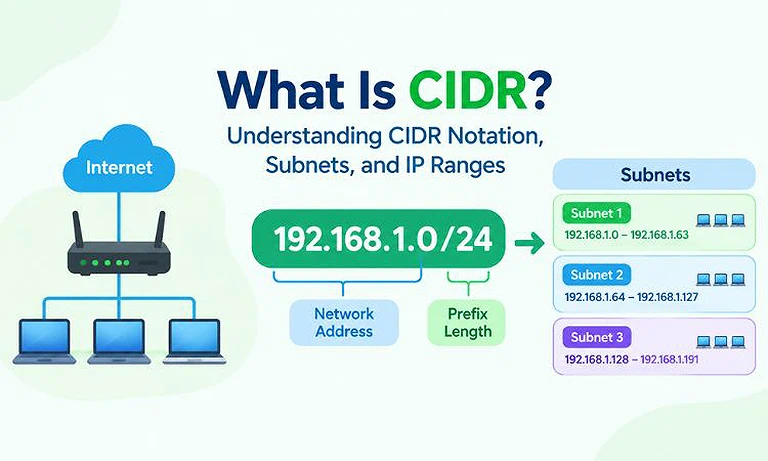
Cover Photo What Is CIDR? Understanding CIDR Notation, Subnets, and IP Ranges
What Is CIDR?
CIDR stands for Classless Inter-Domain Routing. It is a method for allocating IP addresses and routing network traffic more efficiently. CIDR replaced the older class-based approach, which used fixed network sizes for Class A, Class B, and Class C addresses.
Under the classful system, organizations could receive more IP addresses than they actually needed, leading to inefficient address allocation. CIDR solves this problem by allowing networks to use flexible prefix lengths based on their requirements.
For example:
192.168.1.0/24
Here, /24 is the CIDR prefix length. It means the first 24 bits identify the network, while the remaining 8 bits are available for host addresses. This prefix determines the size of the network and the number of IP addresses it contains.
What Does CIDR Notation Mean?
CIDR notation combines an IP address with a forward slash (/) followed by a number. This number is called the prefix length and shows how many bits of the IPv4 address belong to the network portion.
Example:
192.168.1.0/24
Here:
192.168.1.0 is the network address.
/24 is the CIDR prefix length.
24 bits identify the network.
The remaining 8 bits are available for hosts.
The network contains 256 total IPv4 addresses.
For IPv4, CIDR prefixes range from /0 to /32. A smaller prefix represents a larger address block, while a larger prefix represents a smaller address block.
For example:
- /16 provides a larger address block than /24.
- /24 provides a larger address block than /28.
- /28 provides a larger address block than /30.
In simple terms, the higher the CIDR prefix number, the fewer IP addresses the network contains.
How CIDR Works
IPv4 addresses contain 32 bits, divided into four 8-bit sections called octets. CIDR uses a prefix length to determine where the network portion ends and the host portion begins.
For example:
192.168.1.0/24
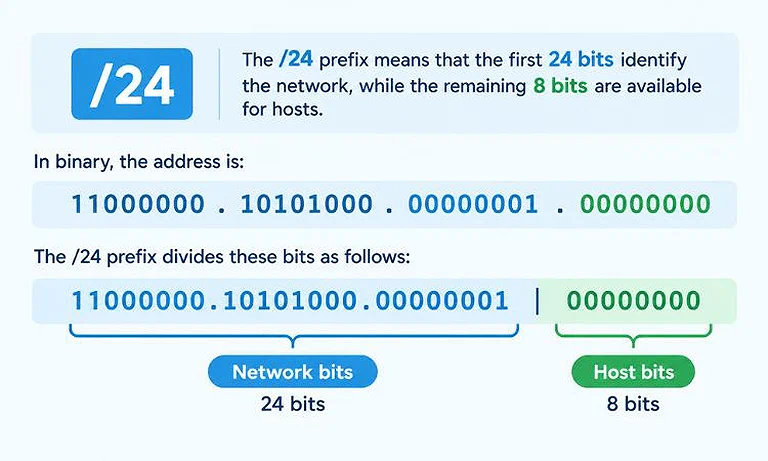
A visual explanation of how a `/24` CIDR prefix divides an IPv4 address into 24 network bits and 8 host bits.
The first 24 bits remain the same for addresses within this network, while the final 8 bits can change to identify different hosts.
For example, devices within the 192.168.1.0/24 network can have addresses such as:
192.168.1.1
192.168.1.25
192.168.1.50
192.168.1.100
The CIDR prefix therefore determines how much of an IP address identifies the network and how much is available for individual hosts. The next section explains how to use this information to calculate the total number of addresses in a CIDR block.
What Is a CIDR Prefix?
The number after the slash in CIDR notation is called the CIDR prefix length. It specifies how many of the 32 bits in an IPv4 address are used for the network portion. The remaining bits are available for host addresses.
For example:
10.0.0.0/8
The /8 prefix means:
8 network bits
24 host bits
Another example is:
172.16.0.0/16
The /16 prefix means:
16 network bits
16 host bits
And:
192.168.1.0/24
The /24 prefix means:
24 network bits
8 host bits
The prefix length directly affects the size of the address block. A smaller prefix provides more addresses, while a larger prefix provides fewer addresses.
For example, a /16 network contains more addresses than a /24 network, while a /28 network contains fewer addresses than a /24 network.
How to Calculate CIDR Addresses
To calculate the number of addresses in an IPv4 CIDR block, subtract the prefix length from 32 to find the host bits.
Use this formula:
Total addresses = 2^(32 − prefix length)
For example, for 192.168.10.0/26:
32 − 26 = 6 host bits
2^6 = 64 total addresses
A traditional IPv4 subnet reserves one network address and one broadcast address, leaving:
64 − 2 = 62 usable host addresses
For quick subnet calculations, you can use a CIDR calculator to find the network address, broadcast address, subnet mask, host range, and other subnet details automatically.
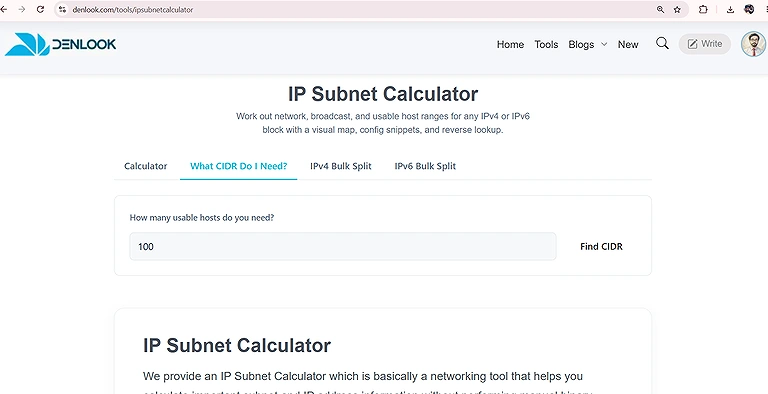
Denlook Official CIDR calculator
How CIDR Creates Smaller Subnets
CIDR allows a larger network to be divided into smaller subnets by increasing the prefix length. This gives each subnet a smaller range of IP addresses.
For example, start with:
192.168.1.0/24
A /24 network contains 256 total addresses. Increasing the prefix from /24 to /26 leaves fewer host bits, creating smaller networks.
The /24 network can be divided into four /26 subnets:
| Subnet | Address Range | Broadcast |
| 192.168.1.0/26 | .0 – .63 | .63 |
| 192.168.1.64/26 | .64 – .127 | .127 |
| 192.168.1.128/26 | .128 – .191 | .191 |
| 192.168.1.192/26 | .192 – .255 | .255 |
Each /26 subnet contains 64 total addresses, with 62 traditionally usable host addresses.
This approach is useful when different departments, devices, or services need separate network segments while using the same larger address block.
CIDR vs. IPv4 Address Classes
CIDR replaced the older classful IPv4 addressing system, which divided addresses into predefined classes. Class A, B, and C were used for different network sizes, while Class D was used for multicast and Class E was reserved for experimental purposes.
Under the classful system, a traditional Class C network had a /24 network boundary and provided 256 total addresses. A network needing only 30 or 100 addresses could therefore receive more address space than necessary.
CIDR removes these fixed boundaries by allowing flexible prefix lengths. Instead of using only a /24, a network can use /25, /26, /27, /28, or another appropriate prefix based on its requirements.
Why CIDR Replaced Classful Addressing
The older classful system had limited flexibility because it used fixed network sizes.
For example, a Class C network provided 256 total addresses, with 254 traditionally usable host addresses. If an organization needed only 60 addresses, allocating a full /24 block would leave many addresses unused.
CIDR introduced variable-length prefixes, allowing address blocks to better match actual network requirements.
For example, instead of allocating a /24 with 256 total addresses, a /26 provides 64 total addresses. This is much closer to a network that needs around 60 addresses.
This approach makes IP address allocation more efficient and helps conserve limited IPv4 address space.
CIDR also supports route aggregation, which can reduce the number of routing table entries required by routers.
CIDR vs. Subnet Mask
CIDR notation and subnet masks are two different ways of showing which part of an IP address identifies the network.
CIDR uses a slash and a number, such as /24. A subnet mask uses four numbers separated by dots, such as 255.255.255.0.
For example:
CIDR: 192.168.1.0/24
Subnet mask: 255.255.255.0
Both describe the same network. The /24 simply tells us that the first 24 bits belong to the network.
Here are some common examples:
| CIDR | Subnet Mask | Total Addresses |
| /24 | 255.255.255.0 | 256 |
| /26 | 255.255.255.192 | 64 |
| /28 | 255.255.255.240 | 16 |
In simple terms, CIDR is the shorter way to write a subnet mask. For example, /24 is the shorter form of 255.255.255.0.
CIDR and VLSM
VLSM stands for Variable Length Subnet Masking. It allows different subnets within the same larger network to use different prefix lengths.
For example, a network could be divided like this:
Department A: 192.168.1.0/25 — 128 total addresses
Department B: 192.168.1.128/27 — 32 total addresses
Point-to-point connection: 192.168.1.160/30 — 4 total addresses
Each subnet gets a different number of addresses based on its requirements. This helps avoid assigning a large subnet to a network that needs only a few addresses.
CIDR provides the classless prefix system, while VLSM uses different prefix lengths to divide a network into subnets of different sizes.
What Is CIDR Aggregation?
CIDR aggregation, also called route summarization, combines multiple smaller networks into a single larger network prefix.
For example, imagine four consecutive /24 networks:
192.168.0.0/24
192.168.1.0/24
192.168.2.0/24
192.168.3.0/24
Each /24 contains 256 total addresses, so all four networks contain:
4 × 256 = 1,024 total addresses
Because these networks are consecutive and properly aligned, they can be represented by one summary route:
192.168.0.0/22
The /22 covers the same 1,024 addresses, from 192.168.0.0 through 192.168.3.255.
Instead of maintaining four separate routes, a router can potentially use one summarized route. This can reduce the size of routing tables and simplify route management.
Aggregation works correctly only when the networks are contiguous and properly aligned for the chosen summary prefix.
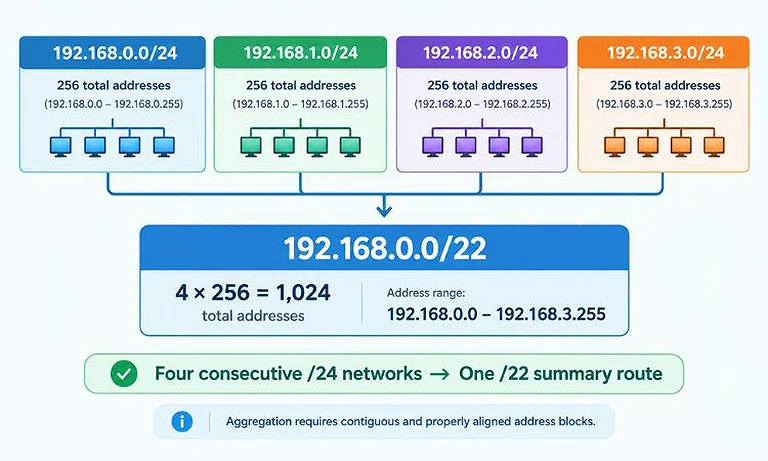
Four consecutive /24 networks aggregated into one /22 summary route.
How CIDR Aggregation Works
The CIDR prefix determines how many addresses a summarized network can cover.
Consider these four consecutive /24 networks:
192.168.0.0/24
192.168.1.0/24
192.168.2.0/24
192.168.3.0/24
Each /24 contains 256 total addresses. Together, they contain:
4 × 256 = 1,024 total addresses
A /22 has two fewer network bits than a /24. Those two bits allow:
2² = 4
So, four equally sized /24 networks can be summarized as one /22 network, provided their addresses are correctly aligned.
The resulting /22 block covers:
192.168.0.0 – 192.168.3.255
Instead of representing these four networks separately, the router can represent them with the single prefix:
192.168.0.0/22
CIDR and Private IP Addresses
Private IPv4 address ranges are commonly written using CIDR notation. These ranges are reserved for devices and networks inside private environments, such as homes, offices, and organizations. If you want to scan the local network and see the IP addresses of connected devices, see our guide to Advanced IP Scanner.
The three main private IPv4 blocks are:
| Private Range | CIDR |
| 10.0.0.0 – 10.255.255.255 | 10.0.0.0/8 |
| 172.16.0.0 – 172.31.255.255 | 172.16.0.0/12 |
| 192.168.0.0 – 192.168.255.255 | 192.168.0.0/16 |
These CIDR blocks provide private addresses that can be reused across different private networks. They aren't used as directly routable public addresses on the Internet.
For example, a home router might create a local network using:
192.168.1.0/24
This subnet contains 256 total addresses, from 192.168.1.0 through 192.168.1.255. Devices can use addresses such as:
192.168.1.10
192.168.1.20
192.168.1.30
The router manages communication between these private addresses and external networks, typically using Network Address Translation (NAT).
CIDR in Home Networks
CIDR is useful even in simple home networks. A router might use the following CIDR network:
192.168.1.0/24
This means the local network contains 256 total addresses, ranging from 192.168.1.0 to 192.168.1.255.
For example, a computer might use:
192.168.1.25
while a printer might use:
192.168.1.26
Both addresses belong to the same 192.168.1.0/24 subnet, so devices on this network can communicate with each other through the local network.
The router's network settings may also show the subnet mask:
255.255.255.0
This subnet mask is another way of representing the /24 prefix. Understanding CIDR makes it easier to interpret these common home network settings.
CIDR in Business Networks
Businesses can use CIDR to divide their address space among different departments, locations, servers, and services.
For example, a company could create separate subnets for:
- Employee computers
- Printers
- Servers
- Guest Wi-Fi
- Security devices
- VoIP phones
Each network segment can use a CIDR prefix that matches its size.
For example, a small segment might use a /28, which provides 16 total addresses. A larger segment might use a /23 or /22, providing 512 or 1,024 total addresses respectively.
This flexible approach helps businesses organize their networks and allocate IP addresses according to actual requirements.
CIDR in Cloud Networking
Cloud platforms commonly use CIDR notation when creating virtual networks.
For example, a virtual network might use:
10.0.0.0/16
This larger network can then be divided into smaller subnets for different applications or services.
For example:
10.0.1.0/24 — Application servers
10.0.2.0/24 — Database servers
10.0.3.0/24 — Internal services
Each /24 subnet contains 256 total addresses and comes from the larger 10.0.0.0/16 network.
Cloud administrators can use different subnets to organize applications, services, and other resources. CIDR therefore plays an important role in designing virtual networks and managing IP address space.
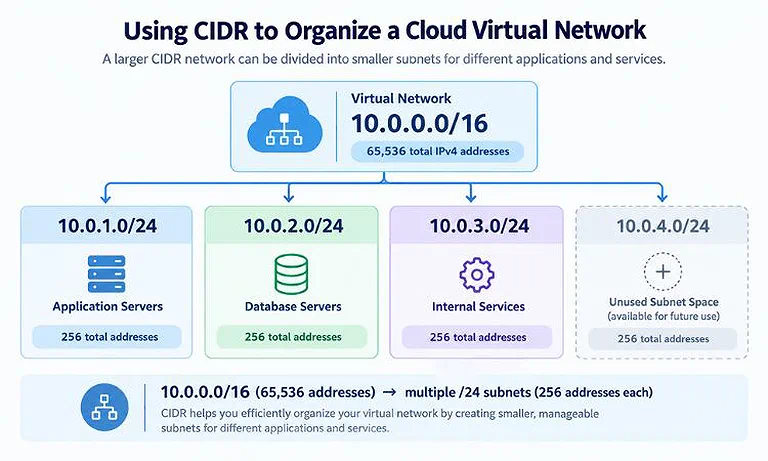
CIDR divides a large `/16` network into smaller `/24` subnets for different cloud services.
CIDR in Firewalls and Access Control
CIDR notation is useful for defining groups of IP addresses in firewall and access control rules.
For example:
192.168.1.0/24
represents an entire /24 network rather than a single IP address. A firewall rule can therefore apply to all addresses in that network without listing each address separately.
When a rule needs to identify only one IPv4 address, a /32 prefix can be used.
For example:
203.0.113.25/32
represents exactly one IPv4 address.
This makes CIDR useful for controlling access to individual devices, groups of devices, or entire networks.
What Does /32 Mean?
A /32 prefix uses all 32 bits of an IPv4 address for the network portion.
For example:
192.168.1.25/32
represents exactly one IPv4 address.
There are:
2^(32 − 32) = 2⁰ = 1
total address in a /32 block.
A /32 is commonly used to identify a specific IPv4 address in routing, firewall, and access-control configurations.
What Does /31 Mean?
A /31 prefix contains two IPv4 addresses.
Calculation:
2^(32 − 31) = 2
Under traditional IPv4 subnetting, one address would normally be used as the network address and the other as the broadcast address. That would leave no usable host addresses.
However, /31 has a special use for point-to-point links. Because these links connect exactly two endpoints, they can use both addresses without requiring a separate broadcast address.
What Does /30 Mean?
A /30 prefix contains four IPv4 addresses.
Calculation:
2^(32 − 30) = 4
Under traditional IPv4 subnetting:
1 address = network address
2 addresses = usable host addresses
1 address = broadcast address
Therefore, a /30 provides two traditional usable host addresses.
This makes /30 useful for point-to-point connections when traditional network and broadcast addressing is required.
How to Find the Network Address From CIDR
To find the network address, you need an IP address and its CIDR prefix.
Consider:
192.168.1.75/26
A /26 leaves 6 host bits, so each block contains:
2⁶ = 64 addresses
Starting from zero, the possible ranges in the final octet are:
0–63
64–127
128–191
192–255
The IP address 192.168.1.75 falls within the 64–127 range.
Therefore:
Network address: 192.168.1.64
Broadcast address: 192.168.1.127
Usable host range: 192.168.1.65–192.168.1.126
This simple method is useful for understanding subnet boundaries and troubleshooting network configurations.
CIDR Block Size and Prefix Length
There is a simple relationship between the CIDR prefix length and the number of addresses in a block.
For IPv4:
Total addresses = 2^(32 − prefix length)
For example, a /28 leaves 4 host bits:
2⁴ = 16 total addresses
Similarly:
/29 → 3 host bits → 2³ = 8 addresses
/30 → 2 host bits → 2² = 4 addresses
/31 → 1 host bit → 2¹ = 2 addresses
/32 → 0 host bits → 2⁰ = 1 address
As the prefix length increases, the number of addresses in the block decreases. This pattern makes common CIDR calculations easier to understand and remember.
Common CIDR Mistakes
a) Mistaking the Prefix for the Number of Hosts
A /24 doesn't mean 24 hosts.
The number represents network bits, not the number of available devices. A /24 leaves 8 host bits, resulting in 256 total addresses and traditionally 254 usable host addresses.
b) Assuming Every Subnet Has Two Reserved Addresses
The traditional network-and-broadcast model doesn't apply identically to every IPv4 prefix.
For example, a /31 has special behavior on point-to-point links, while a /32 represents exactly one IPv4 address.
c) Confusing CIDR With an IP Address Class
CIDR is classless, so networks aren't restricted to traditional Class A, B, or C boundaries.
For example:
192.168.1.0/27
uses a /27 prefix to define the network size. It doesn't have to use the traditional Class C /24 boundary.
d) Choosing a Prefix Without Checking Alignment
Not every IP address can be the starting address of a subnet.
For example, /26 networks have 64 addresses per block, so they start at intervals of 64 in the final octet:
0, 64, 128, 192
Therefore, 192.168.1.75/26 belongs to the 192.168.1.64/26 network. It cannot start a new /26 network at .75.
Benefits of CIDR
CIDR provides several important benefits for IP addressing and network routing.
a) Flexible Network Sizes
CIDR isn't restricted to fixed Class A, B, or C network sizes. Administrators can choose different prefix lengths based on network requirements.
b) Route Aggregation
CIDR allows multiple consecutive networks to sometimes be represented by a single summarized route. This reduces the need to advertise each network separately.
c) Smaller Routing Tables
Route aggregation can reduce the number of routing entries that routers need to maintain. Smaller routing tables can also simplify route management.
d) Efficient IP Address Allocation
CIDR allows organizations to receive address blocks that more closely match their actual requirements. This helps reduce unnecessary allocation of scarce IPv4 address space.
e) Better Network Organization
CIDR makes it easier to divide address space into appropriately sized subnets for different departments, services, applications, and network segments.
CIDR Cheat Sheet
| CIDR | Total IPv4 Addresses | Traditional Usable Hosts |
| /24 | 256 | 254 |
| /25 | 128 | 126 |
| /26 | 64 | 62 |
| /27 | 32 | 30 |
| /28 | 16 | 14 |
| /29 | 8 | 6 |
| /30 | 4 | 2 |
| /31 | 2 | Special point-to-point use |
| /32 | 1 | Single address |
FAQs
Why is CIDR important for modern networks?
CIDR makes IPv4 addressing more flexible by allowing networks to use appropriately sized address blocks. It also supports route aggregation, which helps reduce unnecessary routing information and simplifies large-scale network management.
Can CIDR be used with IPv6?
Yes. CIDR notation is also widely used with IPv6. Because IPv6 addresses contain 128 bits, their prefixes can range from /0 through /128, allowing networks to define address blocks with different sizes.
What is a CIDR block?
A CIDR block is a group of consecutive IP addresses identified by an address and prefix length. For example, 192.168.10.0/24 represents one block containing 256 total IPv4 addresses.
How does CIDR affect IP routing?
CIDR allows routers to make routing decisions using variable-length prefixes instead of fixed address classes. Routers can match destination addresses against these prefixes to determine the appropriate path for network traffic.
Can two networks use the same CIDR range?
Two private networks can use the same CIDR range because private addresses can be reused in separate environments. However, overlapping ranges can create problems when those networks need to communicate or connect through VPNs.
What happens when CIDR networks overlap?
Overlapping CIDR ranges can cause routing conflicts because the same IP addresses may appear to belong to multiple networks. This can make communication, VPN connections, and network management more difficult.
How is CIDR used in VPN networks?
VPN administrators use CIDR ranges to define which networks should send traffic through the VPN tunnel. Correctly planned ranges help prevent overlapping addresses and ensure traffic reaches the intended destination.
Can CIDR improve network security?
CIDR itself isn't a security feature, but it helps define precise network ranges. Firewalls and access-control systems can use these ranges to apply rules to groups of addresses more efficiently.
What is the difference between a CIDR block and an IP range?
A CIDR block identifies an IP range using a prefix, such as 10.0.0.0/24. An IP range describes the starting and ending addresses, while CIDR also defines the block's size.
Is CIDR still used today?
Yes. CIDR remains a fundamental part of modern IP networking. It is used across private networks, Internet routing, cloud environments, VPNs, firewalls, and other systems that require flexible address allocation.
Conclusion
CIDR, or Classless Inter-Domain Routing, provides a flexible way to allocate and organize IP address space. Unlike classful addressing, it uses variable-length prefixes to define network sizes based on actual requirements. Understanding CIDR notation, prefix lengths, subnet masks, and address calculations makes it easier to work with IPv4 networks.
CIDR also plays an important role in subnetting, VLSM, route aggregation, cloud networking, business networks, home networks, and firewall rules. From a large /16 network to a single /32 address, CIDR provides a consistent way to describe different network sizes. Learning these concepts helps make IP addressing, subnet design, and routing easier to understand and manage.