.webp)
Public vs Private IP Address: Uses and How They Work
Every network-connected device needs a way to communicate with other devices, but IP addresses can serve different roles within that communication. Knowing how those roles differ becomes important when setting up a router, connecting devices, troubleshooting network problems, or checking why a device can communicate locally but not directly over the internet.
Here, we’ll look at how public and private IP addresses differ, where each one is used, and how they work together within a network. We’ll also cover their common ranges, practical examples, security considerations, and how to identify them on computers, phones, routers, printers, and other network devices.

 Updated: September 24, 2026 | 11 min read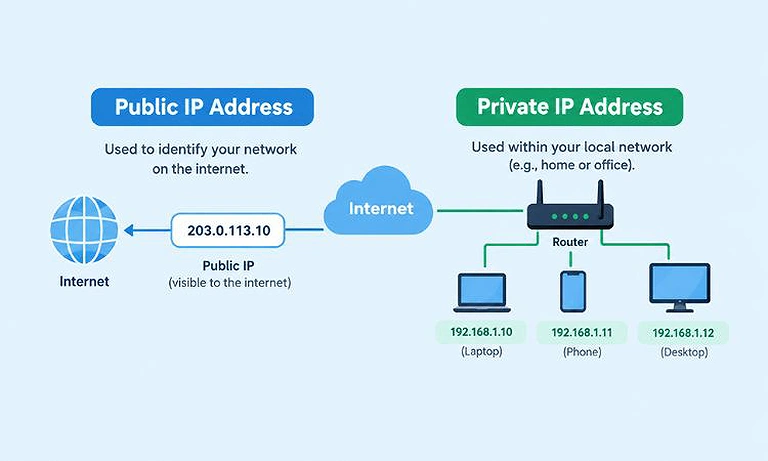
Cover Photo Public vs Private IP Address: Uses and How They Work
Public vs Private IP Address: Key Differences
| Feature | Public IP Address | Private IP Address |
| Main purpose | Identifies an internet-facing connection | Identifies a device within a local network |
| Where it works | Across the public internet | Within a local network |
| Address uniqueness | Globally unique within the public address space | Can be reused on different private networks |
| Commonly assigned by | ISP or network provider | Router, DHCP server, or network administrator |
| Direct internet routing | Can be routed across the public internet | Not directly routable across the public internet |
| Common examples | 203.0.113.25 | 192.168.1.20, 10.0.0.25 |
| Commonly used by | Routers, servers, websites, and internet-facing services | Computers, phones, printers, smart devices, and local servers |
| Static or dynamic | Can be either, depending on the ISP and configuration | Can be either, depending on the network configuration |
| NAT role | Often represents the external side of a NAT connection | Often used on the internal side of NAT |
The two types aren't competing alternatives. In a typical home or office network, private IP addresses identify devices inside the network, while the public IP address represents the network's connection to the internet. NAT can connect these two sides when local devices access internet services.
What Is a Public IP Address?
A public IP address is an IP address used to identify a network or device when communicating over the public internet. Your internet service provider (ISP) typically assigns a public IP address to your internet connection.
Public IP addresses need to be globally unique within the address space being used. They are used for communication across the public internet rather than being reserved specifically for communication within a local network.
Example: A laptop on your home network might use a private IP address such as 192.168.1.20, while the router uses a public IP address such as 203.0.113.25 when communicating with websites and other services on the internet. The laptop uses its private address within the local network, while the public address represents the internet-facing connection.
What Is a Private IP Address?
A private IP address identifies a device within a local network. Home networks, offices, schools, and other organizations commonly use private addresses for computers, phones, printers, smart devices, and servers. Depending on the network's configuration and how the address is assigned, private IP addresses can be static or dynamic.
For example, a home router might assign these private IP addresses:
- Laptop:
192.168.1.20 - Phone:
192.168.1.21 - Printer:
192.168.1.26 - Router:
192.168.1.1
These addresses allow devices to communicate with each other within the local network. They aren't directly routable across the public internet, so devices typically rely on the router when communicating with websites and other internet services. For a broader introduction before looking at public and private addresses, see our guide to what an IP address is and how it works.
Private IPv4 Address Ranges
Three IPv4 address ranges are reserved for private networks under RFC 1918. These ranges are commonly used for devices communicating within home, office, school, and other local networks.
| Private Range | CIDR Notation |
| 10.0.0.0 – 10.255.255.255 | 10.0.0.0/8 |
| 172.16.0.0 – 172.31.255.255 | 172.16.0.0/12 |
| 192.168.0.0 – 192.168.255.255 | 192.168.0.0/16 |
For example, 10.0.0.25, 172.16.5.10, and 192.168.1.20 all fall within the private IPv4 ranges listed above.
Here, /8, /12, and /16 are CIDR notations. They indicate how many bits of the IPv4 address are used for the network portion. The CIDR notation shows the network prefix used to represent each range. For a detailed explanation of how CIDR notation represents IP networks and address ranges, see our guide to CIDR notation, subnets, and IP ranges.
How Public and Private IP Addresses Work Together
Consider a home network with several connected devices. The laptop might use the private IP address 192.168.1.20, while the printer uses 192.168.1.26. The router might use 192.168.1.1 for communication with devices inside the local network.
The router also has a public IP address assigned by the ISP. This address represents the network's internet-facing connection.
When the laptop accesses a website, the communication generally follows this path:
Laptop → Private IP → Router → NAT → Public IP → Internet
The laptop doesn't normally send its private IP address directly across the public internet. Instead, the router uses Network Address Translation (NAT) to translate the connection from the private network to the public IP address.
This allows multiple devices with private IP addresses to access the internet through the same public IPv4 address. The router keeps track of these connections so that responses from internet servers can be delivered to the correct device on the local network.
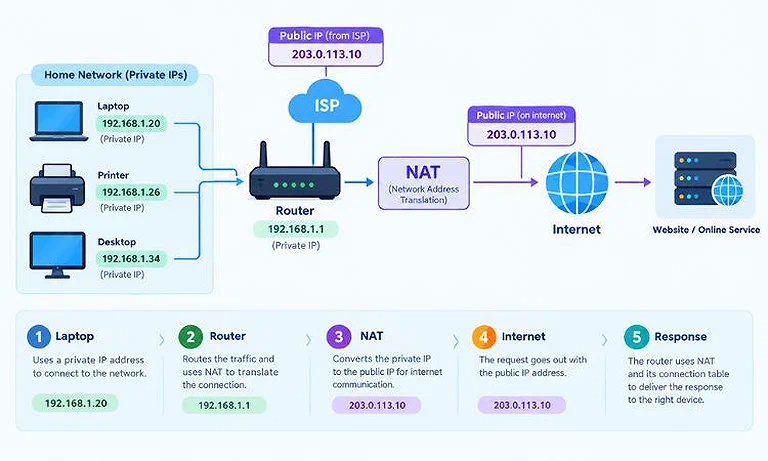
Image showing How Public and Private IP Addresses Work Together in a flow.
What Is NAT?
Network Address Translation (NAT) is a networking technique that translates IP addresses as traffic moves between a private network and another network, commonly the internet.
Suppose a home network contains:
- Laptop: 192.168.1.20
- Phone: 192.168.1.21
- Printer: 192.168.1.26
- Router: 192.168.1.1
- Public IP: 203.0.113.25
The laptop and phone can both access the internet through the router. When they send requests to websites, the router translates their private addresses so the traffic can use the network's public IP address.
NAT keeps track of each connection, including port information, so returning traffic can be matched to the correct device and its interface IP address on the local network. This allows multiple devices to share a single public IPv4 address while maintaining separate connections.
How to Find Your Public IP Address
Finding your public IP address usually takes only a few seconds. You don't need to change any network settings or open your router's configuration page.
The easiest method is to use a public IP address calculator. It detects the internet-facing IP address associated with your connection and displays it directly, making it useful when you need to quickly check the address visible to websites and online services.
You can also check the WAN, Internet, or Status section of your router's administration interface. Depending on the router and ISP, this section may show the public IP address assigned to your connection.
Keep in mind that the address shown by an online service represents the internet-facing connection. It may be different from the private IP address assigned to your computer, phone, or other device inside the local network.
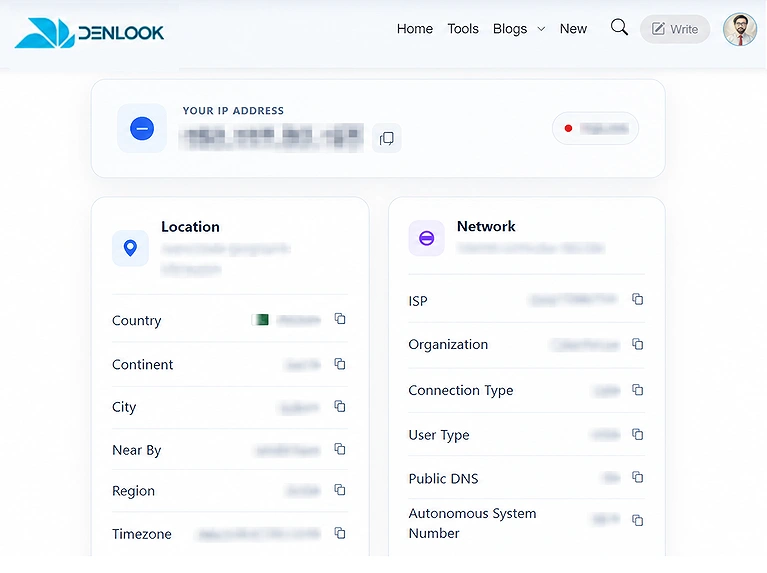
Image showing a public IP address calculator displaying the internet-facing IP address detected from the user’s connection.
How to Find Private IP Addresses on Connected Devices
Finding private IP addresses helps identify devices on a local network. The methods below show how to locate private IP addresses on Windows, Mac, routers, and network printers.
Find Your Private IP Address on Windows
Windows provides several ways to find the private IP address assigned to your device. One of the quickest methods is to use Command Prompt with the ipconfig command.
- Press Windows + R to open the Run dialog.
- Type
cmdand press Enter. - Type
ipconfigand press Enter. - Find the network adapter you're currently using, such as Wi-Fi or Ethernet.
- Look for IPv4 Address under that adapter.
For example:
IPv4 Address: 192.168.1.20
You can also view the private IP address through Windows network settings by opening the properties of your active network connection. For a step-by-step guide, see How to Find an IP Address on Windows.
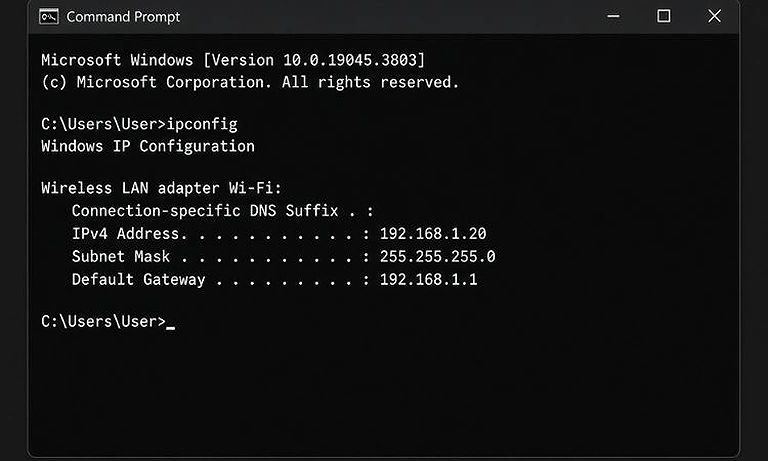
Image showing the `ipconfig` command in Windows Command Prompt to find the device’s IP address.
Find a Private IP Address on Mac
On a Mac, you can find your private IP address through the network settings.
Open System Settings, select Network, and choose your active connection, such as Wi-Fi or Ethernet. Open the connection details to view the assigned IP address.
For example, a Mac connected to a home Wi-Fi network might have a private IP address such as:
192.168.1.35
If you need step-by-step instructions for different macOS versions, see How to Find an IP Address on Mac.
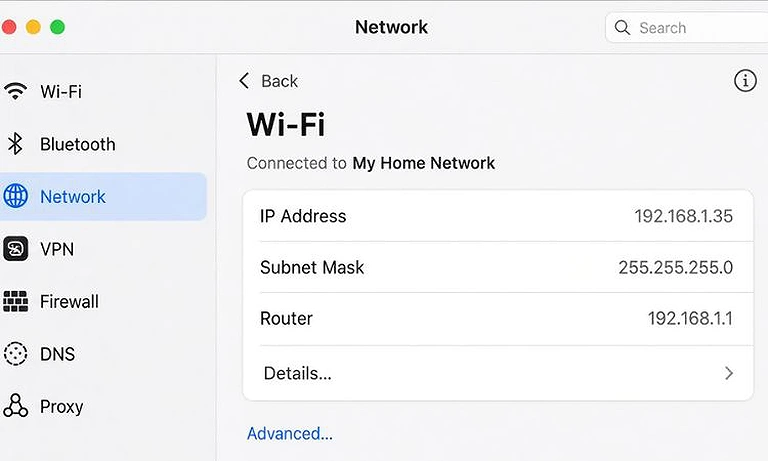
Image showing how to find a Mac’s IP address through System Settings > Network
How to Find Your Router's IP Address
Your router typically has a private IP address that serves as the default gateway for devices on your local network.
Common router IP addresses include:
- 192.168.1.1
- 192.168.0.1
- 10.0.0.1
On Windows, open Command Prompt, type ipconfig, and press Enter. Find the active network adapter and look for Default Gateway.
For example:
Default Gateway: 192.168.1.1
This private address identifies the router on your local network. It isn't the same as the router's public IP address, which identifies your network on the internet. For step-by-step instructions on Windows, Mac, Android, and iPhone, see How to Find Your Router's IP Address.
How to Find Your Printer's IP Address
Network printers can have private IP addresses when connected to a local network. For example, a printer might use 192.168.1.26. You can usually find its IP address in the printer's network settings, on a configuration page, or through your router's connected-device list.
The printer's private IP address allows computers and other devices on the same network to communicate with it. For step-by-step instructions using different methods, see How to Find Your Printer's IP Address.
Can a Private IP Address Access the Internet?
A device with a private IP address cannot directly access the public internet. It normally needs a router or another network device to connect the local network to the internet. The private IP identifies the device within the local network, while the router handles communication with external networks.
For IPv4 connections, the router commonly uses Network Address Translation (NAT) to translate the device's private IP into the network's public IP.
For example:
Computer private IP 192.168.1.20 → Router private IP 192.168.1.1 → Public IP 203.0.113.25 → Website
The website normally receives the network's public IP address 203.0.113.25, not the computer's private IP address 192.168.1.20.
Can a Public IP Address Be Used Inside a Local Network?
Yes, technically. A public IP address can be assigned to a device on a local network, but public IP addresses are designed for global internet communication. For local networks, private IP addresses are specifically designed for internal communication and are usually the better choice.
Private IP addresses allow devices to communicate within a home or office network without using globally routable addresses. The standard private IPv4 ranges include 10.0.0.0/8, 172.16.0.0/12, and 192.168.0.0/16.
Which Is More Secure: Public or Private IP Address?
Public and private IP addresses serve different purposes. A public IP address identifies a network or device on the internet, while a private IP address identifies a device within a local network. Private IP addresses typically communicate with the internet through a router, while public IP addresses can be reachable from external networks depending on the network configuration.
Security doesn't depend on whether an IP address is public or private alone. It depends on factors such as firewall rules, router configuration, strong passwords, authentication, exposed services, software security, port forwarding, and overall network architecture.
FAQs
What is a public IP address used for?
A public IP address identifies a network or device on the internet. It allows communication with external networks and can be used by websites, servers, and internet-connected services that need global reachability.
What is a private IP address used for?
A private IP address identifies devices within a local network. Computers, phones, printers, and other devices can use private addresses to communicate internally without requiring globally routable addresses.
Can a public and private IP address be used together?
Yes. A device can use a private IP address within its local network while the router uses a public IP address for internet communication. NAT commonly connects these two addressing scopes.
Why do home networks use private IP addresses?
Home networks use private IP addresses because they provide local addressing without requiring a unique public IP for every device. The router can then connect multiple local devices to the internet.
Can a private IP address communicate with a public IP address?
Yes, but usually through a router or other network device. The private address communicates within the local network, while the router handles communication between the local network and external public networks.
Can a public IP address communicate with a private IP address?
Not directly in ordinary internet routing. Private addresses aren't publicly routable, so a router, NAT configuration, VPN, or another network mechanism is generally required.
Do public and private IP addresses have different formats?
Not necessarily. Both can use the same IPv4 dotted-decimal format, such as 192.168.1.20. What distinguishes them is whether the address belongs to private or globally routable address space.
Should a device use a public or private IP address?
For ordinary devices on a home or office network, a private IP address is typically used. Public IP addresses are generally assigned where direct internet identification or external connectivity is required.
Conclusion
Public and private IP addresses work together but serve different purposes. A public IP address is used for communication beyond the local network, while a private IP address is used to identify devices within the same local network. A router commonly connects private devices to the internet using the network's public IP.
For most home and office networks, devices use private IP addresses, while the router uses a public IP for internet communication. Knowing which type of IP address, a device uses makes it easier to understand how local devices connect with each other and access the internet.