.webp)
Luma Dream Machine Review: The Honest Truth About Its 3D Camera Controls
Somewhere, an AI video tool just generated someone walking through a wall again. If you've used AI video generators, you know the drill: melty faces, physics-defying cameras, "realism" that looks like a fever dream. Luma Dream Machine showed up in 2026 claiming it's different. Bold claim, considering the competition.
Here's the twist: it might actually be. Instead of guessing what a scene looks like, Luma builds real 3D understanding first which is why its camera moves feel like a cinematographer's, not an algorithm's. Powered by the latest Ray 3.2 model, it promises professional-grade video for creators tired of "close enough."
So does it deliver, or is this just better marketing? Let's find out.

 Updated: June 13, 2026 | 23 min read
 Key Takeaways
- Best for: Creators, marketers, designers, and filmmakers who need high-quality AI-generated videos with advanced camera motion and cinematic 3D scene controls.
- Starting price: Free plan available; paid plans start at approximately $9.99/month for higher generation limits and premium features.
- Biggest strength: Exceptional 3D camera controls that create smooth cinematic movements, realistic depth, and immersive AI-generated scenes.
- Biggest weakness: Generation times can vary for complex prompts, and advanced controls require some experimentation to achieve consistent results.
- Overall rating: 8.9/10 for video quality, camera realism, ease of use, and creative flexibility.
- Deployment type: Cloud-based SaaS platform accessible through any modern web browser with no local installation required.
- Ideal company size: Suitable for solo creators, content agencies, marketing teams, creative studios, and enterprise media production teams.
- Standout feature: Native support for dynamic camera paths, orbit, zoom, dolly, and other cinematic 3D movements that elevate AI-generated videos beyond standard text-to-video tools.
Cover Photo Luma Dream Machine Review: The Honest Truth About Its 3D Camera Controls
How We Evaluated Luma Dream Machine
To evaluate Luma Dream Machine, we used a structured review framework that combines official documentation, product capabilities, feature walkthroughs, publicly available customer feedback, pricing information, and market positioning. Rather than focusing on isolated features.
- AI Video Quality – We evaluated the realism of generated videos, motion consistency, visual fidelity, scene coherence, and the platform's ability to produce cinematic results from text prompts or reference images.
- Creative Controls & Workflow – We assessed prompt-based generation, camera movement options, keyframe support, editing flexibility, and how efficiently users can move from an idea to a finished video.
- Ease of Use – We considered onboarding, interface design, navigation, learning curve, and whether beginners can start creating videos quickly while still providing enough flexibility for experienced creators.
- Performance & Rendering – We reviewed rendering efficiency, cloud-based generation, workflow responsiveness, and how the platform manages video creation without requiring specialized hardware.
- Integrations & Ecosystem – We examined compatibility with common creative workflows, export options, media import capabilities, and how easily generated videos can be incorporated into external editing and publishing tools.
- Pricing & Overall Value – We compared the available plans, free-tier accessibility, feature availability across pricing levels, and the value offered to creators, businesses, and creative teams with different production needs.
- Scalability & Collaboration – We evaluated how well the platform supports individual creators as well as growing teams, considering project management, workflow flexibility, and suitability for larger content production environments.
- Market Position & Innovation – We considered how Luma Dream Machine differentiates itself within the rapidly evolving AI video generation market, particularly through its cinematic 3D camera controls, image-to-video capabilities, and focus on fast, high-quality content creation.
What Is Luma Dream Machine?
Luma Dream Machine is an AI video generation platform that turns text prompts and images into realistic videos. Available through a web browser and iOS app, it was developed by Luma Labs, a company known for its expertise in 3D rendering technology. Unlike many AI video tools that simply animate flat images, Dream Machine creates videos using a 3D scene-based approach, allowing virtual cameras to move naturally through environments. This results in more realistic depth, smoother motion, and better cinematic control for creators.
Company Snapshot
Luma Dream Machine is an AI-powered video generation platform developed by Luma AI that converts text prompts and images into cinematic videos with realistic motion and advanced 3D camera controls. Rather than targeting only enterprises, it is designed for individual creators, marketers, educators, agencies, and businesses that want to produce professional-quality videos without traditional production equipment.
| Category | Details |
| Developer | Luma AI |
| Product Type | AI Video Generation Platform |
| Deployment | Cloud-Based (Web) |
| Primary Use Cases | Text-to-Video, Image-to-Video, AI Cinematic Video Generation |
| Target Users | Creators, Freelancers, Agencies, Marketing Teams, Businesses |
| Free Plan | Yes |
Primary Offerings
- Physically Grounded 3D Engine: Generates geometrically consistent scenes with realistic depth perception and camera trajectories, helping objects maintain accurate scale and positioning from different viewing angles.
- Multi-Keyframe Composition: Supports up to 16 image keyframes within a single generation, giving creators greater control over scene progression, transitions, and visual storytelling.
- Built-in Camera Motion Presets: Includes one-click cinematic movements such as pans, tilts, dolly push-ins, tracking shots, zooms, and orbital camera paths without requiring manual animation.
- Modify Video V2 (Style Transfer): Transforms existing videos up to 20 seconds long while preserving subject movement, composition, and lighting, making it useful for creative restyling and visual experimentation.
Strategic Positioning
Luma Dream Machine occupies a different position from traditional enterprise video production platforms. Instead of emphasizing complex collaboration workflows or long-form editing suites, it focuses on rapidly generating visually impressive AI videos with realistic motion and cinematic camera control. This makes it particularly well suited for creators producing social media content, advertisements, concept visualizations, product showcases, and cinematic B-roll where speed and visual impact are more important than extensive post-production features.
What Problem Does It Solve?
Creating cinematic videos traditionally requires professional cameras, editing software, animation expertise, and significant production time. Luma Dream Machine streamlines this process by turning text prompts or images into high-quality AI-generated videos while automatically handling motion, depth, and camera movements. It enables creators and businesses to produce engaging visual content quickly without investing in expensive equipment or advanced filmmaking skills.
It helps users by:
- Reducing production time from hours to minutes.
- Eliminating the need for expensive filming equipment.
- Creating realistic cinematic camera movements automatically.
- Accelerating marketing, social media, and educational content creation.
- Helping teams prototype visual concepts before full production.
How Luma Dream Machine Works
Luma Dream Machine uses generative AI to interpret text prompts or reference images and transform them into short cinematic videos. Users provide a prompt, optionally add image keyframes or camera movement preferences, and the platform generates the sequence in the cloud. Its 3D motion engine predicts object movement, scene depth, and lighting while applying realistic camera trajectories. Once rendering is complete, users can regenerate, refine prompts, or export the finished video for publishing across social media, marketing campaigns, or creative projects.
This structure flows much better because readers first understand what the platform is, then its primary capabilities, followed by its market positioning, before moving into the problems it solves and how it works. It also aligns well with your review format and avoids repeating feature descriptions later in the article.
Setup, Deployment & User Experience
Onboarding
Getting started with Luma Dream Machine is straightforward. Users can sign up using an email address or supported third-party accounts and begin generating videos within minutes. The interface guides new users through prompt creation without requiring technical expertise, while more experienced creators can immediately explore advanced features such as keyframes, camera motion controls, and style transfer. This low learning curve makes the platform accessible to individuals, small teams, agencies, educators, and businesses alike.
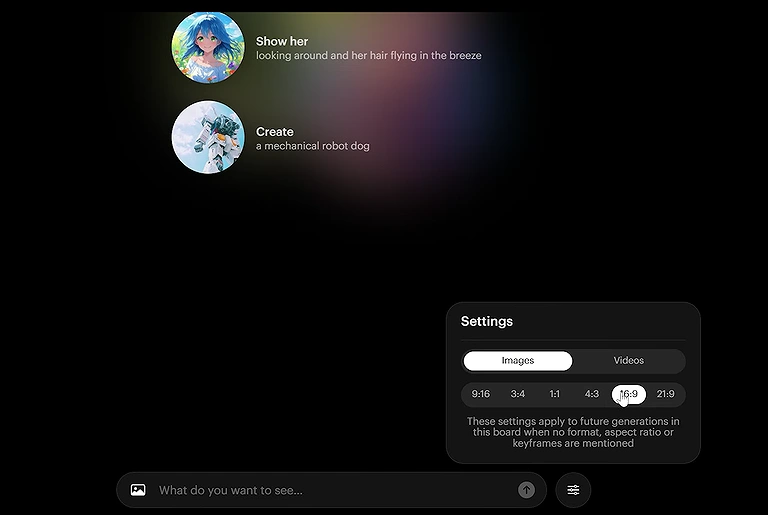
The minimalist user interface of Luma Dream Machine, designed for rapid text-to-video generation
Implementation Timeline
| Stage | Typical Time |
| Account Registration | 2–5 minutes |
| Initial Workspace Setup | Less than 5 minutes |
| First Video Generation | 5–10 minutes |
| Learning Core Features | 30–60 minutes |
| Using Advanced Camera Controls | 1–3 hours of experimentation |
| Production-Ready Workflow | 1–3 days depending on project complexity |
Interface Experience
The interface is clean and creator-focused, prioritizing project management over complex production workflows. Users can quickly access prompt history, generated videos, image uploads, and editing options from a single workspace. Navigation is intuitive, making it easy to create new projects, revisit previous generations, or experiment with different prompts and camera movements without a steep learning curve.
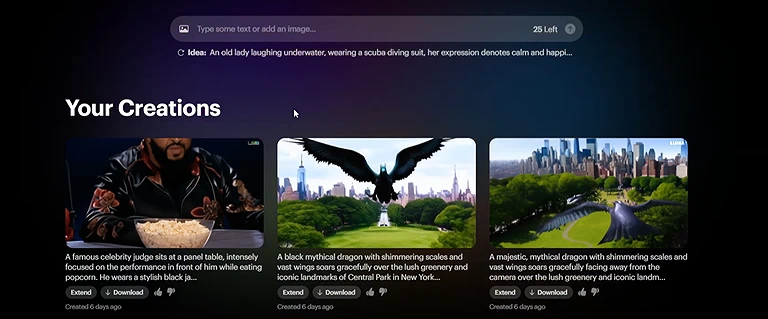
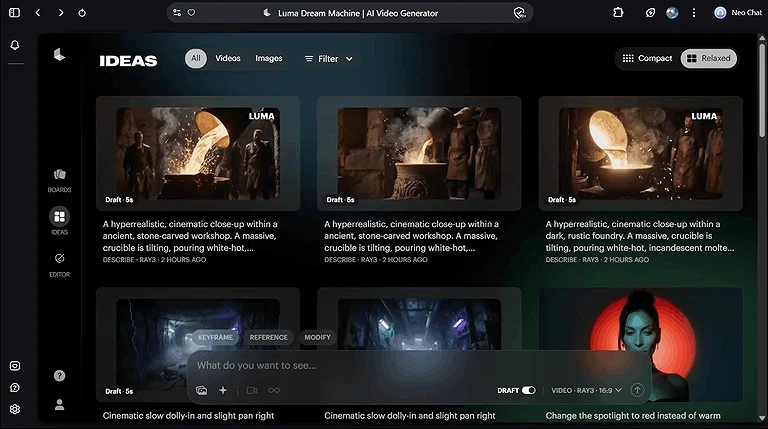
Checking out the Luma Dream Machine gallery to review previous renders before diving into the next prompt!
Deployment Requirements
- Cloud-based platform with no software installation required.
- Accessible through modern web browsers on Windows, macOS, Linux, and ChromeOS.
- Stable internet connection required for AI generation and rendering.
- Works on most modern computers without dedicated GPU hardware.
- Supports image uploads for image-to-video workflows.
- Account registration required to save projects and manage generation credits.
- Paid plans unlock higher generation limits, faster rendering, and premium capabilities.
- Suitable for individual creators, freelancers, agencies, educational institutions, marketing teams, and businesses of all sizes.
Core Features: Technical Breakdown
1. Volumetric 3D Camera Controls
How It Works: The model moves a virtual camera through a 3D scene instead of just shifting pixels, with presets like pan, tilt, orbit, and push in/out.
3D Parallax Effect: The scene behaves like real space, where background elements move slower than foreground, creating natural depth and realistic motion.
2. Multi-Keyframe System
How It Works: Users upload up to 16 images as reference points, and the AI connects them into smooth, logical motion between each frame.
Practical Workflow Example: Animators can set start, middle, and end poses so the system follows a planned movement instead of random action generation.
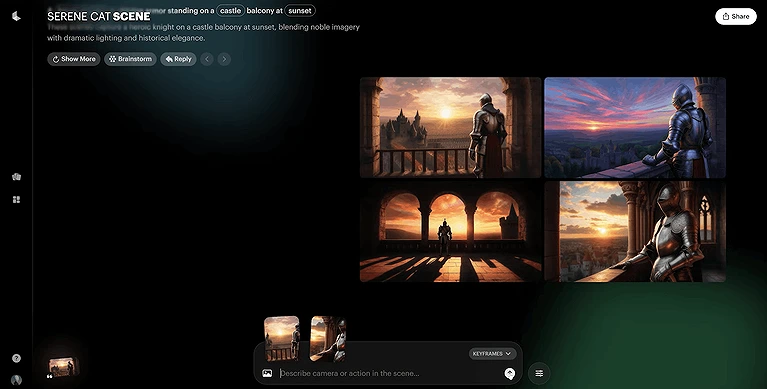
A look at the Luma Dream Machine interface utilizing the new Multi-Keyframe feature to plot up to 16 precise points across a single video clip.
3. Modify Video V2 (Video-to-Video)
How It Works: Users upload a short video (up to 20 seconds) with a prompt or reference image, and the model edits style, environment, or wardrobe while keeping the original motion unchanged.
Practical Workflow Example: Teams can film a simple studio clip and then quickly change backgrounds, outfits, and visual style while preserving the actor’s exact performance and timing.
4. Native Aspect Ratio Formatting
How It Works: The platform offers built-in aspect ratio options like 16:9, 21:9, 9:16, and 1:1, allowing users to generate crop-free videos directly in the interface.
Practical Workflow Example: Marketing teams can create one master video and quickly generate multiple versions for different platforms without losing key visual composition.
5. Output Quality and Performance
a) 3D Camera Precision: The camera follows smooth, stable paths like a real slider or crane, avoiding the jittery distortions seen in older AI video models.
b) Lighting & Shadow Fidelity: The volumetric design produces realistic lighting, natural shadows, and accurate reflections that adapt smoothly with camera movement.
c) Motion Blur & Realism: Motion blur is automatically applied based on speed, making scenes look more natural and closer to live-action footage.
d) Character & Structural Stability: Short clips stay mostly stable, but fine details like fingers, faces, or small text may still show slight inconsistencies. If you experience issues such as character morphing, frame flicker, or unrealistic object behavior in AI-generated videos, read our Why AI Videos Look Fake? Fix Character Morphing, Flicker & Bad Physics for practical techniques to improve visual consistency and produce more realistic results.
e) Render & Processing Speeds: Draft videos render quickly for fast experimentation, while higher-quality outputs take longer depending on the selected tier.
6. Export Options & Production Quality
Professional Format Support: Paid plans allow downloading high-quality, watermark-free videos up to 1080p resolution.
Production-Ready EXR Files: Advanced studio tiers enable uncompressed EXR exports, giving VFX artists full flexibility for professional color grading and post-production workflows.
Integrations and Ecosystem
Luma Dream Machine integrates into modern content creation workflows through media import/export capabilities and compatibility with common creative tools. While it doesn't offer the extensive enterprise integration marketplace found in business software, it works well alongside video editors, design platforms, cloud storage services, and social media publishing workflows. This makes it easy for creators, marketers, agencies, educators, and businesses to incorporate AI-generated videos into existing production pipelines.
| Integration | Supported |
| Image Uploads (PNG, JPG, WebP) | ✔ |
| Video Upload (Modify Video V2) | ✔ |
| Download MP4 Videos | ✔ |
| Adobe Premiere Pro (Export Workflow) | ✔ |
| DaVinci Resolve (Export Workflow) | ✔ |
| Final Cut Pro (Export Workflow) | ✔ |
| Canva | ✔ |
| Cloud Storage (Download/Upload) | ✔ |
| Social Media Publishing | ✔ |
| Public API | Limited / Evolving |
Reality Check
Luma Dream Machine is designed as a standalone AI video generation platform rather than an all-in-one production ecosystem. Most creators generate videos in Luma and then refine, edit, or publish them using dedicated editing software such as Adobe Premiere Pro, DaVinci Resolve, Final Cut Pro, or Canva. This workflow is perfectly adequate for individual creators, agencies, and marketing teams, but organizations requiring extensive native integrations, workflow automation, or collaborative asset management may find the integration ecosystem more limited than enterprise-focused creative platforms.
Real-World Use Cases
Luma Dream Machine helps creators quickly produce cinematic concepts with dynamic camera movements, realistic scenes, and fast rendering speeds. It is especially useful during the creative planning stage of video production. See why it is included among the best AI tools for fast cinematic previsualization.
1. Typical Workflow
| Stage | What Happens |
| Define Creative Goal | The user decides whether to create a marketing video, social media clip, product showcase, or cinematic concept. |
| Write a Prompt or Upload an Image | A text prompt or reference image is provided to guide the AI-generated scene. |
| Configure Generation Settings | The user selects options such as aspect ratio, duration, camera movement, or keyframes if needed. |
| Generate the Video | Luma Dream Machine renders the initial AI-generated video in the cloud. |
| Review the Output | The generated clip is evaluated for motion quality, composition, and prompt accuracy. |
| Refine or Regenerate | The prompt, camera controls, or keyframes are adjusted to improve the results. |
| Export the Video | The finished video is downloaded for further editing or direct publishing. |
| Enhance in Editing Software (Optional) | Users may add branding, captions, music, or effects in external editors before publishing. |
| Publish or Share | The final video is distributed across social media, websites, advertising campaigns, or internal presentations. |
2. Business Scenarios
Social Media Content Creation
Best For: Content creators, influencers, digital marketers, and social media agencies
Luma Dream Machine helps teams produce visually engaging short-form videos without traditional filming. Instead of spending hours recording and editing footage, creators can quickly generate cinematic clips for platforms like TikTok, Instagram, YouTube Shorts, and LinkedIn. This shortens production cycles while keeping content output consistent.
Marketing Campaign Production
Best For: Marketing departments, advertising agencies, SaaS companies, and e-commerce brands
Marketing teams use the platform to create promotional videos, product teasers, and campaign visuals in significantly less time than conventional production. It simplifies creative testing by allowing multiple visual concepts to be generated before investing in full-scale video production.
Product Demonstrations
Best For: E-commerce stores, technology companies, startups, and online retailers
Businesses can visualize product concepts, feature demonstrations, or promotional scenes without organizing expensive video shoots. This makes it easier to create launch content, showcase new products, and support digital advertising campaigns with visually appealing assets.
YouTube & Long-Form Content Support
Best For: YouTubers, video editors, documentary creators, and production studios
Rather than replacing full video editing, Luma Dream Machine is useful for generating cinematic B-roll, visual transitions, and concept sequences. Creators can supplement existing footage with AI-generated scenes, reducing production costs while improving visual storytelling.
Educational Content
Best For: Educators, online course creators, training organizations, and universities
Teachers and instructional designers can create engaging visual examples that explain complex topics more effectively than static slides. AI-generated animations and cinematic scenes help improve learner engagement while reducing the effort required to produce educational media.
Creative Storyboarding
Best For: Filmmakers, creative directors, advertising agencies, and animation teams
Creative professionals often use the platform to visualize scenes before committing to production. It enables rapid concept validation by generating cinematic sequences that communicate camera movement, composition, and storytelling ideas during pre-production.
Internal Business Presentations
Best For: Corporate communications, HR teams, sales teams, and business consultants
Organizations can create polished visual content for presentations, executive updates, product launches, or company announcements. AI-generated videos help communicate ideas more effectively while reducing reliance on external production resources.
Client Content Production
Best For: Creative agencies, freelance designers, video production agencies, and marketing consultants
Agencies handling multiple clients benefit from rapidly producing concept videos, advertising assets, and campaign visuals. Faster turnaround enables teams to present creative ideas earlier in the approval process while maintaining consistent production quality.
Event & Promotional Videos
Best For: Event organizers, conference teams, tourism businesses, and hospitality companies
Promotional videos for conferences, product launches, webinars, and destination marketing can be created quickly without arranging extensive filming. This allows organizers to develop engaging promotional materials even when production budgets are limited.
Rapid Creative Experimentation
Best For: Designers, innovation teams, startups, creative professionals, and independent creators
Luma Dream Machine is well suited for testing visual ideas before committing significant resources. Teams can experiment with prompts, styles, camera movements, and scene compositions, making it easier to refine creative direction through rapid iteration.
Prototyping complex visual ideas on the fly to see what works before investing major production hours
3. Best Organization Size
| Organization Size | Recommendation | Why? |
| Startup | ✔ Highly Recommended | Affordable entry pricing, fast setup, and minimal technical requirements make it ideal for small teams with limited budgets. |
| Small Business | ✔ Highly Recommended | Enables businesses to create professional marketing and promotional videos without hiring dedicated production teams. |
| Mid-Market | ✔ Recommended | Suitable for marketing departments and creative teams, though advanced collaboration and workflow management may require additional tools. |
| Enterprise | ⚠ Depends on Needs | Works well for creative asset generation, but organizations requiring extensive collaboration, governance, or native enterprise integrations may need complementary production platforms. |
Our Experience Using Luma Dream Machine
Based on our review, official documentation, product walkthroughs, publicly available customer feedback, and an analysis of the platform's capabilities, Luma Dream Machine presents a streamlined approach to AI video creation. The workflow is designed around prompt-driven generation, allowing users to move from an idea to a rendered video with relatively few steps. Navigation appears intuitive for first-time users, while achieving highly controlled cinematic results may require more thoughtful prompt writing and experimentation with camera movements and keyframes.
What Stood Out
- Minimal setup encourages faster content creation, allowing users to focus on creative ideas instead of configuring complex projects before generating a video.
- The interface prioritizes a logical generation workflow, making prompt creation, project management, and video review easy to follow even for newcomers.
- Creative iteration is well supported, as users can refine prompts and regenerate videos without rebuilding the entire workflow from scratch.
- Advanced controls remain approachable, giving experienced creators more creative flexibility without making the platform overwhelming for beginners.
- Cloud-based rendering removes hardware barriers, enabling users to create AI videos without investing in high-end editing workstations.
- The platform fits naturally into existing production workflows, since exported videos can be refined in professional editing software before publication.
- The experience scales well across different user types, serving freelancers, marketing teams, educators, agencies, and businesses without requiring enterprise-level implementation.
Potential Limitations
- Producing consistent results often depends on prompt quality, so new users may need time to learn how prompt wording influences the final output.
- Advanced camera controls and multi-keyframe workflows involve a learning curve, particularly for users without prior experience in video production.
- Generation limits on lower-tier plans may affect users producing large volumes of content, making subscription selection an important consideration.
- The platform emphasizes AI video generation rather than complete post-production, so many creators will still rely on external editing software for branding, captions, audio mixing, or advanced editing.
- Organizations requiring extensive workflow automation or deep native integrations may find the platform better suited as part of a broader creative toolset rather than a complete production ecosystem.
Overall, Luma Dream Machine delivers the greatest value to creators and organizations that need to produce visually compelling videos quickly without building complex production pipelines. Its combination of an accessible workflow and sophisticated cinematic camera capabilities makes it suitable for individual creators, marketing teams, agencies, educators, and growing businesses. The platform's strongest advantage is its ability to transform simple prompts into polished, cinematic video content while maintaining a relatively approachable user experience.
Pricing & Plans
Luma uses a credit-based system where costs vary based on clip length, resolution, and settings, with HDR and EXR exports consuming more credits.
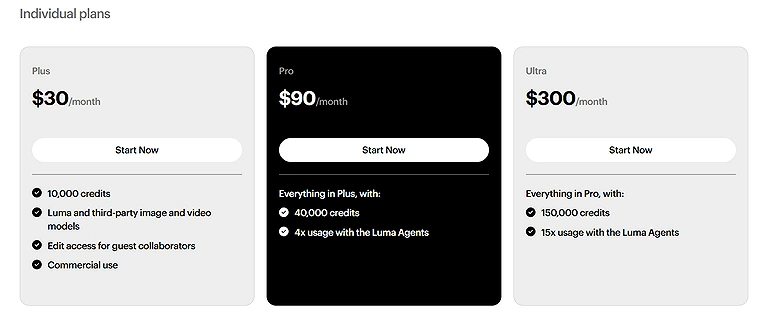
Overview of Luma AI Dream Machine's monthly subscription plans and feature availability.
| Plan | Pricing | Best For |
| Free Tier | $0 (Approx. 5 clips/day) | Hobbyists learning prompt structure with standard resolution watermarked clips |
| Plus Plan | $30/month | Solo creators needing commercial rights and standard priority generation queues |
| Pro Plan | $90/month | Professional editors requiring higher credit limits and deeper access to Luma Creative Agents |
| Ultra Plan | $300/month | High-volume studios needing maximum priority rendering speeds and heavy API integration |
Important Cost Update: Luma frequently updates its credit allocation and features, so production teams should always check the latest rates before planning large-scale rendering or API-based video workflows.
Hidden Limitations
The free plan is useful for experimentation but uses a shared rendering queue, which may cause delays during busy hours. Luma also does not support built-in audio, so users must add dialogue or sound effects later using external editing tools.
Pros and Cons
Pros
- Excellent 3D Parallax: Delivers smooth, geometrically correct camera moves that feel grounded in a real physical space.
- Flexible Multi-Keyframe System: Supports up to 16 anchoring frames for precise control over a clip's composition and timing.
- Agile iOS Application: A responsive mobile app lets you create, edit, and manage video projects while away from your desk.
- Generous Free Tier Option: Offers a reliable daily free generation allowance for testing ideas without an upfront subscription.
Cons
- No Native Audio Synthesis: Does not generate synchronized ambient sound effects or dialogue tracks out of the box.
- Occasional Detail Wobble: Fine structural details like hands, small facial features, and background text can still experience minor distortion during fast camera movements.
- Short Default Clip Lengths: Native generations are capped between 5 and 10 seconds, requiring manual stitching for longer sequences.
- Limited Timeline Controls: Lacks a traditional, hands-on timeline editor within the interface for making frame-by-frame adjustments.
Where Luma Dream Machine Fits in the AI Video Creation Market
To understand how Luma Dream Machine fits into the current creative landscape, it helps to see how it matches up against other industry alternatives. For a broader look at the market, explore our comprehensive breakdown of top ai tools for video creation.
Category Analysis
AI Cinematic Video Generation Platforms
These platforms focus on generating entirely new video scenes from text prompts or reference images. Their primary goal is to help creators produce visually rich footage without filming or manual animation. Advanced AI models generate realistic movement, lighting, depth, and camera trajectories, making them valuable for concept visualization, marketing assets, social media content, and creative storytelling. Organizations that need fast visual production without investing in expensive filming equipment typically benefit most from this category.
Best Suited For
- Content creators and influencers
- Marketing departments
- Creative agencies
- Startup product teams
- Filmmakers and storytellers
- Educational content creators
Typical Capabilities
- Text-to-video generation
- Image-to-video generation
- AI-powered camera movement
- Cinematic scene composition
- Prompt-based editing
- Cloud rendering
- High-quality video exports
Example Products
Luma Dream Machine ,Google Veo ,OpenAI Sora ,Kling AI ,Hailuo AI
AI Avatar Video Platforms
Avatar-focused platforms specialize in creating presenter-led videos using AI-generated digital humans. Rather than producing cinematic scenes, they enable businesses to generate training videos, product demonstrations, multilingual presentations, onboarding materials, and corporate communications without hiring presenters or recording studios. These solutions prioritize consistency, localization, and business communication over cinematic storytelling.
Best Suited For
- HR departments
- Sales enablement teams
- Learning & development
- Customer support
- Corporate communications
- Training organizations
Typical Capabilities
- AI presenters
- Voice cloning
- Multilingual translation
- Script-based generation
- Brand templates
- Team collaboration
- Presentation-style videos
Example Products
Synthesia ,HeyGen ,Elai.io ,DeepBrain AI ,Colossyan
AI Video Editing Platforms
Instead of generating entirely new scenes, AI editing platforms enhance existing video footage. They automate editing tasks such as removing backgrounds, generating captions, improving audio, tracking objects, and applying visual effects. These platforms are ideal for creators who already have recorded footage and want to accelerate post-production rather than generate videos from scratch.
Best Suited For
- YouTubers
- Video editors
- Podcast creators
- Marketing teams
- Production agencies
- Freelancers
Typical Capabilities
- AI editing assistance
- Automatic subtitles
- Audio enhancement
- Object removal
- Background replacement
- Timeline editing
- Export optimization
Example Products
Runway ,Descript ,VEED ,Kapwing ,Adobe Premiere Pro
AI Content Creation Suites
Content creation suites combine multiple AI capabilities into a single platform, including script writing, image generation, video creation, voice synthesis, social media publishing, and collaboration. They aim to support complete content production workflows instead of specializing in one stage of the creative process. These solutions are often adopted by organizations managing large volumes of digital content across multiple channels.
Best Suited For
- Marketing agencies
- Growing businesses
- Social media teams
- Content studios
- Enterprise marketing departments
- Digital publishers
Typical Capabilities
- Multi-format AI generation
- Collaborative workspaces
- Brand asset management
- Workflow automation
- Publishing tools
- Content planning
- Analytics integrations
Example Products
Canva AI ,InVideo AI ,Adobe Express ,Visme ,Designs.ai
Where Luma Dream Machine Fits
Luma Dream Machine fits most naturally within the AI Cinematic Video Generation category. Its strongest value lies in producing visually realistic scenes with sophisticated camera movement and 3D spatial consistency from simple prompts or images. This makes it particularly appealing to creators, marketers, agencies, educators, and businesses that need original video content without traditional production resources.
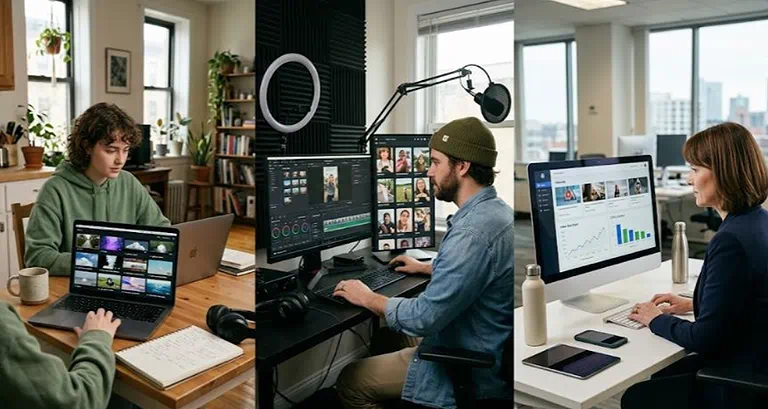
Real-world utility: Rapid visual prototyping across film, marketing, and design
Other Tools Analysis
Google Veo
Where Luma Wins: Luma offers an intuitive mobile workflow, accessible point-and-click camera presets, and a flexible multi-keyframe engine that is much easier for casual creators to pick up.
Where Google Veo Wins: delivers higher native 4K photorealism, stronger long-term character tracking, and integrated audio synthesis out of the box making it a highly anticipated contender in the Luma Dream Machine vs Google Veo matchup
Runway Gen-3
Where Luma Wins: Luma's 3D volumetric architecture handles camera parallax and physical depth with greater geometric accuracy during complex tracking orbits.
Where Runway Wins: Runway features a broader suite of granular control tools, including advanced manual brushes and longer continuous generation lengths.
Who Should Use Luma Dream Machine?
| User Type | Recommendation |
| Beginners | Excellent (Clean interface and point-and-click camera presets make it easy to learn) |
| Professionals / Creators | Very Good (Reliable for cinematic B-roll, mood boards, and short-form video hooks) |
| Agencies | Good (Useful for fast A/B testing, but long-term character tracking needs manual effort) |
| Enterprises | Very Good (Strong API support and EXR exports fit modern studio pipelines) |
Best For: Creative teams who need smooth, physically accurate camera moves, multi-keyframe control, and a fast, intuitive workspace across both desktop and mobile.
Good For: Digital designers looking to quickly bring static photos and style concepts to life with realistic depth and parallax.
Not Recommended For: Projects that require long, continuous narrative scenes, talking-head explainer clips with synchronized dialogue, or precise frame-by-frame timeline editing.
Alternatives
| Alternative | Best For |
| Runway | AI video generation with advanced editing and creative workflows. |
| OpenAI Sora | High-quality cinematic storytelling and realistic scene generation. |
| Google Veo | Premium AI-generated videos with strong multimodal capabilities. |
| Kling AI | Long-form AI videos with realistic motion and character consistency. |
| Pika Labs | Fast, beginner-friendly AI video creation for social media content. |
| LTX Studio | Storyboarding, scene planning, and AI-assisted pre-production. |
What's New in 2026?
- Enhanced 3D Camera Controls: Camera movement has become more precise, offering smoother pans, dolly shots, orbit paths, and cinematic transitions while maintaining realistic scene depth.
- Improved Multi-Keyframe Generation: Users can define more structured visual sequences by anchoring multiple keyframes, giving greater control over scene progression and storytelling.
- Refined Motion Consistency: Updates to the generation models produce more natural object movement and reduce inconsistencies between frames in complex scenes.
- Expanded Image-to-Video Workflows: Reference images now integrate more effectively into generated videos, preserving composition while adding realistic animation and camera motion.
- Better Prompt Interpretation: The AI understands more detailed instructions, enabling users to describe complex environments, actions, and cinematic styles with greater accuracy.
- Improved Rendering Efficiency: Generation workflows have been optimized to deliver videos more quickly while maintaining visual quality.
- Enhanced Creative Flexibility: Additional style variations and camera movement options provide creators with more ways to experiment without significantly increasing workflow complexity.
- Workflow and Interface Refinements: The platform continues to improve usability with a cleaner project management experience and a more intuitive generation workflow for both new and experienced users.
Final Verdict
Best For
- Social media managers and content creators who need to quickly generate high-quality, cinematic B-roll and short-form video hooks.
- VFX artists and filmmakers are looking for an agile, responsive tool to map out camera angles, lighting layouts, and spatial parallax during pre-production.
Skip If
- Your workflow requires multi-minute narrative continuity with characters speaking lines directly to the camera.
- You need a comprehensive, all-in-one editing platform with built-in audio mixing tools and fine-grained timeline controls.
Overall Score
8.9/10
Rating Source: Drawn from user experiences on G2, creator discussions, and independent software reviews, this 8.9/10 score reflects Luma Dream Machine's strengths in realistic motion and cinematic output. Points were deducted for limited editing flexibility and occasional scene inconsistency. If you're still deciding whether AI-powered video generation offers greater value than conventional production methods, explore our AI vs. Traditional Video Creation: Critical Differences, Feature Comparisons, and Long-Term ROI Analysis for a comprehensive comparison of production costs, scalability, creative flexibility, and long-term return on investment.
FAQs
1. What is Luma Dream Machine used for?
Luma Dream Machine is an AI video generation platform that creates short videos from text prompts or images. It is commonly used for marketing content, social media videos, product showcases, storyboarding, educational materials, and creative concept visualization.
2. Is Luma Dream Machine free to use?
Yes. Luma Dream Machine offers a free plan that allows users to explore its core AI video generation capabilities. Paid plans provide additional generation credits, faster processing, and access to premium features for users with higher production needs.
3. How does Luma Dream Machine's 3D camera control work?
Its physically grounded 3D engine generates realistic camera movements such as pans, zooms, dolly shots, and orbital paths while maintaining consistent object scale and scene depth. This helps create more cinematic and immersive AI-generated videos than simple animation effects.
4. Can Luma Dream Machine generate videos from images?
Yes. In addition to text-to-video generation, the platform supports image-to-video workflows, allowing users to animate reference images into dynamic video sequences with AI-generated motion and camera movement.
5. Who should use Luma Dream Machine?
The platform is suitable for content creators, marketers, educators, creative agencies, filmmakers, social media managers, startups, and businesses that want to create professional-looking videos without traditional filming equipment or advanced editing expertise.
6. Is Luma Dream Machine suitable for enterprise organizations?
It can support enterprise creative teams, particularly for concept visualization and marketing content. However, organizations requiring advanced governance, large-scale collaboration, or extensive workflow automation may need additional creative management tools alongside Luma Dream Machine.
7. Does Luma Dream Machine replace professional video editing software?
Not entirely. It excels at generating original AI videos, but many creators still use editing software such as Adobe Premiere Pro, DaVinci Resolve, or Final Cut Pro to add branding, captions, audio, and final post-production refinements.
8. What types of videos can you create with Luma Dream Machine?
Users can create social media videos, cinematic B-roll, advertisements, promotional content, educational animations, product showcases, concept visualizations, creative storytelling clips, and short marketing videos.
9. How difficult is Luma Dream Machine for beginners?
The platform is relatively beginner-friendly thanks to its clean interface and prompt-based workflow. While basic video generation is easy to learn, producing highly specific cinematic results may require practice with prompt writing, keyframes, and camera controls.
10. How does Luma Dream Machine compare to AI avatar generators?
Luma Dream Machine focuses on generating cinematic scenes and AI-driven camera movement rather than presenter-led videos. Businesses creating training materials or multilingual presentations may prefer AI avatar platforms, while creators producing visually rich storytelling content will benefit more from Luma Dream Machine.
11. What are the main limitations of Luma Dream Machine?
Its effectiveness depends on well-written prompts, and it is designed primarily for AI video generation rather than complete post-production. Users with complex editing or enterprise collaboration requirements may need complementary creative tools.
12. Is Luma Dream Machine worth using in 2026?
For creators and businesses looking to generate cinematic AI videos quickly, Luma Dream Machine remains a strong option. Its advanced 3D camera controls, image-to-video capabilities, and straightforward workflow make it well suited for modern content creation, especially when combined with dedicated editing software for final production.
Conclusion
Luma Dream Machine delivers on its core promise, offering impressive 3D camera controls, realistic parallax depth, and an intuitive, fast workflow. While the lack of native audio means you'll need external software for sound design, its robust multi-keyframe system and accessible cross-platform interface make it a powerful choice. For solo creators and professional studios looking to quickly produce polished, cinematic visuals with reliable spatial consistency, Luma Dream Machine stands out as an exceptionally capable option in 2026.