.webp)
Runway Gen-3 Review: I Tested It Is It Really the Best AI Video Generator?
AI video generators love to promise Hollywood-quality videos from a single prompt. Then they give you a character with three different faces, a camera that forgets where it's going, and physics that seem to have taken the day off. Runway has spent years trying to fix those problems. Instead of focusing only on text-to-video generation, it combines AI filmmaking, editing, visual effects, and post-production into one creative platform powered by its Gen-3 model. It's also one of the pioneers that helped push AI video from an experiment into a practical production tool.
But being first doesn't guarantee you'll stay on top. New AI video generators now claim better realism, stronger prompt accuracy, and faster results, putting Runway's reputation to the test. So, is Runway Gen-3 still one of the best AI video generators in 2026, or have its rivals finally caught up? In this review, we'll put its video quality, features, pricing, ease of use, and real-world workflow under the microscope to find out.

 Updated: June 10, 2026 | 20 min read
 Key Takeaways
- Best for: Content creators, marketers, creative agencies, filmmakers, and businesses looking for a complete AI video production platform that combines generation, editing, and visual effects in one workflow.
- Starting price: Free plan available; paid plans start at approximately $12/month (Standard plan) with higher generation credits, faster processing, and access to premium AI features.
- Biggest strength: High-quality text-to-video and image-to-video generation with strong prompt adherence, realistic motion, and a powerful suite of built-in AI editing tools that reduce the need for multiple applications.
- Biggest weakness: Credit-based generation can become expensive for high-volume projects, and maintaining perfect character consistency across multiple scenes may require additional prompting or manual refinement.
- Overall rating: 9.2/10 for video quality, creative workflow, AI editing capabilities, ease of use, and overall value.
- Deployment type: Cloud-based SaaS platform that runs entirely in a modern web browser, with no software installation or high-end hardware required.
- Ideal company size: Suitable for individual creators, marketing teams, digital agencies, startups, production studios, and enterprise creative teams.
- Standout feature: An integrated AI creative workflow that combines text-to-video, image-to-video, video editing, background removal, object manipulation, and AI visual effects within a single platform, eliminating the need to switch between multiple creative tools.
Cover Photo Runway Gen-3 Review: I Tested It Is It Really the Best AI Video Generator?
How We Evaluated Runway Gen-3
To evaluate Runway Gen-3, we applied a comprehensive review framework that combines official product insights, feature analysis, workflow testing, creator experiences, pricing evaluation, and its competitive position in the AI video generation landscape. Rather than assessing isolated features, we focused on how effectively Runway Gen-3 enables creators to produce realistic, consistent, and professional-quality AI videos through a streamlined production workflow.
- AI Video Quality – Evaluated Runway Gen-3’s video realism, motion accuracy, prompt adherence, visual consistency, cinematic quality, and ability to generate believable scenes.
- Creative Controls & Workflow – Assessed text-to-video, image-to-video, camera movement, editing tools, and how effectively creators control the entire video production process.
- Ease of Use – Reviewed dashboard usability, workflow simplicity, learning curve, generation process, and accessibility for beginners and experienced video creators.
- Performance & Rendering – Analyzed generation speed, cloud-based processing, output reliability, rendering efficiency, and performance during different video creation workflows.
- Integrations & Ecosystem – Examined export flexibility, creative workflow compatibility, asset management, and Runway’s ability to connect with broader production environments.
- Pricing & Overall Value – Compared Runway’s plans, credit usage, available features, limitations, and overall value for different creator and business requirements.
- Scalability & Collaboration – Evaluated team features, workflow management, project organization, and suitability for agencies, businesses, and high-volume content production.
- Market Position & Innovation – Assessed Runway Gen-3’s technological advancements, cinematic generation capabilities, industry influence, and competitive position against emerging AI video models.
What Is Runway Gen-3?
Runway Gen-3 is an advanced AI video generation model developed by Runway, one of the companies that helped bring generative AI into mainstream video production. It transforms text prompts and reference images into realistic videos, but generation is only part of the story. Unlike many AI video tools that stop after creating a clip, Runway combines AI video generation with professional editing, visual effects, object removal, inpainting, and motion tracking in a single browser-based platform. The result is a workflow where creators can generate, refine, and polish videos without constantly jumping between different applications.
Company Snapshot
Runway is an AI research company focused on building generative tools for video creation and editing. Its flagship Gen-3 model combines AI video generation with a broader creative workflow, making it a popular choice for creators, marketers, agencies, filmmakers, and businesses. The table below provides a quick overview of the company and the platform.
| Category | Details |
| Company | Runway AI |
| Founded | 2018 |
| Headquarters | New York, United States |
| Industry | Generative AI & Creative Software |
| Platform Type | Cloud-Based SaaS |
| Core Product | AI Video Generation, Editing & Visual Effects |
| Supported Platforms | Web Browser |
| API Access | Available |
| Target Audience | Content Creators, Marketers, Agencies, Filmmakers, Educators & Enterprise Teams |
| Best For | AI-powered video generation, editing, visual storytelling, and creative production workflows |
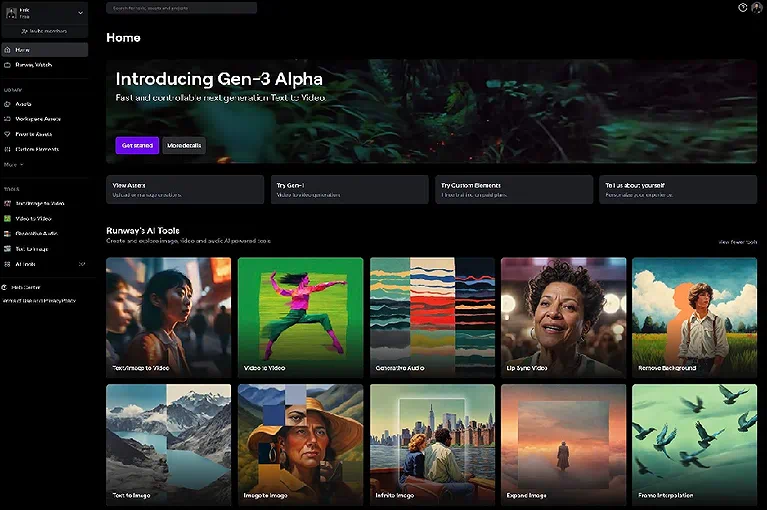
Primary Offerings
- Text-to-video generation from detailed prompts.
- Image-to-video animation with natural motion.
- Video-to-video style transformation.
- AI-powered video editing and enhancement.
- Object removal and background editing.
- Motion tracking and video expansion.
- Unified video creation and editing workflow.
Strategic Positioning
Runway Gen-3 positions itself as more than a standalone AI video generator. It serves as an end-to-end creative platform where creators can generate, edit, and refine videos without switching between multiple tools. Instead of competing solely on video realism, Runway emphasizes workflow efficiency, making it a strong choice for marketers, creative agencies, filmmakers, and businesses that need to produce high-quality content quickly while simplifying the entire production process.
What Problem Does Runway Gen-3 Solve?
Producing professional-quality videos traditionally requires multiple applications, manual editing, and significant production time. Runway Gen-3 simplifies this process by bringing AI video generation, editing, and visual effects into a single platform, allowing creators to complete most video projects from concept to final export without leaving the application. For teams aiming to produce cinematic films, large-scale campaigns, or studio-grade content, Runway also integrates seamlessly into broader AI workflows, where specialized tools can further enhance planning, audio, avatars, and post-production.
- Generating AI Videos: Turn text prompts and reference images into high-quality videos within minutes, reducing production time and accelerating content creation.
- Editing and Enhancing Footage: Enhance videos with AI-powered object removal, background removal, motion tracking, and inpainting without using separate editing software.
- Reducing Tool Switching: Generate, edit, and enhance videos within one platform, creating a smoother workflow with fewer interruptions and greater efficiency.
- Accelerating Content Creation: Produce marketing videos, product demos, educational content, and social media assets faster without compromising visual quality or consistency.
- Supporting Professional Workflows: Complete projects independently or integrate with specialized AI tools for advanced audio, storyboarding, and enterprise-level post-production.
How Runway Gen-3 Works
- Describe Your Idea: Enter a detailed text prompt or upload a reference image or video to define the scene, characters, and visual style.
- Configure the Output: Choose settings such as aspect ratio, video duration, camera movement, and motion style to match your creative requirements.
- Generate the Video: Runway Gen-3 analyzes your inputs and creates a cinematic video with realistic motion, consistent subjects, and natural camera movements.
- Review and Refine: Adjust the prompt, regenerate specific scenes, or enhance the output using Runway's built-in AI editing and enhancement tools.
- Export the Final Video: Download the finished video in your preferred format and publish it for marketing, social media, education, filmmaking, or business projects.
Setup, Deployment & User Experience
Onboarding
Runway Gen-3 offers a fast and intuitive onboarding experience, allowing users to start creating AI videos with minimal setup. After creating an account, users can immediately generate videos from text prompts, reference images, or existing footage without requiring prior video editing experience.
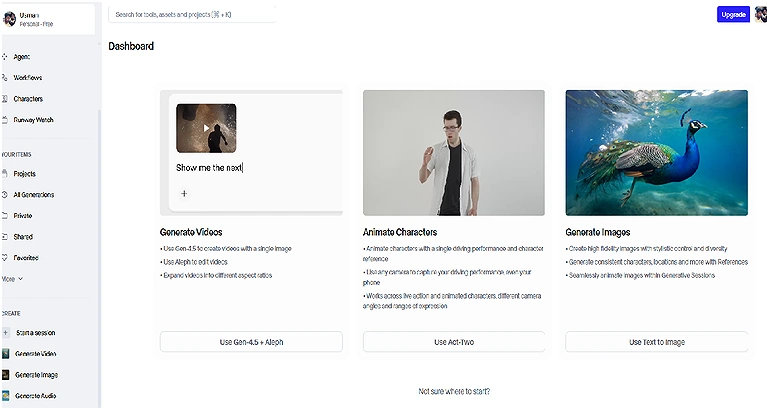
The interface is clean, well-organized, and designed for creators of all skill levels. Beginners can produce videos using guided workflows, while experienced users can access advanced tools such as camera controls, Motion Brush, video extension, and AI-powered editing. The result is a smooth learning curve that enables individuals, marketing teams, agencies, educators, and filmmakers to become productive in a short time.
Implementation Timeline
| Milestone | Typical Time |
| Create an account | 2–3 minutes |
| Generate your first AI video | 2–5 minutes |
| Learn the core interface | 30–60 minutes |
| Create polished marketing videos | 1–2 days |
| Master advanced AI editing tools | 1–2 weeks of regular use |
Deployment Requirements
Modern Web Browser: Access Runway Gen-3 through any up-to-date browser, including Chrome, Edge, Firefox, or Safari.
Reliable Internet Connection: A stable internet connection is essential for smooth cloud-based video generation, editing, and exporting.
No Dedicated GPU Required: All AI processing and rendering are performed on Runway's cloud infrastructure, reducing local hardware requirements.
Cross-Platform Support: Works seamlessly across Windows, macOS, and Linux without requiring platform-specific software.
No Local Installation: Start creating AI videos instantly without downloading, installing, or maintaining desktop applications.
Runway Account: Sign in with a free or paid Runway account to access Gen-3 features, manage projects, and export completed videos.
1 Text-to-Video Generation
How It Works: Users enter text prompts describing a scene, and Runway generates corresponding video clips using AI models trained on cinematic motion, lighting, and scene composition.
Practical Workflow Example: A marketing team creates multiple video ad variations by entering product-focused prompts, then selects the most visually appealing output for campaigns.
2 Image-to-Video Animation
How It Works: Static images are converted into motion-based video clips with AI-generated camera movement, depth simulation, and environmental effects.
Practical Workflow Example: An e-commerce brand animates product photos into short promotional videos for social media advertising.
3 AI Video Editing Tools
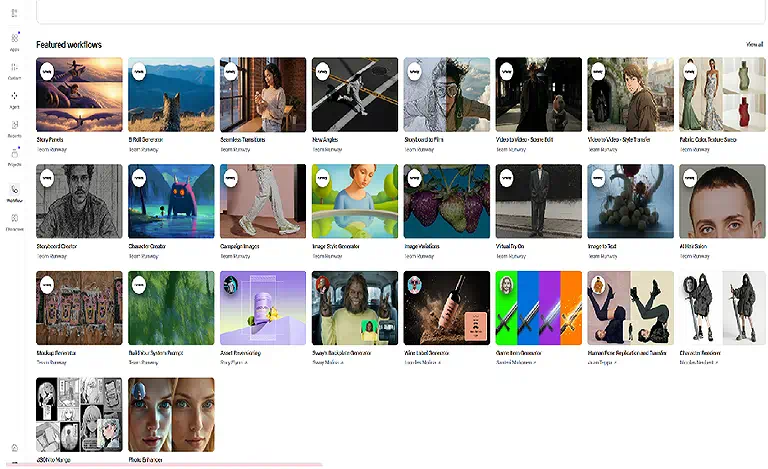
How It Works: Runway automates complex editing tasks such as background removal, object isolation, masking, and scene enhancement using machine learning.
Practical Workflow Example: A creator removes a distracting background from a video and replaces it with a clean studio environment without manual frame-by-frame editing.
4 Motion Tracking
How It Works: The system tracks objects or subjects across frames and allows overlays or effects to remain locked to moving elements.
Practical Workflow Example: A sports creator attaches live stats and graphics to players during a highlight video.
5 Collaborative Workflow
How It Works: Runway supports shared workspaces where teams can collaborate on projects, manage assets, and edit content in real time through the cloud.
Practical Workflow Example: A creative agency allows designers and editors in different locations to work on the same campaign video simultaneously.
6 Output Quality and Performance
1 Visual Quality: Runway produces high-quality cinematic visuals with strong lighting, realistic textures, and well-composed scenes. It performs especially well in environmental storytelling and stylized visuals.
2 Motion Consistency: Camera movement is generally smooth and stable, with improved continuity across frames compared to earlier AI video systems.
3. Character Consistency: Character stability is strong in short clips, although longer sequences may still show minor facial or identity drift. If you encounter issues such as character morphing, frame flicker, or unrealistic object behavior in AI-generated videos, read our Why AI Videos Look Fake? Fix Character Morphing, Flicker & Bad Physics for practical techniques to improve visual consistency and achieve more realistic results.
4 Physics and Object Interaction: Basic motion and environmental interactions appear realistic, but complex physical interactions can still produce occasional artifacts.
5 Text and Typography Rendering: Short text elements and signage are often readable, but longer or detailed typography may lack consistency.
6 Rendering Speed: Runway delivers fast generation times, supporting rapid experimentation and iterative creative workflows.
7 Export Quality
- 720p output supported
- 1080p standard quality
- Higher resolutions available on paid tiers
- Suitable for commercial use on Pro plans
8 Commercial Readiness: Runway outputs are suitable for social media content, advertising campaigns, internal communications, and client-facing creative work, although high-end production may require refinement.
Real-World Use Cases
Runway Gen-3 is built for creators who want photorealistic visuals, cinematic camera movements, and professional-quality AI videos. Its advanced video generation makes it a popular choice for filmmakers and VFX artists. Learn why it is featured among the best AI tools for cinematic video production.
Marketing and Advertising: Runway enables teams to quickly generate ad creatives, promotional videos, and campaign variations without traditional production costs.
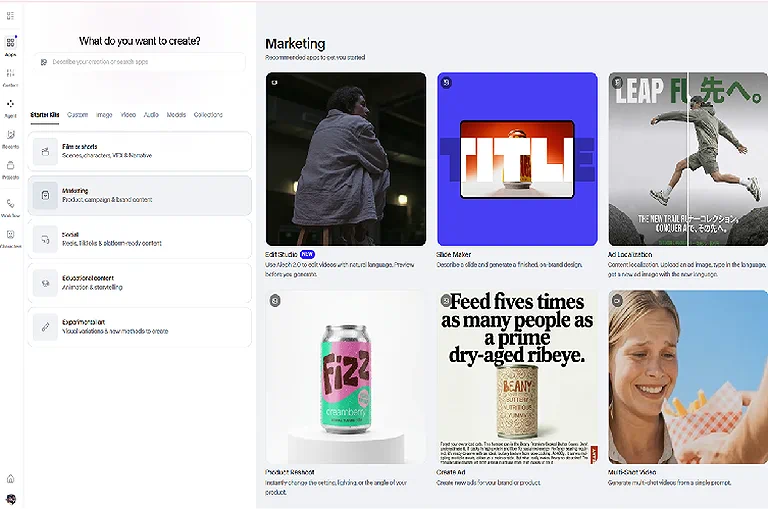
Content Creators: YouTubers and influencers use Runway to produce visual storytelling content, intros, and cinematic clips at scale.
Corporate Training: Businesses create onboarding videos, training modules, and internal communication content efficiently.
E-Commerce: Brands convert product images into engaging video ads optimized for social platforms.
Agencies: Agencies use Runway for concept visualization, pitch presentations, and rapid content production.
Best Organization Size
| Organization Size | Recommendation | Why? |
| Startup | ✔ Highly Recommended | Affordable pricing, cloud-based access, and AI-powered video generation help startups create professional content with minimal resources. |
| Small Business | ✔ Highly Recommended | Enables businesses to produce marketing, social media, and promotional videos quickly without maintaining an in-house production team. |
| Mid-Market | ✔ Recommended | Well suited for marketing departments, agencies, and creative teams that need to scale AI-assisted video production efficiently. |
| Enterprise | ✔ Recommended | Supports enterprise creative teams with collaboration, security, and scalable AI video generation, while fitting best alongside existing enterprise content and workflow tools. |
Integrations and Ecosystem
Runway Gen-3 integrates seamlessly with professional video production workflows by combining AI generation, editing, collaboration, and export capabilities in a single cloud-based platform. It supports image and video imports, high-quality exports, shared workspaces, and compatibility with leading post-production software, enabling creators, marketers, agencies, and businesses to incorporate AI-generated content into existing production pipelines with minimal friction.
| Integration | Supported |
| Text-to-Video | ✔ |
| Image Uploads (PNG, JPG, WebP) | ✔ |
| Video Upload (Video-to-Video) | ✔ |
| MP4 Export | ✔ |
| Adobe Premiere Pro Workflow | ✔ |
| DaVinci Resolve Workflow | ✔ |
| Final Cut Pro Workflow | ✔ |
| Cloud-Based Collaboration | ✔ |
| Team Workspaces | ✔ |
| Public API | ✔ |
Reality Check
Unlike many AI video generators that focus solely on content generation, Runway Gen-3 covers much of the production lifecycle within a single platform. Teams can generate videos, apply AI-powered edits, collaborate in shared workspaces, and export projects for advanced finishing in professional editors such as Adobe Premiere Pro, DaVinci Resolve, or Final Cut Pro. For most creators and marketing teams, this significantly reduces tool switching while maintaining compatibility with established post-production workflows.
Our Experience Using Runway Gen-3
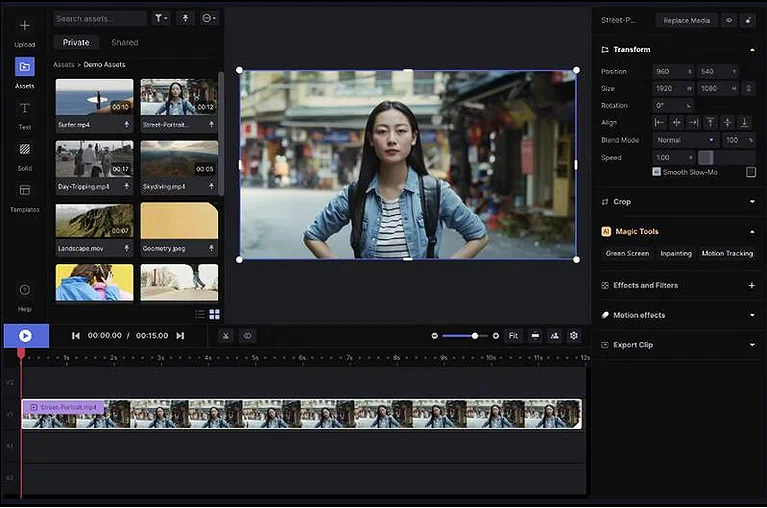
Based on our review, official documentation, product demonstrations, publicly available user feedback, and an evaluation of the platform's capabilities, Runway Gen-3 offers a polished and efficient AI video creation experience. The platform makes it easy to move from an initial idea to a finished video by combining AI video generation and essential editing tools within a single workspace. Navigation is straightforward, allowing first-time users to begin creating content quickly, while advanced controls provide experienced creators with greater flexibility when refining prompts, camera movement, and visual style.
What Stood Out
- The workflow feels streamlined, with video generation and AI editing available in one platform instead of requiring several separate applications.
- Generated videos show strong prompt adherence, producing realistic motion, cinematic camera movement, and visually coherent scenes for many creative use cases.
- Multiple input methods allow projects to begin from text prompts, reference images, or existing videos, providing flexibility for different production workflows.
- Creative iteration is efficient, making it simple to adjust prompts, regenerate clips, and compare different outputs without restarting a project.
- Built-in AI editing tools help refine generated content through features such as background removal, object replacement, masking, and video enhancement.
- The overall learning curve is approachable, making the platform suitable for both beginners creating their first AI videos and experienced creative professionals.
Potential Limitations
- Prompt quality has a significant impact on results, so producing highly specific scenes often requires experimentation and multiple refinements.
- Maintaining consistent characters and environments across longer videos remains challenging, particularly for multi-scene storytelling.
- Generation limits on lower-tier plans may restrict creators producing large volumes of high-resolution content.
- Advanced post-production tasks, including complex motion graphics, professional audio mixing, and broadcast-level finishing, are still better handled in dedicated editing software.
Overall Impression
Runway Gen-3 delivers a well-balanced combination of usability, creative flexibility, and output quality. Rather than focusing solely on AI video generation, it supports a broader production workflow that helps creators develop, refine, and export professional-looking videos from a single platform. Although complex productions may still require specialized editing software, Runway Gen-3 provides an efficient and reliable solution for most marketing, social media, educational, and commercial video projects.
Security, Privacy & Compliance
Data Privacy: Runway processes user content through cloud systems with privacy controls designed for professional workflows.
AI Training Policies: The platform continues refining how user data interacts with model training and generation systems.
Enterprise Security: Enterprise plans include access controls, user permissions, and administrative management tools.
Compliance: Runway is evolving toward enterprise-grade compliance standards suitable for large organizations. However, compliance and data security do not automatically determine the copyright ownership or commercial usage rights of AI-generated content. Before publishing AI-generated videos, read our Creating AI Videos? Don't Publish Until You Read This Legal Guide to better understand licensing, intellectual property, and other legal considerations for commercial projects.
Pricing & Plans
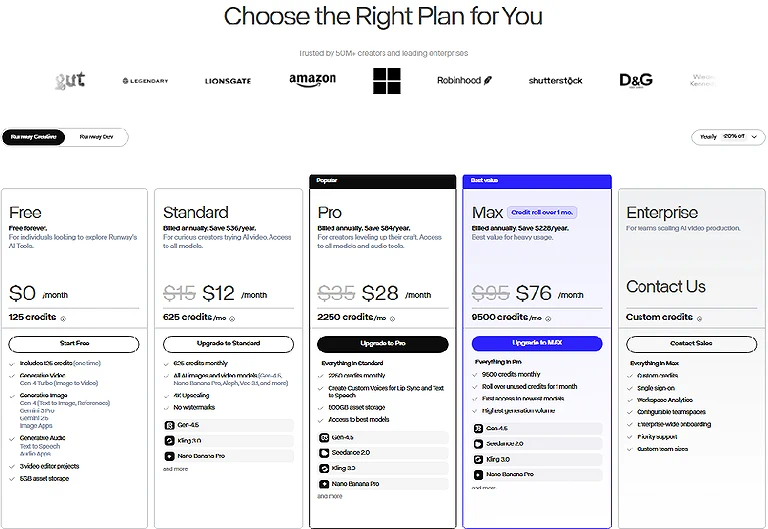
| Plans | Best Offer |
| Free | Testing and Experimentation |
| Standard | Individual Creators |
| Pro | Professional Creators |
| Unlimited | High Volume Users |
| Enterprise | Large Organisation |
Hidden Limitations
Runway uses a credit-based system that may limit heavy usage on lower plans. Advanced models and higher-resolution exports may require premium tiers. Watermarks and export restrictions apply to free users.
Value for Money
Runway offers strong value for users who regularly produce video content. Its combination of generation, editing, and collaboration tools reduces the need for multiple separate software subscriptions.
Pros and Cons
Pros
- High-Quality AI Video Generation: Produces cinematic, visually detailed videos with realistic motion suitable for marketing, filmmaking, and professional creative projects.
- Intuitive Creative Workflow: Clean interface and streamlined generation process make it easy for both beginners and experienced creators to produce AI videos efficiently.
- Integrated AI Editing Tools: Combines video generation with editing features in a single workspace, reducing the need to switch between multiple applications.
- Fast Cloud-Based Processing: Delivers efficient rendering and rapid creative iteration without requiring high-performance local hardware.
Cons
- Credit-Based Pricing: Frequent video generation or high-resolution outputs can consume credits quickly, increasing costs for heavy users.
- Scene Consistency Challenges: Maintaining identical characters, objects, and environments across multiple generated clips may require additional refinement.
- Complex Motion Limitations: Fast action sequences, intricate object interactions, or realistic physics can occasionally produce less accurate results.
- Advanced Features Require Paid Plans: Many premium capabilities and higher usage limits are only available through paid subscriptions.
Customer Support & Learning Resources
Documentation: Runway provides structured documentation covering setup, generation, editing, and advanced workflows.
Tutorials and Guides: The platform includes tutorials and learning resources for both beginners and advanced users.
Community: Users benefit from active creator communities sharing workflows, tips, and production techniques.
Support Quality: Paid users generally receive faster and more responsive support compared to free-tier users.
Who Should Use Runway?
| User Type | Recommendation |
| Beginners | Good |
| Youtubers | Excellent |
| Marketers | Excellent |
| Agencies | Excellent |
| Enterprise | Excellent |
| Filmaker | Very Good |
Best For: Runway is best for content creators, marketing teams, agencies, businesses, and production studios seeking an AI-powered platform for fast, scalable video creation with advanced editing, collaboration, and automation features requiring minimal technical expertise.
Good For: It is also well-suited for independent filmmakers, educators, designers, and social media creators experimenting with AI-assisted storytelling, concept visualization, promotional videos, educational content, and creative production workflows without extensive editing experience.
Not Recommended For: Runway may not be the best choice for users needing complete frame-by-frame manual editing, highly predictable outputs, offline workflows, or those with very limited budgets who cannot justify premium subscription pricing.
How Does Runway Compare?
Providing alternative tools in this review helps you compare different options and choose the one that best fits your workflow, budget, and editing needs. If none of these tools meet your requirements, explore our complete guide to AI Tools for Video Creation to discover more AI video creation platforms.
OpenAI Sora
Where Runway Wins: Runway offers a complete AI video production ecosystem with generation, editing, motion tracking, collaboration, and workflow automation. It is better suited for professional teams that need end-to-end video creation within a single platform.
Where Sora Wins: Sora delivers more realistic long-form videos with stronger scene consistency and natural motion, making it ideal for cinematic storytelling. See our Runway Gen-3 vs Sora AI: Which AI Video Generator Is Better?
Pika
Where Runway Wins: Runway provides more advanced editing capabilities, AI-powered production tools, and collaborative workflows. Its comprehensive feature set makes it a better fit for agencies, businesses, and professional content creators.
Where Pika Wins: Pika focuses on simplicity, speed, and ease of use, making it ideal for quickly creating short-form videos for platforms like TikTok, Instagram Reels, and YouTube Shorts with minimal editing experience.
What's New in 2026?
- More Advanced AI Video Models: Runway continues expanding its AI model lineup, providing improved video quality, greater creative flexibility, and broader generation capabilities for different production workflows.
- Improved Video Quality and Motion: Ongoing model refinements produce more realistic motion, stronger prompt adherence, better scene consistency, and enhanced visual fidelity across AI-generated videos.
- Enhanced Image-to-Video Generation: Image-based video creation has been improved to better preserve subject appearance, composition, and visual style while generating smoother cinematic animation.
- Expanded Model Ecosystem: Users can access a growing selection of first-party and supported third-party AI models, making it easier to choose the right model for different creative tasks.
- Faster Generation Performance: Continuous infrastructure and rendering optimizations help reduce generation times while improving platform responsiveness and overall workflow efficiency.
Final Verdict: Should You Use Runway?
Best For: Runway is ideal for marketing teams, content creators, agencies, filmmakers, and businesses seeking an all-in-one AI video production platform with powerful generation, editing, collaboration, and automation features for creating professional-quality content efficiently.
Skip If: Skip Runway if you need complete manual editing control, prefer traditional video editing software, require highly predictable outputs every time, or have a limited budget that cannot justify premium AI subscription costs.
Final Recommendation: Runway remains one of the leading AI video platforms in 2026, combining advanced generation, editing, and collaboration features into a unified workflow. Despite premium pricing and occasional inconsistencies, it delivers exceptional value for professional creators, agencies, and businesses. If you're still deciding whether an AI-powered workflow is the right choice for your organization, explore our AI vs. Traditional Video Creation: Critical Differences, Feature Comparisons, and Long-Term ROI Analysis for a detailed comparison of production costs, scalability, creative flexibility, and long-term business value across both approaches.
FAQ
What is Runway Gen-3 used for?
Runway Gen-3 is used to generate AI videos from text prompts, reference images, and existing footage. It also provides AI-powered editing, visual effects, background removal, and creative tools for marketing, filmmaking, education, and social media content creation.
Is Runway Gen-3 free to use?
Yes, Runway offers a free plan that allows users to explore its AI video generation and editing features with limited credits. Paid plans unlock higher generation limits, premium models, and advanced creative capabilities for professional use.
Is Runway Gen-3 worth it?
Runway Gen-3 is worth considering for creators, marketers, agencies, and businesses seeking professional AI video generation with integrated editing tools. Its combination of quality, usability, and creative flexibility makes it one of the leading AI video platforms.
Can I use Runway Gen-3 for commercial projects?
Yes, Runway permits commercial use under its paid subscription plans. Users can create AI-generated videos for client work, advertising campaigns, business promotions, social media content, and other commercial projects while following the platform's licensing terms.
Does Runway Gen-3 support image-to-video generation?
Yes, Runway Gen-3 supports image-to-video generation, allowing users to animate reference images into realistic video clips. It preserves key visual elements while adding natural motion, cinematic camera movement, and AI-generated scene animation.
How long can videos be in Runway Gen-3?
The maximum video length depends on the selected AI model and subscription plan. Longer productions are typically created by generating multiple clips and combining them within Runway's built-in editing workspace or external editing software.
Is Runway Gen-3 beginner-friendly?
Yes, Runway Gen-3 is designed for beginners with its intuitive interface, prompt-based workflow, and cloud-based platform. At the same time, it offers advanced creative controls that appeal to experienced creators and professional production teams.
Does Runway Gen-3 offer an API?
Yes, Runway provides API access for eligible developers and enterprise customers. The API enables businesses to integrate AI video generation, editing, and automation capabilities into custom applications, creative workflows, and production pipelines.
What are the best alternatives to Runway Gen-3?
Popular alternatives include OpenAI Sora, Google Veo, Kling AI, Luma Dream Machine, Pika, and Hailuo AI. Each platform offers different strengths in AI video generation, cinematic quality, creative controls, and production workflows.
Which industries benefit most from Runway Gen-3?
Runway Gen-3 is widely used across marketing, advertising, filmmaking, education, e-commerce, media production, and creative agencies. Its AI-powered workflow helps organizations produce professional-quality videos more efficiently while reducing traditional production time and costs.
Conclusion
Runway Gen-3 proves that AI video creation has evolved far beyond simple text-to-video generation. By combining cinematic AI video generation, image-to-video animation, and AI-powered editing in one intuitive platform, it enables creators to transform ideas into professional-quality videos with greater speed, flexibility, and creative control. Whether you're producing marketing campaigns, social media content, educational materials, or cinematic visuals, Runway streamlines the entire workflow without sacrificing quality.
While no AI platform is perfect, Runway Gen-3 continues to raise the bar through ongoing model improvements, enhanced creative capabilities, and a refined user experience. Its few limitations are outweighed by its versatility, production quality, and integrated workflow. If you're searching for a reliable, future-ready AI video platform that balances ease of use with professional results, Runway Gen-3 remains one of the best investments for creators and businesses in 2026.