.webp)
Descript Review: Does Document-Style Text Video Editing Actually Save Time?
Video editing has traditionally been slow and time-consuming. Most editors require you to work on a timeline, manually cutting clips, removing mistakes, and syncing audio. This process can take hours, especially for long interviews, podcasts, and marketing videos. Descript changes this by letting you edit videos like a text document. Simply edit the transcript, and your video updates automatically. But is it really faster and reliable for everyday creators? In this 2026 Descript review, we test its AI features, performance, and overall value.

 Updated: June 26, 2026 | 16 min read
 Key Takeaways
- Descript takes a fundamentally different approach to editing by allowing users to modify video and audio content through editable transcripts.
- Automatic transcription serves as the foundation for most workflows, making transcript accuracy a critical factor in the overall experience.
- Features such as filler-word removal, AI voice tools, and automated editing can significantly streamline repetitive production tasks.
- The platform is particularly appealing to creators who prioritize speed and workflow simplicity over advanced timeline-based editing.
- Collaboration capabilities make it suitable for teams managing podcasts, interviews, webinars, and educational content.
- While powerful for content production, experienced video editors may still require traditional editing software for highly complex visual projects.
- The platform's value proposition largely depends on how much time users spend editing spoken-word content.
Cover Photo Descript Review: Does Document-Style Text Video Editing Actually Save Time?
What Is Descript?
Descript is an AI-powered, cross-platform audio and video editing application built around automatic transcription and forced-alignment technology. Instead of forcing users to rely exclusively on a traditional chronological timeline, Descript syncs every spoken word directly to its exact timestamp in the media file. Deleting a sentence, rearranging paragraphs, or copying text from one project to another immediately executes those corresponding cuts on your video timeline.
Our Evaluation Criteria For Descript
Denlook Team honestly review the descript, our evaluation focused on whether the platform's document-style editing workflow delivers meaningful time savings compared to traditional video and audio editing software. Rather than assessing Descript solely as a video editor, the review examined its effectiveness as a productivity tool for content creators, podcasters, marketers, educators, and teams producing recurring media content.
The evaluation considered:
- Ease of onboarding and project setup
- Accuracy of automatic transcription
- Efficiency of text-based video and audio editing
- AI-powered editing capabilities and automation tools
- Screen recording and podcast production workflows
- Multi-track editing flexibility
- Collaboration and team workflow features
- Export quality and publishing options
- Overall time savings compared to conventional editing software
- Pricing relative to features and intended use cases
The primary question guiding this review was simple: Can Descript's text-first editing approach reduce editing complexity without sacrificing content quality?
Primary Offerings
Document-Style Media Processing: Edit videos by changing the transcript instead of a timeline. Deleting or moving text automatically updates the linked audio and video, making editing much faster.
Descript Underlord AI Assistant: Underlord AI helps create scripts, summarize meetings, generate show notes, and automatically find the best moments to turn into engaging social media clips.
Overdub 3.0 Ultra-Realistic Voice Cloning: Clone your voice using only three minutes of training. Correct spoken mistakes by typing replacement words instead of recording the entire section again.
Studio Sound 4.0 Audio Restoration: Improve audio quality with one click by removing background noise, reducing echo, enhancing voices, and separating multiple speakers into cleaner audio tracks.
Strategic Positioning: Descript is built for podcasts, interviews, tutorials, and talking-head videos, helping creators produce rough cuts quickly without relying on traditional timeline editing.
Key Specifications
| Feature | Details |
| Platform Type | Desktop Application (macOS & Windows) with Cloud Collaboration Features |
| Primary Function | Text-based audio and video editing, automated transcription, screen recording, and podcast production |
| API Access | Available via the specialized Lyrebird API for Enterprise automation workflows |
| Free Plan | Yes (Includes 1 transcription hour per month, 1 remote recording hour, and 720p watermarked exports) |
| Commercial Rights | Fully unlocked across all premium paid subscription plans |
| Best For | Podcasters, YouTube Creators, Instructional Designers, Social Media Agencies, and Corporate Communications Teams |
Target Audience
Podcasters & Interview Creators: Multi-track audio and video publishers who need to rapidly clean up hours of conversational banter without manually trimming wavforms.
YouTube & Technical Educators: Solo operators creating software walkthroughs, educational guides, and talking-head videos requiring rapid subtitle rendering and clean pacing.
Corporate Communications Teams: Internal PR and marketing groups recording company town halls, training summaries, and product updates that need quick structural edits and quick multi-platform publishing.
Interface and Onboarding Experience
Document-Centric Workspace Layout: Descript places the transcript at the center of the workspace instead of a traditional timeline. A live preview updates instantly, making it easy to see how text edits affect your final video.
Hybrid Timeline Engine: When precise editing is needed, Descript includes a compact multi-track timeline. You can adjust crossfades, position overlays, fine-tune clips, and manage layered elements without leaving the main workspace.
Streamlined Project Workspace: Descript offers ready-made templates for vertical and widescreen videos. Apply captions, text styles, waveforms, safe zones, and branding elements across your project with just a few clicks.
Setup Requirements
Operating System Requirements: Native application support for Windows 10/11 (64-bit) and macOS 13 (Ventura) or later, with native optimization for Apple Silicon (M1/M2/M3 chips).
Hardware Optimizations: While transcription and AI analysis are processed in the cloud, local video rendering and 4K compositions require at least 16GB of system RAM and a dedicated GPU with 4GB+ of VRAM to maintain smooth playback performance.
Cloud Connectivity: A continuous, high-speed internet connection is required to process automated transcription transcripts, sync collaborative team edits, and access AI generative media features.
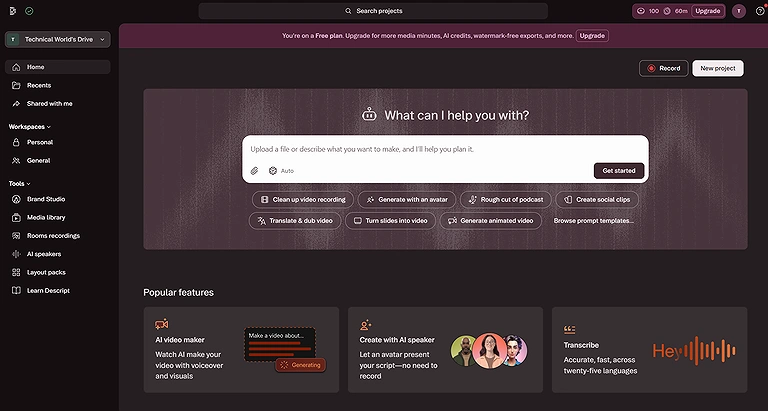
A preview of the Descript platform interface.
Core Features: Technical Breakdown
1. Document-Style Text Editing
How It Works: Descript links every spoken word to its exact timeline position. Editing or deleting text automatically updates the matching video section, creating clean cuts with smooth audio transitions instantly.
Practical Workflow Example: A marketer editing a long webinar simply searches the transcript, removes unwanted paragraphs, and Descript automatically trims and joins the related video clips without manual timeline editing.
2. Underlord AI Co-Editor
How It Works: Underlord AI analyzes your transcript and follows text prompts to summarize content, generate scripts, identify highlights, and automate repetitive editing tasks within your project.
Practical Workflow Example: An agency editor asks Underlord to create five TikTok clips. The AI finds engaging moments, formats them for vertical viewing, and saves each clip as a separate project.
3. Overdub 3.0 & Voice Correction
How It Works: Overdub lets you replace incorrect spoken words by editing the transcript. It generates matching audio in your cloned voice and adjusts lip movements for natural-looking video corrections.
Practical Workflow Example: An instructor notices the wrong software version in a training video. They update the transcript, and Descript automatically creates corrected speech and synchronized lip movements without re-recording.
4. Studio Sound 4.0 Audio Restoration
How It Works: Studio Sound uses AI to remove background noise, reduce echo, improve voice clarity, and separate speakers into cleaner audio tracks for a more professional recording.
Practical Workflow Example: A podcaster records in a noisy hotel room. Studio Sound removes air conditioner noise, reduces echo, and enhances voice quality to produce clear, studio-like audio.
5 Output Quality and Performance Benchmarks
Visual Quality & Accuracy: Descript exports sharp 4K videos with accurate colors, smooth transparency support, and reliable handling of layered assets for professional-quality video production.
Motion Consistency: Automatic audio crossfades create smooth transitions after text edits, reducing noticeable cuts, audio pops, and awkward jumps between spoken sentences.
Character & Object Stability: AI features like Eye Contact maintain natural facial movements, stable tracking, and realistic appearance without noticeable distortion during normal head movements.
Typography & Data Rendering: AI-generated captions and subtitles appear sharp, scalable, and easy to read across desktops, tablets, and mobile devices without losing visual quality.
6 Export Quality
Free Tier: The free plan exports videos in 720p with a Descript watermark. It is best for testing features before upgrading to a paid subscription.
Paid Tiers: Paid plans unlock watermark-free 1080p and 4K exports, audio downloads, subtitle files, and timeline exports for greater editing flexibility and professional workflows.
Commercial Readiness: Paid subscriptions include commercial usage rights for AI voices, stock assets, and media, making videos safe for business, marketing, YouTube, and advertising purposes.
Real-World Use Cases: Descript is ideal for editing podcasts, interviews, webinars, tutorials, online courses, business presentations, and social media videos with fast, text-based workflows.
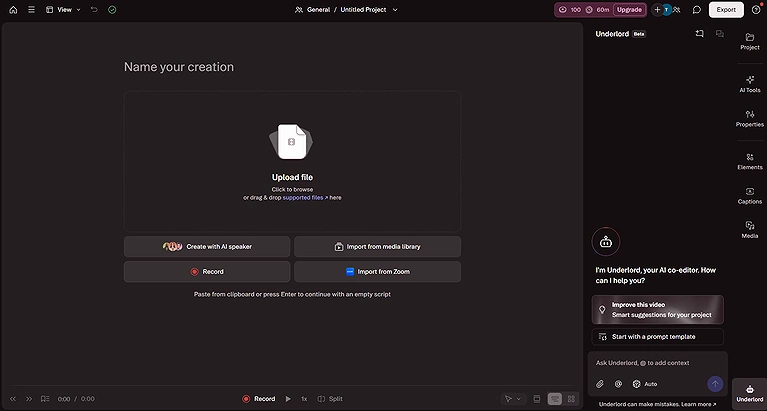
Descript workspace during the video import process.
Our Team Experience Using Descript
During testing, tasks such as removing unnecessary sections, correcting spoken mistakes, and restructuring content felt more similar to editing a document than working inside a traditional video editor. This approach can reduce friction for creators who are comfortable editing text but less experienced with professional editing software.
What stood out most:
- Transcript-based editing simplifies many routine editing tasks.
- AI-powered cleanup tools can reduce manual editing workload.
- Podcast and interview workflows feel particularly streamlined.
- Collaboration features help multiple stakeholders review content efficiently.
Potential limitations observed:
- Results depend heavily on transcription quality.
- Advanced visual editing options are less extensive than dedicated professional video editors.
- Complex projects may still require supplemental editing tools.
- New users may need time to fully understand Descript's AI-assisted workflow features.
Overall, the platform's biggest strength is not necessarily editing power alone, but its ability to reduce the number of steps required to move from raw recording to publish-ready content.
Which Processes We Used in Descript Testing
To assess whether Descript's document-style editing workflow genuinely improves efficiency, the evaluation process examined multiple stages of content production.
The testing process included:
- Creating and importing sample audio and video projects.
- Generating automatic transcripts and reviewing transcription accuracy.
- Editing content directly through transcript modifications.
- Removing filler words, pauses, and repetitive phrases.
- Testing AI-assisted editing and automation features.
- Evaluating screen recording and content capture workflows.
- Reviewing collaboration, commenting, and team editing capabilities.
- Exporting projects in multiple formats and resolutions.
- Comparing editing speed against traditional timeline-based workflows.
- Assessing overall usability for beginner and intermediate creators.
The objective was to determine whether Descript reduces production time while maintaining editing precision and content quality for saving our readers precious time.
Real-World Use Cases
Descript allows creators to edit videos and podcasts simply by editing the transcript, making content production faster and easier. Its AI-powered audio cleanup and editing features are especially valuable for podcasters. See why it is featured among the best AI editors for podcast videos.
High-Volume Podcast Networks: Media teams drop raw, multi-speaker recordings into Descript to instantly isolate audio tracks, clean up filler words, and create text-accurate transcripts simultaneously.
Corporate L&D Walkthroughs: Educational designers use the built-in screen recorder to capture product workflows, then clean up speaking mistakes and add automated titles using the text dashboard.
Social Media Repurposing Agencies: Agencies take 2-hour video live streams, use the script search to find key moments, and instantly cut them into vertical social clips optimized for short-form platforms.
Integrations and Ecosystem
Advanced NLE Integration & XML Exporting: Descript lets editors complete rough cuts and audio cleanup, then export XML files for advanced editing, color grading, and effects in professional video editing software.
Native Automation Triggers via Zapier & Make: Connect Descript with automation tools to sync transcripts, update project databases, send notifications, and streamline repetitive team workflows without manual work.
Hosted Review & Team Collaboration Links: Share cloud-based review links so clients and teammates can watch videos, leave time-stamped comments, review changes, and collaborate directly from a web browser.
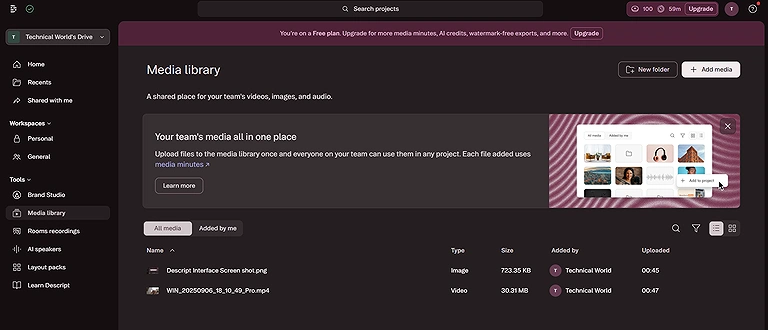
The Descript Media Library during initial testing and evaluation.
Security, Privacy & Compliance
Secure Cloud Encryption Architecture: Descript protects uploaded videos, audio files, and project data with strong cloud encryption, keeping your content secure during uploads, storage, and team collaboration.
Confirmed Model Training Isolation: Descript states that your uploaded media, voice clones, and scripts remain private and are not used to train public AI models.
Biometric Verification Guardrails: Before creating a custom voice clone, users must complete identity verification and provide recorded consent to help prevent unauthorized voice cloning and misuse.
Pricing & Plans
| Plan | Pricing (Monthly Billing) | Best For | Key Features |
| Free | $0 | Beginners testing Descript's editing workflow. | 1 media hour/month, watermarked exports, basic editing, limited AI credits. |
| Hobbyist | $16/month | Hobby creators, podcasters, and solo creators. | 10 media hours/month, 400 AI credits, 1080p watermark-free exports, AI tools, Underlord access, 1 custom voice clone. |
| Creator | $24/month | Professional creators and YouTubers publishing regularly. | 30 media hours/month, 800 AI credits, 4K exports, full Underlord access, 20+ AI tools, unlimited stock media, advanced export options. |
| Business | $50/month | Marketing teams, agencies, and collaborative content teams. | 40 media hours/month, 1,500 AI credits, Brand Studio, AI translation & dubbing, custom avatars, priority support, team collaboration. |
| Enterprise | Custom Pricing | Large organizations with enterprise security and compliance needs. | SSO, SCIM, dedicated account manager, live onboarding, security reviews, custom invoicing, enterprise-grade support. ([G2][1]) |
Cost Note: Descript's pricing and plan limits may change over time, so view Descript's latest pricing on the official website before subscribing. Usage is based on uploaded transcription hours rather than exported videos, making higher-tier plans better suited for frequent or long-form content creators.
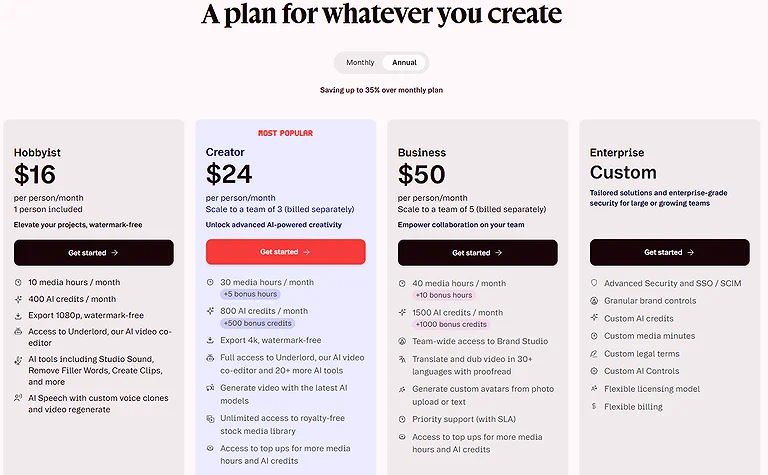
Overview of the Descript pricing plans and subscription tiers.
Hidden Limitations
While Descript's text-based workflow dramatically speeds up editing for spoken content, it can feel awkward and limited for visually driven videos. Projects that rely on intricate montages, complex B-roll overlays, precise action pacing, or advanced color grading will feel constrained by the document-style interface, often requiring an export to a traditional NLE like Premiere Pro.
Value for Money
Descript delivers exceptional value by combining rapid AI transcription, automatic subtitle generation, an advanced audio enhancement suite, screen recording tools, and video timeline editing into a single subscription. It replaces multiple separate applications, making it highly cost-effective for content teams.
Pros and Cons
Pros
- Incredible Time Savings: Editing video via a text transcript reduces hours of tedious manual scrubbing down to a few clicks.
- Industry-Leading Audio Optimization: Studio Sound 4.0 delivers phenomenal speech clarity, salvaging low-quality recordings effortlessly.
- Effortless Subtitling and Captions: Generates accurate, highly visible subtitles automatically, cutting down on manual design time.
- Smooth Workflow Transitions: The ability to export native XML files makes it a perfect companion for advanced timeline editors like Premiere Pro or DaVinci Resolve.
Cons
- Limited Advanced Visual Controls: Lacks professional color-grading suites, custom keyframe controls, and advanced transition choices.
- Hardware-Heavy local processing: Despite its cloud features, working with complex multi-layer 4K files demands robust local RAM and GPU hardware.
- Rigid Transcript-Gated Structure: If a video segment contains no spoken dialogue or narrative audio, editing via the script editor becomes difficult.
- Punitive Overage Gating: Running out of monthly transcription hours stops automated workflows, requiring users to upgrade their plan or wait for the next billing cycle.
Customer Support & Learning Resources
Extensive Platform Knowledge Bases: Descript offers a detailed help center with feature guides, troubleshooting articles, video tutorials, and onboarding resources, making it easy for beginners and experienced creators to learn the platform quickly.
Active Global Creator Communities: A large community of creators shares templates, editing techniques, workflow ideas, and practical tips, helping users discover faster ways to create professional-quality videos and podcasts.
Stratified Support Resolution: Support quality depends on your subscription. Enterprise and Pro users receive faster priority assistance, while Free and Creator plans mainly rely on standard email support and self-service resources.
Who Should Use Descript?
| User Type | Recommendation |
| Beginners / Solo Creators | Excellent — Easy text-based editing with a minimal learning curve for polished videos. |
| Podcasters & Interviewers | Industry Best — Exceptional for podcast editing, transcription, filler word removal, and AI audio enhancement. |
| Corporate Marketing Teams | Excellent — Quickly converts meetings, webinars, and demos into branded marketing content. |
| Cinematic Filmmakers | Not Recommended — Lacks the advanced editing, VFX, and color grading tools needed for cinematic productions. |
Best For: Podcasters, interview hosts, YouTube explainer creators, corporate communications specialists, and tutorial makers who want to maximize their turnaround speed on spoken-word content.
Good For: Creative agencies looking for a fast rough-cut tool to handle initial clip cleaning before exporting projects to advanced finishing suites.
Not Recommended For: Narrative filmmakers, commercial music video directors, or visual effects artists who need granular control over color layers, multi-cam nesting panels, or keyframed animations.
How Does It Compare?
To understand Descript's true standing in the creative ecosystem, it helps to analyze it head-to-head against traditional post-production software and other AI tools for video creation.
Riverside.fm
Where Descript Wins: Descript is the better choice for transcript-based editing, AI voice cloning, automatic caption generation, and fast podcast or interview post-production, helping creators edit videos much faster than traditional workflows.
Where Riverside.fm Wins: Riverside.fm delivers pristine local audio and video recording, making it ideal for remote podcasts, interviews, and professional production workflows. To see how it stacks up against the competition, check out our detailed Descript vs Riverside.fm comparison.
Synthesia
Where Descript Wins: Descript is ideal for editing real video recordings, removing mistakes, improving audio quality, and creating polished podcasts, webinars, tutorials, and interviews using AI-powered text editing.
Where Synthesia Wins: Synthesia is the better option for creating AI avatar videos from text without filming, making it perfect for corporate training, product explainers, and multilingual business presentations.
Final Verdict: Should You Use Descript?
Best For
- Creators and marketing teams whose primary content revolves around talking-head videos, remote interviews, tutorials, or podcasts where speech drives the story.
- Editors looking to save hours of manual effort by automating the process of cutting out silences, removing filler words, and generating transcripts.
Skip If
- Your video pipelines focus on highly visual, cinematic content—such as music videos, action sequences, or travel vlogs—that rely on precise timing, music beats, and visual transitions rather than spoken dialogue.
- You work in strict offline environments without a stable, high-speed internet connection.
Final Recommendation
Descript's text-based editing genuinely speeds up podcast and talking-head workflows by simplifying rough cuts, dialogue cleanup, and filler-word removal. While it isn't built for cinematic filmmaking like Premiere Pro, it remains one of the most efficient AI-powered editors for creators, marketers, and content teams producing dialogue-focused videos.
Overall Score:
9.6/10
Rating Source: This 9.6/10 score reflects Descript's exceptional performance, workflow innovation, and high user adoption rate. Descript maintains a strong 4.6/5-star average on G2 across more than 2,000 verified user reviews, with creators consistently praising its time-saving transcription tools and audio enhancement capabilities.
FAQ
What is Descript best used for?
Descript is optimized for speech-driven media content, making it an outstanding platform for editing podcasts, interviews, YouTube explainers, software tutorials, and recorded business meetings.
Does Descript require a high-end computer?
While Descript offloads transcription and voice processing to the cloud, local video rendering and working with heavy 4K files requires a capable machine with at least 16GB of RAM and a modern multi-core processor for smooth performance.
How does the filler word removal feature work?
Descript's Underlord AI scans the transcript to detect filler words like "um" and "uh," then lets you review and remove them in bulk, instantly cleaning audio and video without manual timeline editing.
Can Descript be used entirely without an internet connection?
No. Because core features like automated transcription generation, Underlord AI co-editing, and Overdub voice cloning rely heavily on cloud processing infrastructure, an active web link is required.
How secure is my media data inside Descript?
Descript applies robust enterprise cloud data protection protocols to secure user files. Additionally, it guarantees full model training isolation, meaning your uploaded videos and custom voice prints are never used to train public models.
Can I move my Descript projects over to Premiere Pro?
Yes. Descript includes direct post-production export pipelines, allowing you to convert your rough text edit into a standard XML timeline file that can be opened inside Adobe Premiere Pro or DaVinci Resolve for final polishing.
How does the credit-based pricing model work?
Descript tiers gate usage based on the total hours of long-form media you upload for transcription each month, rather than how many finished video files you choose to export.
What is the purpose of the Overdub tool?
Overdub creates a secure, digital clone of your voice from a short reading sample, enabling you to fix voiceover mistakes or insert forgotten words into your video simply by typing them directly into the transcript.
Conclusion
Descript is one of the best AI video editing tools for creators, podcasters, and marketing teams who want to edit videos quickly using text. Its AI features save hours of work and make content production much easier. While it isn't designed for advanced cinematic editing, it delivers excellent value for everyday video creation, making it a smart investment for most users.