.webp)
Descript vs Riverside: Which Is Better for Text-Based Editing and Remote Recording?
Descript and Riverside may look similar, but they serve different purposes. Descript focuses on AI-powered editing using text, while Riverside is built for recording high-quality audio and video remotely. Choosing the wrong platform can lead to longer editing time, limited AI features, lower video quality, or unnecessary subscription costs. Whether you're a podcaster, content creator, or marketing team, selecting the right tool matters. Compare Descript vs Riverside carefully before subscribing to find the best fit for your workflow and content goals.

 Updated: June 29, 2026 | 9 min read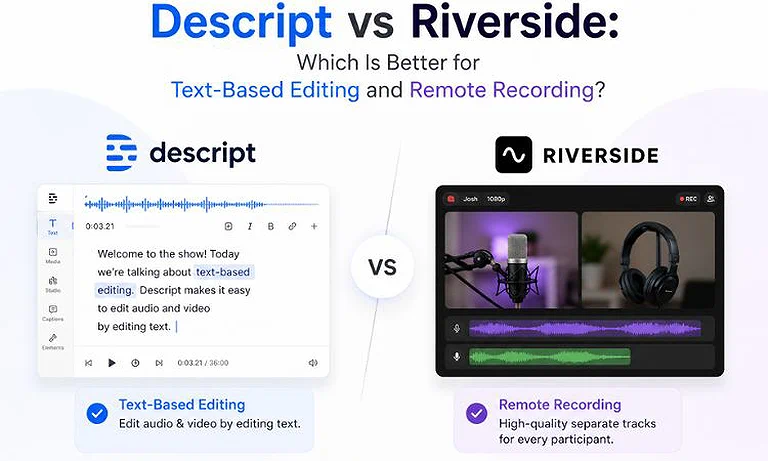
Cover Photo Descript vs Riverside: Which Is Better for Text-Based Editing and Remote Recording?
Quick Comparison Table
| Feature | Descript | Riverside |
| Primary Workflow | Text-based document-style timeline editing | Browser-based local multi-track recording |
| Best Use Case | Post-production, podcast editing, and audio/video cleanup | Remote guest interviews, podcasts, and live streaming |
| AI Script Generation | Full AI script writing, text-to-speech, and script-based editing | AI show notes, episode summaries, and basic script outlines |
| Blog-to-Video Support | Yes (creates videos from scripts with visual scenes) | Limited (primarily edits existing recordings) |
| Auto Captions | Native AI captions with highly customizable styles | Automatic captions with dynamic templates and synchronization |
| Stock Media Library | Built-in royalty-free music, B-roll, images, and sound effects | No integrated stock media library |
| Brand Kit | Custom fonts, colors, templates, and reusable layouts | Logos, branded backgrounds, and livestream overlays |
| Collaboration | Google Docs-style collaborative editing with comments | Producer mode, backstage controls, and guest management |
| Maximum Export Quality | Up to 4K UHD | Up to 4K UHD (locally recorded tracks) |
| API Availability | Yes | Yes (Content Management API) |
| Commercial Usage | Full commercial rights on paid plans | Full commercial rights for recorded content |
| Starting Price | $16/month (Hobbyist) | $24/month (Pro) |
| Overall Rating | 9.1/10 | 9.3/10 |
Rating Source: Overall ratings combine our independent editorial evaluation with verified user feedback, including G2 ratings—Descript: 4.6/5 and Riverside: 4.8/5. Scores also consider AI capabilities, workflow, ease of use, collaboration, export quality, pricing, and overall value.
What is Descript?
Descript is an AI-driven, document-style video and audio post-production platform. Instead of cutting waveforms on a traditional timeline, its core AI workflow transcribes files into text, allowing users to edit video by simply deleting or rewriting paragraphs. Its biggest strengths are its automated filler-word removal, AI voice cloning, and deep stock media integration. It positions itself as an all-in-one workspace for content marketers, educators, and podcasters who want to quickly clean up, re-order, and polish pre-recorded files. Check out our comprehensive Descript Review to see if it's worth the investment.
What is Riverside?
Riverside is a premier browser-based recording platform engineered to capture studio-grade multi-track audio and video regardless of internet stability. Its core AI workflow relies on local recording—saving full-resolution data directly to each participant’s computer before uploading it to the cloud. Its biggest strengths lie in its independent track downloads, continuous cloud backup, and automatic highlight clipping via Magic Clips. Riverside targets remote interviewers, broadcast media houses, and enterprise marketing teams looking for premium raw source quality. Dive into our in-depth Riverside Review for more performance data.
Quick Verdict Table
| Decision | Choose |
| Best Overall | Riverside |
| Best for Beginners | Descript |
| Best for Bloggers | Descript |
| Best for Small Businesses | Riverside |
| Best AI Automation | Descript |
| Best Manual Editing Control | Descript |
| Best Value for Money | Riverside |
Feature-by-Feature Workflow Comparison
1. AI Content Repurposing & Automation
Descript: Analyzes full multi-hour transcripts instantly, matches dynamic text layouts with smart stock assets, and cuts long talk shows down into distinct scenes using script context.
Riverside: Uses its proprietary Magic Clips tool to automatically scan files for logical hooks, isolation of conversational turning points, and vertical layout reframing.
Winner: Descript wins for comprehensive blog-to-video asset synthesis.
2. Editing Workflow & Ease of Use
Descript: Eliminates classic non-linear timelines entirely; you edit by highlighting words like a document, making it incredibly intuitive with an almost zero learning curve.
Riverside: Features a linear timeline interface that can occasionally feel slow or sluggish inside dense web applications when parsing heavy files.
Winner: Descript wins for its revolutionary text-to-cut speed.
3. AI Editing Features
Descript: Boasts advanced speech-to-text corrections, AI eye-contact realignment, studio sound profiling, and custom voice overdub engines that can generate missing words.
Riverside: Focuses heavily on high-accuracy multi-speaker transcriptions, background hum cancellation, automatic dead-air trimming, and basic multi-cam speaker switches.
Winner: Descript wins due to its comprehensive AI text audio corrections.
4. Templates & Brand Customization
Descript: Lets you save full design systems including custom intros, font libraries, layered watermarks, and transitions across dynamic multi-scene layouts.
Riverside: Provides basic frame overlays, standard split-screen orientations, text titles, and simple custom brand color selections for social export.
Winner: Descript wins for structural brand kit depth.
5. Social Media Optimization
Descript: Adjusts canvas aspect ratios smoothly from landscape to vertical while maintaining background padding and multi-layer text designs.
Riverside: Excels at extracting multi-speaker grids directly into vertical feeds, adding dynamic kinetic text layouts optimized for TikTok and Reels.
Winner: Riverside wins for frictionless multi-clip shorts exporting.
6. Collaboration & Business Workflow
Descript: Acts like a real-time multiplayer document hub where teammates can simultaneously leave notes or trim video layers together.
Riverside: Protects large productions with private backstages, dedicated live director controls, custom link invitations, and cloud asset isolation.
Winner: Riverside wins for its live virtual control room.
7. Export Quality & Performance
Descript: Renders complex compositions locally on machines up to 4K, though web processing can occasionally create heavy system resource consumption.
Riverside: Downloads raw uncompressed 4K video streams separate from your internet call quality, completely bypassing local client-side performance bugs.
Winner: Riverside wins for flawless track recording clarity.
Real-World Workflow Assessment
Assessment 1: Long-Form Content to Video Conversion
Descript: Transforms structural text outlines, text files, or raw speech recordings into structured videos by generating media layers, auto-matching text cues, and cleaning verbal errors out of the primary timeline instantly.
Riverside: Records continuous long-form media directly across separate host-guest feeds, automatically running deep summarization tools to extract coherent show notes, timeline chapters, and distinct visual segments.
Assessment Result: Descript wins for building videos directly out of bare transcripts, while Riverside dominates if you require pristine multi-track source elements.
Assessment 2: Short-Form Content Production Speed
Descript: Cuts down long timelines via text selections, allowing you to hand-pick social clips, paste them to a secondary composition, and customize heavy animated caption templates.
Riverside: Uses a single-click AI engine to analyze your recorded conversation, locate the most engaging hooks, crop speakers cleanly to 9:16 vertical space, and export clips rapidly.
Assessment Result: Riverside delivers faster, hands-free vertical clips directly from a fresh session, while Descript offers more precise control over your final short-form aesthetics.
Where Descript Dominates
Text-Driven Fine Tuning: Deleting filler words like "um" or "uh" inside a transcript removes them from both the audio track and video timeline simultaneously.
Synthetic Voice Overdubs: If you mispronounce a phrase, you can type the correct word into the script to generate it via your cloned AI voice model.
Rich Asset Integration: Direct access to an expansive catalog of royalty-free sound effects, stock video clips, images, and backing music layers within the app workspace.
Where Riverside Dominates
Local High-Fidelity Recording: It captures up to 4K resolution video files locally on each guest's device, ensuring network dropouts never ruin your final recording file.
Isolated Multi-Track Engineering: Separate audio and video outputs are generated for every participant, providing audio engineers with pristine individual stems for professional mixing.
Live Stream Distribution: Broadcasts your ongoing live studio feed directly out to platforms like YouTube, LinkedIn, X, and Facebook simultaneously without extra software.
Pricing & Cost Analysis
| Plan | Monthly Price* | AI Limits | Export Limits | Commercial Rights | Best For |
| Descript | $24 / $35 / $65 ($16 / $24 / $50 billed annually) | 400 / 800 / 1,500 AI credits per month | 10 / 30 / 40 media hours per month | Yes (Paid Plans) | Solo creators, podcasters, and AI-powered text-based editors |
| Riverside | $24 / $34 / $79 | Unlimited text-based editing and AI transcripts | **15 / 25 / Unlimited recording hours** (plan-dependent) | Yes | Remote podcasters, interview recording, and distributed production teams |
Note: Pricing, plan features, usage limits, and subscription tiers may change over time and vary by region, taxes, or promotions. Always verify the latest information on the official pricing pages: Descript Pricing and Riverside Pricing.
Riverside Delivers Better Long-Term Value: Riverside is the stronger investment for creators who prioritize high-quality local recording. Unlimited recording and built-in text editing make it ideal for podcasts, interviews, and ongoing production.
Descript Packs More Features per Plan: Descript includes AI script generation, stock media, transcript editing, and audio enhancement in one subscription, making it an excellent value for solo creators focused on post-production.
Usage Limits Affect Overall Costs: Descript's monthly media-hour limits can increase expenses for high-volume teams, while Riverside offers a more predictable recording-focused pricing model for consistent content production.
Best Use Cases (Selection Matrix)
Choose Descript If You Need:
- A rapid text-based approach to fix heavily unscripted solo narrative videos or webinars.
- To generate voiceovers from scratch using cloned voice assets without needing to re-record lines.
- To seamlessly weave stock B-roll tracks and graphic backgrounds into an audio script outline.
Choose Riverside If You Need:
- Pristine, broadcast-ready 4K remote interviews featuring multiple guests on separate video tracks.
- To host live streams with interactive viewer call-ins and professional backstage control settings.
- A reliable, uncompressed recording method that won't compromise raw video tracks due to spotty WiFi.
Better Alternatives Worth Considering
We selected these alternatives because they address different creator needs. CapCut offers affordable AI editing for budget-conscious users, while VEED.io delivers browser-based AI editing, collaboration, and branding tools for growing creators and teams.
| Alternative | Best For | When to Choose It |
| CapCut | Affordable AI video editing and social media content creation | Choose this if you want a budget-friendly editor with AI-powered features, auto captions, templates, and quick exports for TikTok, Reels, and other short-form social videos without paying for advanced collaboration tools. |
| VEED.io | Browser-based AI video editing and team collaboration | Choose this if you need a complete online video editor with AI editing, subtitles, branding, screen recording, and collaboration features, making it a stronger choice for teams and businesses than recording-focused platforms like Descript or Riverside. |
Looking beyond these platforms? Explore our complete AI Tools for Video Creation guide to compare leading AI video generators, editors, avatar platforms, and automation tools to find the best solution for your content creation workflow.
FAQ
Which tool is better for converting blog posts into videos?
Descript is vastly superior for blog-to-video pipelines. Its system lets you paste written text directly into the project window to generate synthetic voices, overlay matching stock media, and sync text layouts.
Which editor is easier for beginners?
Descript features an easier workflow for newcomers. Anyone who can navigate a standard word processor like Google Docs can cut video sequences without learning complex timeline keyframes or video splicing.
Which platform creates better AI captions?
Descript provides superior AI caption control. It offers extensive manual formatting, custom font uploads, and active animated word tracking styles, whereas Riverside provides simpler, less adjustable layout baselines.
Which tool is best for YouTube Shorts?
Riverside wins for rapid generation. Its Magic Clips feature automatically extracts key conversational highlights from remote files and instantly scales them to 9:16 frames with synchronized social captions.
Which platform offers the largest stock media library?
Descript wins decisively. Paid plans include built-in, unmetered access to millions of premium video backgrounds, sound clips, images, and audio loops, whereas Riverside features no native stock library.
Which editor is better for small business marketing?
Descript is better suited for standalone marketing creation due to its extensive asset system, voiceover tools, and template depth which empower single marketers to produce polished, ad-ready video structures.
Which platform exports without watermarks?
Both applications remove watermarks entirely once you upgrade to their entry-level paid subscription plans. Free tiers on both platforms enforce visible branding and limited output resolutions.
Which tool provides better value for money?
Riverside provides better long-term values for multi-guest interviewers requiring flawless recordings. Descript represents a better financial investment for solo content producers who rely heavily on heavy script editing and automated stock assets.
Conclusion
Both Descript and Riverside offer top-tier, workflow-altering capabilities, but they solve entirely different problems across the content production pipeline. Descript provides unmatched post-production automation through its unique text-based editor, making it an excellent asset for solo video creators and marketers who build narrative shows out of rough audio. Riverside focuses entirely on capturing pristine multi-track source quality, making it the definitive choice for premium remote talk shows and enterprise-grade podcasters. Carefully weigh your needs against the primary Descript vs Riverside differences outlined here to secure the layout workflow your specific digital brand requires.