.webp)
Best AI HR Tools for Small Businesses and Growing Startups
Picture this: you're a founder with 12 employees, one overworked ops person, and an HR "system" that's really just seventeen spreadsheets held together by hope and Slack reminders. Sound familiar?
Small businesses don't get the luxury of a 20-person HR department every hire has to count, and every dollar has to work twice as hard. That's exactly why legacy HR systems, built for slow-moving enterprises with months to spare on deployment, quietly become the thing slowing you down instead of speeding you up. For the bigger picture on scaling your hiring stack, check out our master overview of AI-driven systems for smarter, faster talent acquisition The good news? Lean doesn't mean limited not anymore.

 Updated: June 01, 2026 | 10 min read
Cover Photo Best AI HR Tools for Small Businesses and Growing Startups
Quick Answer
Why is Personio the top recommendation?
It delivers the best all-in-one HR automation for growing teams and matches fast setup speeds for small businesses looking to eliminate manual admin data entry.
Why is Breezy HR the best enterprise suite alternative?
It excels at visual talent pipeline automation and broad multi-job board distribution, ensuring small teams can scale candidate pipelines rapidly.
Why is Gusto the best specialized choice?
It provides the top automated payroll, benefits compliance, and tax calculation setup optimized specifically for lean, local, and domestic remote teams.
Who Is This Guide For?
Small businesses and growing startups often need HR software that simplifies hiring, employee management, payroll, and compliance without requiring a large HR team. This guide helps organisations identify AI-powered HR tools that match their current needs while supporting future growth.
- Small business owners managing HR alongside daily operations.
- Startup founders building their first structured HR processes.
- HR managers looking to automate hiring and employee administration.
- Operations managers responsible for workforce planning and compliance.
- Companies with lean HR teams that need to reduce manual administrative work.
- Fast-growing startups preparing to scale recruitment and employee management.
- Organisations seeking integrated HR, payroll, and onboarding solutions.
- Businesses comparing Personio, Breezy HR, and Gusto to find the best fit for their growth stage.What Is AI HR for Small Businesses and Growing Startups?
What Is AI HR for Small Businesses and Growing Startups?
AI HR software helps small businesses and growing startups centralise everyday HR operations, reduce manual administration, and improve accuracy as their workforce expands. Instead of relying on spreadsheets and disconnected tools, organisations can automate routine processes and create a more scalable HR function. Businesses planning future expansion or distributed hiring can also explore Best AI HR Software for Remote Teams and Global Payroll Compliance to compare solutions designed for remote workforce management and international HR operations.
Common HR challenges include:
- Recruiting and onboarding new employees efficiently.
- Managing employee records, payroll, and time-off requests.
- Maintaining compliance with employment regulations.
- Eliminating manual processes, duplicate data entry, and administrative errors while supporting business growth.
Why Traditional AI HR Processes for Small Businesses and Growing Startups Struggle
As small businesses grow, HR responsibilities become more complex and time-consuming. Relying on spreadsheets, paper records, and disconnected systems often creates inefficiencies that affect hiring, employee management, payroll accuracy, and compliance. These operational challenges become more noticeable as the workforce expands.
| Challenge | Business Impact |
| Disconnected employee records | Important HR information becomes difficult to track and maintain accurately. |
| Manual onboarding processes | New hires take longer to become productive, creating inconsistent onboarding experiences. |
| Payroll administration complexity | Increased risk of calculation errors, delayed payments, and compliance issues. |
| Leave and attendance tracking | Managers spend excessive time handling requests and maintaining accurate balances. |
| Compliance documentation | Employment records and policy documentation become difficult to keep up to date. |
| Limited HR visibility | Business leaders struggle to monitor workforce trends and make informed staffing decisions. |
| Administrative workload | HR teams spend more time on repetitive tasks than strategic workforce initiatives. |
| Growth-related process inconsistency | HR procedures vary across departments, reducing operational efficiency as the business scales. |
Workflow: How AI Improves AI HR for Small Businesses and Growing Startups
| Stage | What Happens |
| Workforce planning | Business leaders identify hiring needs, staffing gaps, and upcoming workforce requirements. |
| Job creation | HR prepares standardised job descriptions, employment details, and hiring requirements. |
| Candidate attraction | Job opportunities are distributed across appropriate recruitment channels to reach qualified applicants. |
| Candidate evaluation | Applications are organised and prioritised to help HR identify suitable candidates more efficiently. |
| Interview coordination | Candidate communications, interview planning, and scheduling are streamlined across hiring teams. |
| Hiring and offer management | Selected candidates move through approval, offer preparation, and acceptance processes with consistent documentation. |
| Employee onboarding | New employees complete required paperwork, receive company resources, and begin structured onboarding. |
| Workforce administration | Employee records, attendance, leave, payroll information, and organisational data remain centrally managed. |
| Performance and employee support | Managers monitor employee progress, conduct reviews, and address ongoing HR requirements throughout the employee lifecycle. |
| Growth and workforce optimisation | Leadership uses workforce insights to improve planning, support expansion, and maintain efficient HR operations as the organisation grows. |
What to Look for in AI Software for Small Businesses
Admin Processing Velocity: Small platforms must instantly automate repetitive daily tasks like document signing, basic data entry, and time-off tracking to free up solo HR managers.
Predictive Payroll & Tax Modeling: Machine learning engines should automatically calculate localized state tax variations, payroll changes, and shifting benefits compliance tracking in real time.
Compliance Safeguards: The software must maintain built-in regulatory frameworks to ensure local payroll processing aligns with evolving state labor guidelines and federal tax requirements.
Manager Onboarding Speed: The system requires a highly intuitive, clean user interface that non-technical business owners and new hires can navigate with zero formal training.
Comparative Matrix: Top Small Business Platforms Side-by-Side
| Metric / Criteria | Personio | Breezy HR | Gusto |
| Core Feature for Small Businesses | Automated personnel lifecycle management | AI-driven candidate sourcing & hiring pipelines | Full-service automated payroll & benefits engine |
| Implementation Timeline | 4–6 weeks | 1–2 weeks | 1–3 weeks |
| Best Fit Scenario | Ideal for SMBs with European/global workforce needs | Ideal for fast-moving startups focused on continuous hiring | Ideal for US-based teams prioritizing payroll, tax & benefits |
| Structural Rating | 9.2 / 10 | 8.8 / 10 | 9.5 / 10 |
Note: These scores are derived specifically from each platform’s performance in Small Business (SMB) environments. Ratings may vary considerably when assessed under different use cases or operational conditions.
The Best AI Tools for Small Businesses Fully Analyzed
1. Personio Best for All-In-One European & International HR Lifecycle Management
Centralized HR Management for Operational Efficiency
Personio resolves the fragmentation of daily personnel management by consolidating core HR records, attendance, time tracking, and performance reviews into one centralized platform. As detailed in this comprehensive personio review, this software stops data fragmentation across multiple tools, helping small teams eliminate manually maintained master spreadsheets that introduce major compliance and data entry risks.
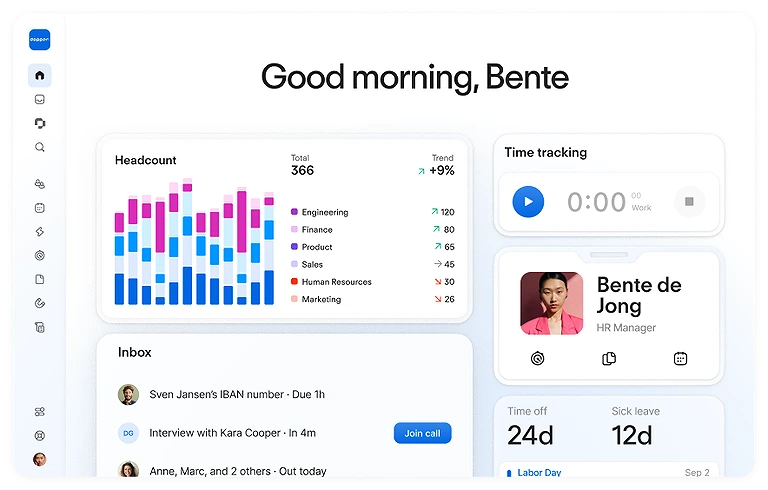
The Personio Homepage your central hub for HR operations.
Workflow Automation That Reduces Administrative Work
Its automation excels through its structured workflows engine, which auto-triggers localized onboarding checklists, sends reminder alerts to managers, and handles time-off approvals without manual intervention. The platform gives lean leadership teams a single source of truth for their workforce data.
Key Pricing and Regional Limitations to Consider
Enterprise buyers should note that Personio can scale up in price quite rapidly as you add premium modules like advanced payroll or specialized recruitment tracking. Additionally, its primary product design targets European regulatory frameworks, meaning businesses with a pure US footprint might experience localization friction.
2. Breezy HR Best for Streamlining Startup Recruitment Pipelines
Automated Recruiting for Growing Small Businesses
Breezy HR tackles the immense pressure of small business talent acquisition by automating the manual overhead of job posting, candidate screening, and interview scheduling. It helps small operations scale up their headcount without needing a dedicated team of full-time internal recruiters.
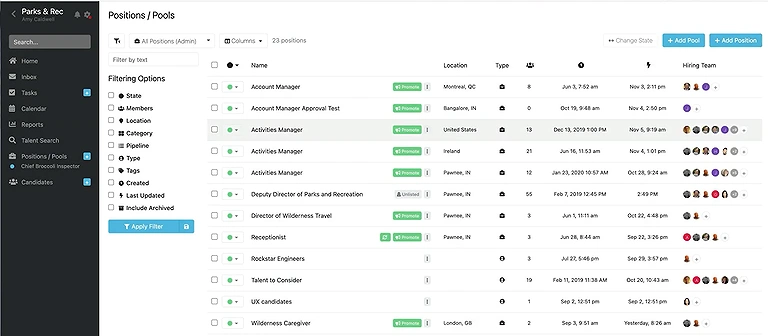
Visual Hiring Pipelines and Intelligent Candidate Screening
The platform's brightest automation asset is its drag-and-drop visual pipeline management engine, which uses automated stage actions to send screening questionnaires and schedule interviews through calendar integrations the moment a candidate applies. Its AI-powered parsing engine instantly ranks applicants against core job parameters.
ATS-Focused Design and Post-Hire Limitations
Organizations should realize that Breezy HR is built heavily as an applicant tracking system rather than a comprehensive, long-term core HRIS platform. For deeper post-hire workflows like benefits enrollment or continuous shift tracking, you will need to establish third-party application connections.
3. Gusto Best for Domestic US Payroll, Tax, and Benefits Automation
Automated Payroll and Compliance for Small Businesses
Gusto addresses the operational risk of running small-scale business payroll by automating complex calculations across multiple local tax jurisdictions. It keeps business owners out of regulatory trouble by processing state filings, tracking health insurance calculations, and managing direct deposits automatically.
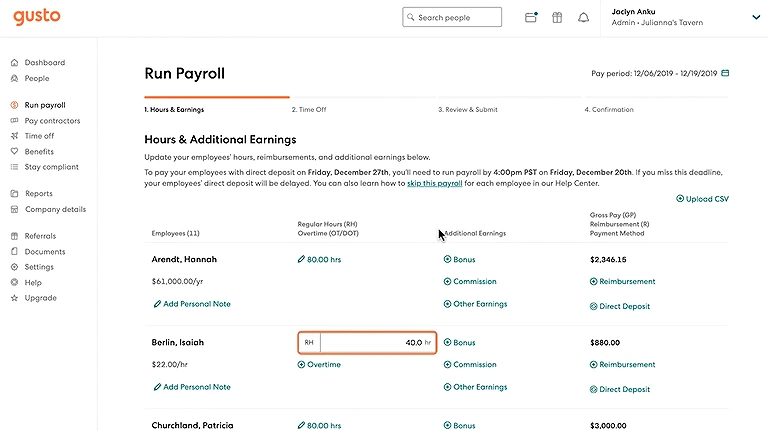
Streamlining payroll while staying 100% compliant with Gusto's all-in-one dashboard.
Continuous Tax Automation and Employee Self-Service
Its automation performance shines inside its continuous tax calculation engine, which handles changing local withholding laws, updates compliance logs, and auto-submits filings directly to local revenue departments every single cycle. The employee self-service dashboard simplifies the gathering of year-end documents.
Geographic Limitations and Scalability Considerations
Keep in mind that Gusto is tailored almost exclusively for US-based workforce, which makes it less ideal for international entities managing large hubs of non-US workers. Teams needing complex multi-currency ledger structures or detailed custom shift planning will likely outgrow its core payroll focus.
Which Tool Fits Your Business Scenario?
| Business Scenario | Recommended Tool | Why |
| Small businesses needing an all-in-one HR platform | Personio | Best suited for organisations that want to manage core HR processes, employee records, recruitment, and workforce administration from a single platform. |
| Growing startups hiring frequently | Breezy HR | A practical choice for businesses focused on improving recruitment efficiency and building a structured hiring process. |
| Small businesses managing payroll and employee benefits | Gusto | Well suited for organisations that prioritise payroll administration, benefits management, and employee onboarding. |
| Companies expanding from 20 to 200 employees | Personio | Provides structured HR processes that support business growth without significantly increasing administrative workload. |
| Startups with lean HR teams | Breezy HR | Helps small HR teams organise recruitment activities while reducing manual hiring coordination. |
| Businesses replacing spreadsheets with dedicated HR software | Personio | Offers a centralised approach to employee information and HR administration as operations become more complex. |
| Organisations prioritising payroll accuracy and compliance | Gusto | A strong fit for businesses where payroll processing and employee compensation are the primary operational priorities. |
| Companies recruiting for multiple open positions simultaneously | Breezy HR | Designed for organisations that need a structured recruitment workflow across several hiring campaigns. |
| Startups building formal HR processes for the first time | Personio | Suitable for establishing consistent HR operations that can scale alongside business growth. |
| Businesses wanting separate solutions for hiring and payroll | Breezy HR + Gusto | An effective combination for organisations that prefer dedicated recruitment software alongside specialised payroll and employee management. |
Common Mistakes When Choosing AI Software for Small Businesses and Growing Startups
Choosing HR software is a long-term business decision rather than a short-term technology purchase. Many organisations focus on individual features or pricing while overlooking operational requirements, scalability, and employee adoption, which can lead to costly implementation challenges later.
| Mistake | Why It Matters | Better Approach |
| Choosing software based only on price | Lower-cost solutions may lack essential capabilities as the business grows. | Evaluate total business value, scalability, and long-term operational fit. |
| Ignoring future growth plans | Software that fits today may become restrictive after hiring more employees. | Select a platform that can support workforce growth over the coming years. |
| Overlooking integration requirements | Disconnected systems increase manual work and data inconsistencies. | Verify compatibility with payroll, accounting, communication, and productivity tools. |
| Prioritising feature count over business needs | Paying for unused functionality increases costs and complexity. | Focus on features that directly support your HR workflows and objectives. |
| Not involving HR and department managers | Important operational requirements may be missed during selection. | Include key stakeholders throughout the evaluation process. |
| Underestimating implementation effort | Poor planning can delay deployment and reduce user adoption. | Review onboarding, migration, and training requirements before purchasing. |
| Ignoring user experience | Complex systems often lead to lower employee and manager adoption. | Choose software that is intuitive for HR teams, managers, and employees. |
| Failing to review compliance needs | Missing compliance capabilities can create legal and administrative risks. | Ensure the platform supports applicable employment and data management requirements. |
| Not considering ongoing support | Limited vendor support can slow issue resolution after implementation. | Assess customer support quality, documentation, and available training resources. |
| Making a decision without comparing alternatives | Choosing the first suitable option may overlook a better business fit. | Compare multiple solutions against your operational requirements, budget, and long-term goals before making a final decision. |
The Final Verdict: Which Tool Wins the Small Business Battle?
Choose Personio if:
You need the absolute best-in-class standalone capability for centralized HRIS record tracking across international or European teams.
Choose Breezy HR if:
Your priority is rapid candidate sourcing or scaling up a high-velocity startup pipeline without heavy administrative effort.
Choose Gusto if:
Your organization requires a highly agile, cost-effective alternative focused on automated US payroll, domestic tax compliance, and benefits administration.
FAQs
What is the biggest HR challenge that small businesses face as they begin to grow?
The biggest challenge is keeping HR processes organised while the workforce expands. Tasks such as hiring, onboarding, payroll, leave management, and compliance become increasingly difficult to manage with spreadsheets or disconnected tools. A structured HR system helps standardise these processes and reduces administrative overhead.
At what stage should a startup invest in dedicated HR software?
Many startups begin considering HR software once they have around 10–20 employees or are hiring regularly. At this stage, manual processes often become difficult to maintain consistently, making automation and centralised employee records more valuable.
Can HR software replace the need for an HR manager in a small business?
No. HR software automates administrative tasks but does not replace human decision-making. Business owners and HR professionals are still responsible for hiring decisions, employee relations, performance discussions, and workplace policies.
How difficult is it to migrate employee data from spreadsheets into a new HR platform?
Most modern HR platforms support bulk data imports using CSV or spreadsheet files. Businesses typically migrate employee records first, verify the imported data, and then transition functions such as onboarding, payroll, and leave management in phases to minimise disruption.
How can growing businesses choose software that will still meet their needs in the future?
Rather than selecting software based only on current employee numbers, businesses should evaluate scalability, available integrations, reporting capabilities, compliance support, and pricing flexibility to ensure the platform continues to support growth over time.
Can small business HR software support remote and hybrid teams?
Yes. Many HR platforms allow businesses to manage employee records, onboarding, leave requests, attendance, and company documents from a central location, making workforce administration more efficient regardless of where employees work.
What should businesses look for before integrating HR software with payroll and accounting systems?
Businesses should confirm that employee information, payroll data, leave balances, and financial records can sync accurately between systems. Reliable integrations reduce duplicate data entry and improve reporting accuracy across departments.
How long does it usually take to implement HR software in a small business?
Implementation time depends on company size, existing data quality, and the number of HR processes being migrated. Smaller organisations can often complete implementation within a few weeks, while larger or more complex businesses may require additional planning and employee training.
Is AI HR software affordable for startups with limited budgets?
Many HR software providers offer subscription-based pricing that allows startups to begin with essential HR capabilities and expand as their workforce grows. Comparing total value, implementation costs, and long-term scalability is generally more important than focusing only on the lowest monthly price.
How can businesses encourage employees to adopt a new HR platform?
Successful adoption usually comes from selecting software with an intuitive interface, providing short onboarding sessions, offering clear guidance for everyday tasks, and communicating how the platform simplifies activities such as requesting leave, accessing documents, or updating personal information.
Which business processes benefit the most from AI-powered HR software?
The greatest improvements are typically seen in recruitment, employee onboarding, document management, payroll administration, leave tracking, workforce reporting, and maintaining accurate employee records. Automating these routine activities allows HR teams to spend more time supporting business growth.
How should a small business compare different HR software before making a final decision?
Businesses should evaluate each platform against their operational requirements, expected employee growth, implementation process, integration options, compliance support, ease of use, customer support, and overall cost of ownership. The best choice depends on the organisation's workflows and long-term business objectives rather than the largest feature list alone.
Conclusion
Small businesses and growing startups often struggle to manage hiring, employee records, payroll, onboarding, and compliance efficiently as their workforce expands. AI HR software helps streamline these operational workflows, reducing manual administration while improving consistency, visibility, and productivity across the employee lifecycle. However, there is no single solution that fits every organisation. The right platform depends on factors such as company size, growth plans, existing systems, regulatory requirements, and internal HR processes. Rather than choosing software based solely on popularity or the number of features, businesses should evaluate each solution according to their operational requirements, scalability, integration capabilities, and long-term strategic goals. As organisations continue to grow, they may also benefit from exploring Best AI Software for Strategic Workforce Headcount Planning and Compensation which examines platforms designed to support long-term workforce planning, compensation strategy, and organisational growth at scale.