.webp)
How to Fix the Disconnected Stack, Visual Inconsistency and Construct a Unified Production Process in 2026
Scaling premium video output while keeping visual assets consistent is a massive operational headache for modern creative teams. Traditional post-production workflows create severe logjams, dragging out turnaround times and limiting your ability to launch localized marketing campaigns quickly. This guide breaks down the exact pipeline engineering framework needed to overhaul your media stack using advanced generative AI systems.
The real trap for content directors is the "disconnected stack"—using isolated apps for scripting, rendering, and editing. This tool fragmentation triggers constant visual inconsistency, where characters morph and styles drift between cuts. By linking platforms like LTX Studio, Runway Gen-3, OpenAI Sora, and Descript into one unified engine, you can eliminate credit waste and build a seamless production pipeline.

 Updated: July 10, 2026 | 7 min read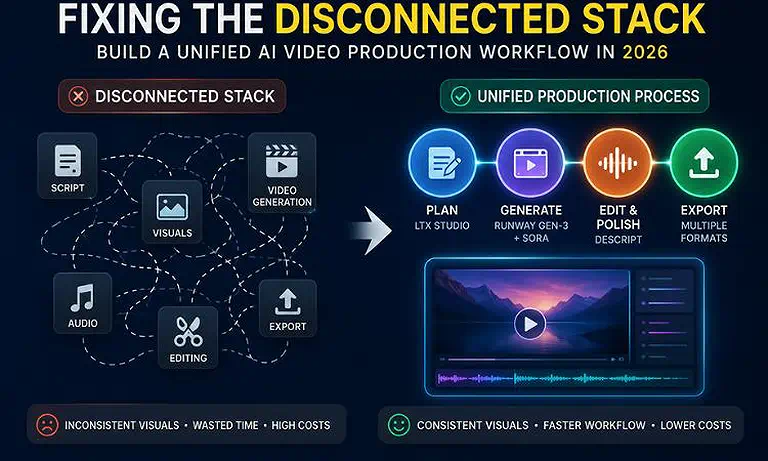
Cover Photo How to Fix the Disconnected Stack, Visual Inconsistency and Construct a Unified Production
AI Video Production Workflow at a Glance
| Quick Answer | Details |
| Core AI Tools | LTX Studio, Runway Gen-3, OpenAI Sora, and Descript. |
| Best Workflow | Plan and storyboard in LTX Studio, generate AI video clips with Runway Gen-3 and OpenAI Sora, then edit, enhance audio, and export the final video in Descript. |
| Estimated Time Savings | AI-assisted workflows can reduce production time from 40+ hours to approximately 45–90 minutes, depending on project complexity, revisions, and approval requirements. |
| Best For | Content creators, marketing teams, agencies, educators, and businesses producing high-quality videos at scale. |
| Key Benefit | Accelerates video production while maintaining consistent visual quality, reducing repetitive tasks, and streamlining the entire creative workflow from planning to final export. |
Who Should Read This Guide?
Agencies & Creators: Social media leads, brand managers, and high-volume digital creators looking to scale visual output without hitting computational asset caps.
Enterprise Content Leads: Corporate Communications and HR/L&D teams aiming to rapidly localize training materials across global compliance regions.
Production Operations: Creative directors and video editors tired of fighting "style drift" across disconnected software tools.
The Disconnected Stack: Why AI Pipelines Cause Visual Inconsistency
Most AI video tools are designed to work independently, not as part of one connected system. When you use different tools for writing scripts, creating videos, and editing, they don't remember the style or context of your project. As a result, characters, backgrounds, lighting, and camera angles may change between scenes. Fixing these differences takes extra time and manual editing, making video production slower and reducing many of the efficiency benefits that AI tools promise.
Why a Connected AI Video Workflow Matters?
| Area | How a Connected Workflow Helps |
| Consistent Video Quality | Maintains the same characters, visual style, lighting, and branding throughout the project. |
| Faster Production | Reduces time spent switching between tools, transferring files, and fixing AI-generated inconsistencies. |
| Lower AI Costs | Better planning prevents unnecessary video generations, saving AI credits and reducing production costs. |
| Simplified Collaboration | Keeps scripts, assets, edits, and feedback organized so teams can work together more efficiently. |
| Scalable Content Creation | Makes it easier to create multiple versions for different languages, platforms, and marketing campaigns. |
| Less Manual Editing | Minimizes repetitive tasks like scene matching, color correction, and visual consistency fixes. |
| Improved Workflow Efficiency | Gives each AI tool a defined role, creating a smooth process from planning to final export. |
| Better Final Results | Produces professional-quality videos with greater consistency, faster turnaround, and fewer production bottlenecks. |
The Best AI Workflow to Solve This Problem
The key to building a reliable AI video production process is giving each tool a specific role instead of asking one platform to do everything. Instead of combining a messy stack of apps, pick the best AI tools for video creation based on a structured system that covers your project from planning to final export. A connected workflow keeps your story, visuals, editing, and publishing aligned, reducing credit waste while improving consistency and production speed.
Step 1: Planning and Storyboarding
Start by defining your script, storyboard, characters, visual style, and scene sequence before generating any video. A clear production plan ensures every scene follows the same creative direction and reduces mistakes later in the workflow.
Step 2: AI Video Generation
Generate video scenes based on your approved script and storyboard. Creating videos from a well-defined plan helps maintain consistent characters, camera angles, lighting, and overall visual quality throughout the project.
Step 3: Editing and Quality Enhancement
Combine all generated clips into a single timeline, refine scene transitions, improve audio quality, add captions, and make final adjustments. This stage transforms individual AI-generated clips into a polished, professional video.
Step 4: Localization and Final Export
Prepare your video for different audiences by adding subtitles, translating content into multiple languages, and exporting versions optimized for websites, social media, training platforms, or marketing campaigns. This final step makes it easy to scale content while maintaining consistent quality across every version.
The Best AI Tool for Each Task
LTX Studio — Best for Planning and Storyboarding
LTX Studio is the ideal starting point for an AI video production workflow because it helps organize scripts, build storyboards, define characters, and structure scenes before video generation begins. Starting with a clear production blueprint improves consistency, reduces unnecessary revisions, and keeps every scene aligned with your creative vision. Explore our in-depth LTX Studio review to learn more.
Runway Gen-3 — Best for AI Video Generation
Runway Gen-3 is an excellent choice for generating cinematic AI videos with realistic motion, advanced camera controls, and high-quality visuals. It transforms approved storyboards into polished video clips while maintaining better control over movement, composition, and visual consistency across different scenes. See our detailed Runway Gen-3 review for a complete evaluation.
OpenAI Sora — Best for Long-Form Cinematic Video Generation
OpenAI Sora is designed for creating realistic, long-form video sequences with detailed environments and natural movement. It performs especially well for projects that require continuous cinematic scenes, making it a valuable option for storytelling, marketing, and professional video production. Learn more in our comprehensive OpenAI Sora review.
Descript — Best for Video Editing, Localization, and Final Export
Descript streamlines the final production stage by combining script-based editing, audio enhancement, subtitle generation, and multi-platform exporting in a single workspace. It helps convert AI-generated clips into polished videos while making localization and distribution faster, simpler, and more efficient. Discover everything it offers in our Descript review.
Common Mistakes to Avoid When Building an AI Video Workflow
Even with the right workflow, a few common mistakes can lead to inconsistent results, wasted AI credits, and extra editing time. Avoiding these issues will help you create professional videos more efficiently.
Don't generate high-quality videos too early. Test your prompts with low-resolution or draft versions first. This helps you identify and fix problems before using premium AI credits.
Don't skip the planning stage. Define your script, characters, visual style, and scene order before generating videos. A clear plan keeps your content consistent from beginning to end.
Don't ignore different video formats. If you need content for YouTube, Instagram Reels, or TikTok, plan for both horizontal (16:9) and vertical (9:16) layouts from the start to avoid cropping important visuals later.
AI Video Production Best Practices
Following a few simple best practices can improve video quality, reduce editing time, and make your AI workflow more reliable. These tips help you produce consistent results while avoiding unnecessary delays and extra production costs.
Finalize your script and voiceover first. Complete your script and audio timing before generating videos so every scene matches the narration and requires fewer edits later.
Keep your visual style consistent. Use the same characters, colors, camera style, and visual references throughout the project to maintain a professional and unified look.
Plan for branding and localization early. Prepare brand names, product terms, and pronunciation guidelines before creating voiceovers and translations to ensure accurate, consistent results across all versions.
FAQs
How do I fix character faces changing between different AI video clips?
Lock down a clear source image inside your pre-visualization step or use an image-to-video workflow within tools like Runway Gen-3. Feeding the exact same reference picture into every generation keeps facial structures stable.
Can I build an entire commercial using just a single text prompt?
No, one prompt usually creates unstructured, chaotic results. For a professional video, you must break your script down into scenes and build them shot-by-shot using an organized pipeline.
Why does the audio timing break when I translate my video to another language?
Words take different amounts of time to speak across languages. Use an editor like Descript to stretch or trim your visual clips to match the natural speed of the new translated audio track.
Is it better to use text-to-video or image-to-video for marketing products?
Image-to-video provides far cleaner results. Starting with a high-quality, static product image ensures your item looks accurate before the AI adds motion around it.
Do I need an expensive computer with a powerful graphics card to run these AI tools?
No, all the heavy processing happens on remote cloud servers. You only need a standard computer with a stable internet connection to access these browser-based platforms.
How do I stop AI video generations from looking blurry or dreamlike?
Incorporate specific technical terms in your text prompts, such as cinematic lenses, high shutter speeds, and crisp 35mm film grain, while avoiding generic words like "photorealistic."
What should I do if my favorite video generator doesn’t have built-in audio tools?
Export your silent video clips and bring them into a dedicated audio-first platform like Descript to easily layer voiceovers, background sound effects, and music.
Is there a way to reuse the exact same virtual background across separate scenes?
Yes, generate a single master background image first, and then use it as a consistent backdrop layer across your different video generation tools.
Conclusion
A successful AI video production workflow is built on a clear process, not just powerful tools. By following a structured approach for planning, video generation, editing, and final export, you can avoid common workflow problems, maintain consistent video quality, and reduce unnecessary editing. Assigning the right task to the right tool helps your team work more efficiently, save time, and create professional videos with a smoother and more organized production process.