.webp)
Top Trending AI Tools for Data Analysis You Should Try This Year
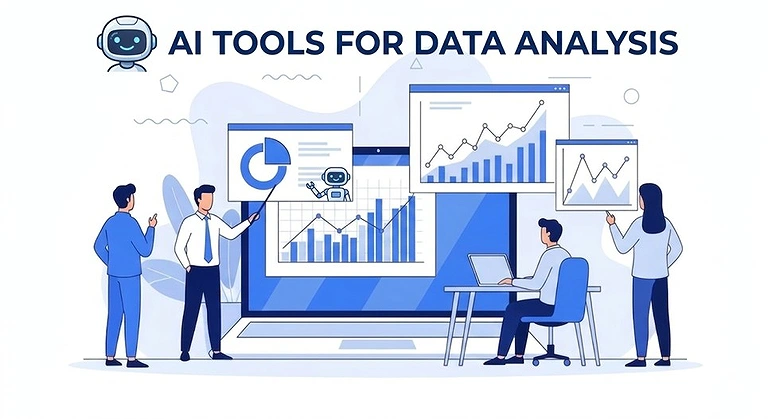
Data analysis has shifted from manual spreadsheets and complex SQL queries to intelligent AI-powered platforms that simplify and accelerate insight generation. Modern AI tools now enable natural language queries, predictive modeling, and real-time insights, making data more accessible and actionable. This evolution has transformed analytics from a technical task into a conversational experience with data. Today’s ecosystem includes enterprise tools like Microsoft Power BI and Tableau, alongside specialized solutions like GigaSpaces eRAG and PyTorch, each designed to serve different analytical and business needs efficiently.

 Updated: April 23, 2026 | 23 min read
 | Best
For | Pricing | Ease | |
| Microsoft Power BI | Business intelligence dashboards | Free + Paid | Beginner |
| Polymer | AI-powered data visualization | Paid | Beginner |
| RapidMiner | Data science & predictive analytics | Free + Paid | Intermediate |
| Tableau | Interactive data visualization | Paid | Beginner |
| GigaSpaces eRAG | Real-time data intelligence | Paid | Advanced |
| Microsoft Azure Machine Learning | ML model development | Pay-as-you-go | Advanced |
| Sisense | Embedded analytics | Paid | Intermediate |
| KNIME | Data science workflows | Free + Paid | Intermediate |
| Google Cloud AutoML | Automated ML model building | Pay-as-you-go | Advanced |
| PyTorch | Deep learning framework | Free (open-source) | Advanced |
| DataRobot | Automated machine learning | Paid | Intermediate |
| Talend | Data integration & ETL | Free + Paid | Intermediate |
| H2O.ai | AI & machine learning platform | Free + Paid | Advanced |
What is Data Analysis?
Data analysis is the process of inspecting, cleansing, transforming, and modeling data to discover useful information, inform conclusions, and support decision-making. It's a crucial skill across many fields, including business, marketing, finance, healthcare, and scientific research. Ultimately, data analysis helps organizations understand customer behavior, optimize marketing campaigns, identify financial trends, diagnose diseases, and make evidence-based breakthroughs.
Why the Best AI Tools for Data Analysts Are Essential in 2024
You might be wondering why everyone is talking so much about the best AI tools for data analysts these days. There's a good reason for it. The rapid evolution of artificial intelligence technologies has completely redefined what it means to be a data analyst today. These tools have significantly evolved from simple automation programs into robust platforms capable of understanding, analyzing, and predicting trends with impressive accuracy.
The Transformation from Labor-Intensive to Intelligent
In the past, data analysis was a labor-intensive process. Analysts would spend hours, if not days, cleaning data, preparing it for analysis, and then trying to draw meaningful conclusions from a jumble of numbers. It was tedious work that left little time for actual thinking.Today, the best AI tools for data analysts have dramatically simplified everything. These tools use sophisticated algorithms to automate tedious tasks like data cleaning and preparation, allowing analysts to focus on what truly matters: interpreting the data and making strategic decisions.
Real-World Impact: The Gravite.io Example
Take Gravite.io as an example. This leader in the field has developed a suite of native integrations that allow users to centralize their data in just a few clicks. You no longer need to juggle multiple platforms or waste time importing and exporting files. Everything is automated, saving you valuable time and reducing the risk of human error.
Beyond Efficiency: Accuracy and Reliability
The benefits don't stop there. The best AI tools also offer increased accuracy. Thanks to machine learning capabilities, these tools can detect anomalies and errors that even the most experienced analysts might miss. This not only improves the quality of the data but also the reliability of the analyses. In a world where data-driven decisions can make or break a company, this accuracy is truly invaluable.
The Competitive Edge
By 2024 (and certainly by 2026), not using the best AI tools would clearly put you at a disadvantage. These tools enable you to stay competitive, optimize your workflow, and improve your analyses. They are simply indispensable for any data analyst who wants to excel in their field.
Cover Photo
What to Look for in AI Data Analysis Tools ?
When evaluating AI data analysis tools, consider these essential factors:
1. Ease of Use
Look for intuitive interfaces that don't require extensive coding knowledge. Tools with drag-and-drop functionality and natural language querying make analytics accessible to team members with various skill sets.
2. Automation Capabilities
The best tools automate the tedious parts of the job—data cleaning, preparation, and routine calculations—freeing you to focus on higher-value interpretation and strategic thinking.
3. Integration Flexibility
Your tool should play well with others. Seek platforms that offer native integrations with your existing software, databases, and cloud services. The ability to centralize data from multiple sources without manual importing and exporting is a game-changer.
4. Accuracy and Intelligence
Machine learning capabilities matter. The best tools don't just process numbers—they detect anomalies, identify patterns, and offer predictive insights that might otherwise go unnoticed.
5. Scalability
Choose tools that can grow with you. Whether you're analyzing thousands or millions of records, the platform should maintain performance and accuracy without breaking down.
6. Governance and Security
Especially important for regulated industries, look for tools that maintain data integrity, provide audit trails, and offer robust security features to protect sensitive information.
1. Microsoft Power BI
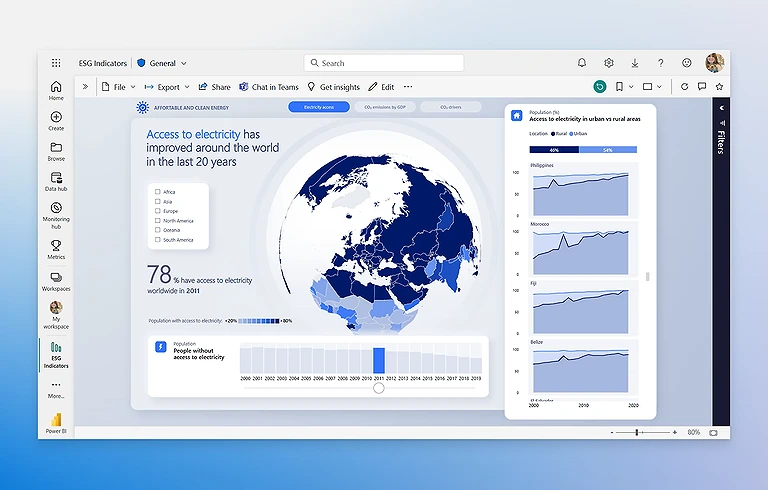
Microsoft Power BI feels like a natural extension of Excel within the Microsoft ecosystem, making it easy for teams to adopt advanced analytics. It combines familiar spreadsheet workflows with AI capabilities such as sentiment analysis, key phrase extraction, and natural language queries. The platform offers interactive visualizations and seamless integration with Microsoft 365, Azure ML, and Excel. This makes it ideal for both beginners and advanced users who want to turn data into actionable insights efficiently.integrating Power BI into your workflow is a core strategy to manage your business smarter as its 2026 Copilot features now allow you to generate full performance reports using simple voice commands
Microsoft Power BI
How to Use Microsoft Power BI
- Download Power BI Desktop to connect and prepare data from Excel or other sources
- Use AI features like Q&A to ask questions in natural language and generate instant visuals
- Apply built-in analysis tools for insights like anomalies and text sentiment
- Publish reports to the cloud and create interactive dashboards
- Share dashboards easily via Microsoft Teams or PowerPoint for collaboration
Pros
- Seamless integration with Microsoft 365, Excel, and Azure ML for unified workflows
- Powerful AI features like sentiment analysis, key phrase extraction, and natural language queries
- Rich, interactive dashboards that make complex data easy to explore and understand
- Scalable pricing and usage options suitable for individuals, teams, and enterprises
- Continuous updates from Microsoft, including new AI features like Copilot integration
Cons
- Steep learning curve for advanced features like DAX and data modeling
- Performance issues may occur with very large or complex datasets
- Licensing costs increase significantly for Pro and Premium plans
- Limited customization options for some built-in visualizations
- Works best within Microsoft ecosystem, less flexible with diverse tech stacks
Pricing Plans
- Power BI Pro: $10/user/month for reporting and sharing
- Premium Per User (PPU): $20/user/month with advanced AI features and larger data capacity
- Premium/Fabric Capacity: Starts ~$4,995/month for enterprise-level scalability and organization-wide analytics sharing
Use Cases
This platform is the ideal solution for businesses already using Excel and the broader Microsoft services ecosystem. It is particularly well-suited for organizations looking to democratize analytics, allowing both power users and beginners to leverage AI and rich visualizations for deeper insights.
Comparable Analytics Platforms
Tableau, Sisense, Looker
2. Polymer
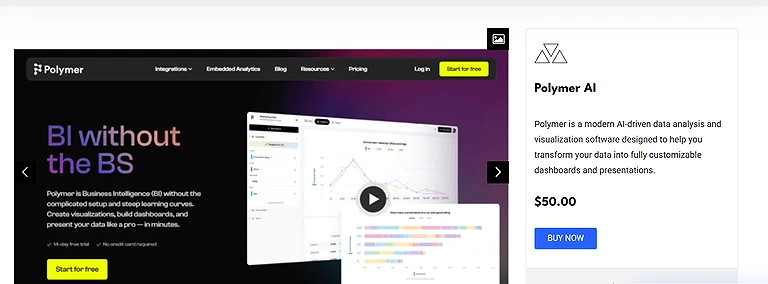
Polymer turns raw spreadsheets into interactive dashboards within minutes, making it ideal for non-technical users. Its no-code interface simplifies data visualization and sharing. With PolyAI, a built-in conversational assistant, users can generate real-time insights quickly, helping SMBs and teams make faster, data-driven decisions.Polymer’s ability to instantly find demographics with high ROI makes it a perfect companion for succeeding with AI in Google Ads by visualizing campaign data without complex formulas.
Polymer Verified Source Image
How to Use Polymer
- Upload Data: Import spreadsheets from Excel/Google Sheets or connect tools like Shopify and Google Analytics
- AI Analysis: Let Polymer automatically analyze data and create initial dashboards
- Use PolyAI: Ask questions in plain English to generate dynamic visualizations
- Share Insights: Publish and share dashboards with your team for real-time collaboration
Pros
- True no-code interface makes dashboard creation easy for non-technical users
- PolyAI enables conversational data exploration with natural commands
- Converts spreadsheets into dashboards within minutes for quick insights
- AI detects trends and patterns automatically
- Ideal for SMBs needing fast, simple analytics
Cons
- Performance may slow with very large datasets
- Requires stable internet (cloud-based tool)
- Initial data setup can need some technical effort
- Beginners may face a slight learning curve
- Limited customization compared to advanced tools
Pricing Plans
- Starter Plan: $25/month (annual) or $50 monthly for basic use
- Pro Plan: Custom pricing with advanced features and team tools
- Free Trial: 14-day trial to explore features before subscribing
Use Cases
This tool is the ideal match for SMBs and marketing teams seeking simplicity and speed. It's specifically designed for organizations that live in spreadsheets but want to graduate to interactive analytics without hiring specialized talent .
Comparable Analytics Platforms
Tableau, Microsoft Power BI, Qlik Sense
3. RapidMiner
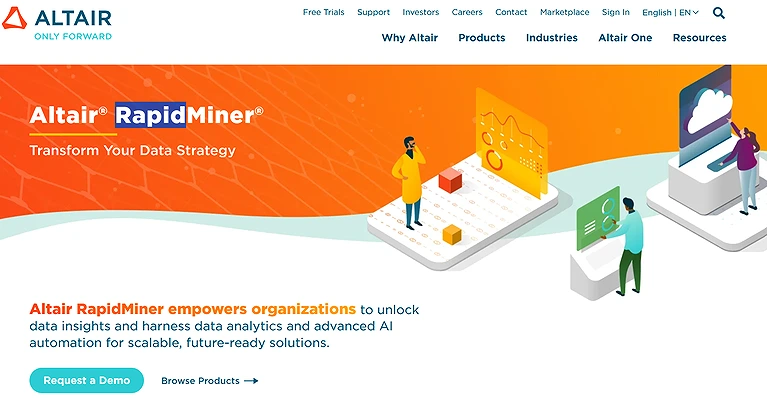
RapidMiner offers a user-friendly drag-and-drop interface that simplifies AI-driven data analysis for all skill levels. It supports the full analytics lifecycle with strong machine learning integration. Its versatility allows analysis of text, images, and audio data, making it a flexible yet powerful tool for diverse business and data projects..
RapidMiner
How to Use RapidMiner
- Install: Download RapidMiner Studio and set it up
- Learn Basics: Use built-in tutorials for guidance
- Import Data: Drag and drop data from various sources
- Build Workflow: Create processes using visual operators
- Apply ML: Use algorithms for prediction and analysis
- Analyze Results: Review outputs and refine your workflow
Pros
- Drag-and-drop interface makes data science accessible without coding
- Supports diverse data types like text, images, and audio
- Covers full analytics lifecycle with built-in machine learning
- Strong community support and learning resources
Cons
- Can be resource-heavy with complex datasets
- Advanced features require time to master
- Limited native support for geospatial analysis
Pricing Plans
- Professional: $7,500/user/month for advanced analytics
- Enterprise: $15,000/user/month with added security and collaboration
- AI Hub: $54,000/user/month for large-scale AI deployment
- Free Trial: Available for testing before purchase
Use Cases
RapidMiner is ideal for data teams and organizations seeking a unified platform that supports diverse data types—from structured databases to texts, photos, and audio files—while accommodating individuals with various skill sets through its intuitive user interface and drag-and-drop approach.
Comparable Analytics Platforms
KNIME, DataRobot, Orange
4. Tableau
Tableau makes data visualization intuitive with dynamic dashboards and easy exploration for all users. Features like Ask Data, Tableau GPT, and Pulse enable natural language queries and real-time insights. With strong AI integration and support for Python and R, it suits both technical and business analysts.
Tableau Official Source
How to Use Tableau
- Connect Data: Import from Excel, CSV, or cloud sources
- Use Ask Data: Query data in natural language for instant visuals
- Build Visuals: Drag and drop fields to create charts
- Use Pulse: Get AI alerts and trend insights automatically
- Integrate Tools: Connect Python or R for advanced analysis
- Share: Publish dashboards via Tableau Cloud or Public
Pros
- Ask Data enables natural language queries for quick insights
- Industry-leading visualizations with dynamic dashboards
- Strong integration with Python, R, and Salesforce ecosystem
- Continuous AI updates like Tableau GPT and Pulse
Cons
- Steep learning curve for advanced features
- Pricing can increase significantly for teams
- May lag with very large datasets
- Limited built-in data cleaning capabilities
Pricing Plans
- Creator: From $15/user/month with full features
- Explorer: ~$35–42/user/month for data exploration
- Viewer: ~$12–15/user/month for dashboard access
- Public: Free for learning (data is public)
Use Cases
Tableau is the ideal platform for data scientists and business analysts needing visual storytelling with AI smarts. It excels in organizations where technical depth meets creative communication—teams that want to communicate compelling data narratives while leveraging advanced modeling and statistical analysis to back their stories.
Comparable Analytics Platforms
Microsoft Power BI, Sisense, Looker Studio
5. GigaSpaces eRAG
GigaSpaces eRAG enables real-time conversational analytics by understanding natural language queries with full context. It connects to multiple data sources, delivers instant insights, and adapts to changing business conditions. Its read-only governance model ensures security while logging queries for transparency, making it powerful for non-technical teams.
How to Use GigaSpaces eRAG
- Connect Data: Link SQL databases like Oracle or PostgreSQL
- Set Security: Apply roles and access controls
- Ask Questions: Use natural language with follow-ups
- Use AI: Run scenarios and multi-step analysis
- Monitor: Track queries and refine data sources over time
Pros
- Maintains full conversational context for natural follow-up queries
- Delivers real-time insights from live, authorized data sources
- Zero-ETL setup reduces data preparation and integration complexity
- Adapts quickly to changing business conditions and variables
- Strong governance with read-only access and full query logging
Cons
- Enterprise-focused pricing may not suit small teams
- Initial setup requires careful configuration and planning
- Best suited for large-scale, complex data environments
- Output quality depends on underlying data accuracy
- Admins need technical understanding for setup and governance
Pricing Plans
- SaaS Starter: Custom pricing with basic features and limited sources
- Enterprise Pro: Usage-based with advanced workflows and security
- Dedicated Cluster: Custom pricing with private deployment and support
- Pilot Program: Start small, then scale as needed
Use Cases
This platform is ideal for enterprises with complex operational data environments where decisions must reflect current reality. It excels in scenarios involving supply chain management, financial monitoring, logistics optimization, and any context where real-life variables change rapidly and require immediate response.
Comparable Analytics Platforms
DataRobot, H2O.ai, Azure Machine Learning
6. Microsoft Azure Machine Learning
Microsoft Azure Machine Learning is a powerful cloud-based AI tool that enables scalable data processing and model building without local limitations. It helps data scientists use existing skills while integrating deeply with Azure services to build tailored enterprise solutions. It supports real-time data connections for faster forecasting and decision-making. With a free tier and paid plans starting around $9.99/month, it offers flexible access for both beginners and enterprise teams.
How to Use Azure Machine Learning
- Create Workspace: Set up ML workspace in Azure portal
- Choose Environment: Use studio UI or Python SDK
- Set Compute: Configure CPU/GPU resources as needed
- Build Model: Use AutoML or custom training scripts
- Deploy: Publish model as API or batch service for applications
Pros
- Highly scalable cloud architecture handles large, complex workloads efficiently
- Deep integration with Azure services for end-to-end AI solutions
- Flexible pricing with free and paid tiers for different users
- Supports full ML workflows from AutoML to custom model building
- Works across multiple data types like NLP, vision, and analytics
Cons
- Steep learning curve for beginners
- Costs can increase significantly with heavy compute usage
- Complex interface and MLOps setup
- Some friction in local-to-cloud development workflow
- Documentation can be scattered and hard to navigate
Pricing Plans
- Free Tier: $0/month with limited compute and storage
- Standard Tier: From $9.99/seat/month + usage-based compute costs
- Pricing scales based on resources like storage, training, and deployment
Use Cases
This platform is best suited for data scientists and machine learning experts who are already invested in or planning to adopt the Microsoft Azure cloud ecosystem. It's the ideal choice for enterprises that need to build comprehensive AI solutions that leverage additional Azure services to solve complex, specific business requirements at scale.
Comparable Analytics Platforms
Google Cloud AutoML, DataRobot, H2O.ai
7. Sisense
Sisense enables companies to embed AI-powered analytics directly into products using low-code tools. It offers customizable dashboards, real-time alerts, and predictive modeling to forecast trends like customer churn. With developer-friendly APIs, it helps SaaS teams integrate analytics seamlessly into applications, improving user experience and decision-making efficiency.
How to Use Sisense
- Choose Embed Method: iframe, SDK, or Compose SDK
- Connect Data: Use ElastiCube for unified data modeling
- Build Dashboards: Create AI-powered visual dashboards
- Secure Access: Apply SSO or JWT authentication
- Integrate APIs: Connect analytics with your application
- Deploy & Monitor: Track usage and optimize performance
Pros
- Strong embedded analytics for customer-facing applications
- Flexible embedding options (iframe, SDK, Compose SDK)
- Predictive modeling for forecasting trends and business planning
- Real-time alerts for instant decision-making
- Developer-friendly APIs with modern framework support
Cons
- Expensive and non-transparent pricing structure
- Requires JavaScript knowledge for advanced customization
- Complex setup and heavy data modeling environment
- Can be resource-intensive for large deployments
- Learning curve for advanced features and workflows
Pricing Plans
- Entry Level: ~$10,000/year (self-hosted, ~5 users)
- Cloud: ~$21,000/year for small teams
- Mid-Market: $40,000–$109,000/year packages
- Enterprise: $100,000–$4M+ annually depending on scale
- AI Add-ons: +20–30% extra for advanced features
Use Cases
Sisense is ideal for SaaS providers and product teams embedding data into user-facing apps who need enterprise-grade analytics infrastructure and are willing to invest in custom development. It's particularly well-suited for organizations with dedicated technical resources who can navigate the platform's complexity to deliver embedded analytics at scale .
Comparable Analytics Platforms
Tableau, Microsoft Power BI, Qlik Sense
8. KNIME
KNIME is an open-source tool offering end-to-end data science capabilities, including ETL, machine learning, predictive modeling, and visualization. Its drag-and-drop interface allows building full workflows from data processing to deployment. It’s cost-effective, scalable, and widely used for production-grade analytics without licensing constraints.
KNIME
How to Use KNIME
- Install: Download KNIME Analytics Platform from official site
- Add Extensions: Install AI, database, and ML extensions
- Explore Workflows: Use KNIME Hub templates for learning
- Build Workflow: Drag and connect nodes (import → process → visualize)
- Use K-AI: Generate workflows or get help via natural language
- Share Work: Save locally or publish to KNIME Hub for collaboration
Pros
- Fully open-source and free, no licensing cost required
- Drag-and-drop interface makes data science accessible to non-coders
- K-AI assistant helps generate workflows from natural language
- Huge extension ecosystem supports Python, R, TensorFlow, and more
- Auto-generated workflow documentation improves transparency and reuse
- Strong governance and auditability for enterprise compliance
Cons
- Slows down with very large datasets (4GB+ issues)
- Steep learning curve for advanced workflow concepts
- Limited native data visualization compared to BI tools
- Deployment features require paid Business Hub
- May need technical tuning for memory and performance
Pricing Plans
- Free Desktop: $0 with full core features and 300+ connectors
- K-AI Usage: 20 assistant interactions/month included
- Business Hub: ~€35,000/year for enterprise features
- Trial: Available for paid enterprise features before purchase
Use Cases
This platform is ideal for data teams who value transparency, control, and zero upfront cost. It excels in academic research, healthcare analytics, financial modeling, and any environment where understanding every step of the data journey matters more than slick visualizations. The open-source nature makes it particularly attractive for organizations building long-term data capabilities without vendor lock-in .
Comparable Analytics Platforms
RapidMiner, Orange, Dataiku
9. Google Cloud AutoML
I remember the first time I opened Google Cloud AutoML; I was stunned by how it contains numerous components that allow you to develop ML models in such an organized and accessible manner. It truly democratizes machine learning by letting Users create unique machine-learning models using a surprisingly user-friendly interface, often without requiring major coding experience. For a consultant like me, this has been incredibly helpful for businesses that would like to test several ML methods and models to determine what approach best suits their unique requirements.The sophisticated language processing found in the top free AI writing platforms is actually powered by the same infrastructure used in Google Cloud AutoML and Azure ML.
How to Use Google Cloud AutoML
- Prepare Data: Upload labeled datasets to Cloud Storage
- Create Dataset: Import data via Vertex AI console
- Train Model: AutoML handles tuning and training automatically
- Evaluate: Review performance metrics like accuracy and recall
- Deploy: Publish model as API or export for predictions
Pros
- Makes machine learning accessible through automated workflows
- Seamless integration with Google Cloud services like BigQuery and Vertex AI
- Automates feature engineering, tuning, and model selection
- Performs well with smaller datasets using transfer learning
- Supports vision, NLP, translation, and structured data use cases
Cons
- Costs can increase significantly with heavy usage
- Limited transparency due to black-box automation
- Strong dependency on Google Cloud ecosystem
- Less flexibility for advanced custom model control
- Pricing complexity can make cost estimation difficult
Pricing Plans
- Free Trial: $300 credits for 90 days
- Training: ~$0.20–$7.89 per node hour depending on task
- Prediction: ~$0.02–$0.50 per 1,000 requests
- Monthly Cost: Can range from $0 to $5,700+ based on usage
Use Cases
This platform excels for organizations that need custom ML models tailored to their specific domain but lack dedicated data science teams. It's particularly valuable for businesses wanting to test several ML methods and models to determine the best approach without heavy upfront investment in specialized talent .
Comparable Analytics Platforms
Azure Machine Learning, DataRobot, H2O.ai
10. PyTorch
Pytorch all-inclusive framework for creating deep learning models—a critical subset of machine learning—has become my go-to for complex projects making it a mandatory resource for those exploring AI tools for physics students to simulate particle interactions.. It's widely utilized for demanding tasks like language processing and picture identification. Moreover, its extensive tool and library sets cover everything from computer vision to learning by reinforcement. Consequently, it's no surprise that leading cloud service providers extensively back it, solidifying its place in modern AI development.PyTorch remains the backbone for deep learning research,
How to Use PyTorch
- Install: Use pip install torch or official setup command
- Learn Basics: Work with tensors, autograd, and nn.Module
- Build Model: Define neural network class with layers
- Train Model: Use loss function, optimizer, and training loop
- Extend: Use torchvision or Hugging Face for prebuilt models
Pros
- Python-native design makes it easy to learn, write, and debug
- Dynamic computation graphs enable flexible model experimentation
- Widely used in research, with early access to new AI breakthroughs
- Strong hardware support across CUDA, ROCm, and Apple Silicon
Cons
- Requires extra tools for production deployment
- Lacks a built-in advanced visualization tool like TensorBoard
- MLOps and enterprise tooling still less mature than competitors
- More setup needed for large-scale production systems
Pricing Plans
- Local Development: Free
- Cloud GPUs: From ~$0.07/hour depending on provider
- Platforms: Free and paid tiers via services like Google Colab
Use Cases
PyTorch is the ideal choice for researchers, academics, and development teams focused on prototyping, experimentation, and building models with state-of-the-art architectures. Its flexibility makes it perfect for projects where innovation and speed of iteration are paramount .
Comparable Analytics Platforms
TensorFlow, Keras, JAX
11. DataRobot
DataRobot significantly reduces model development time by using automated machine learning. It enables deployment across cloud, on-premise, and edge environments while ensuring strong governance. Its AI-driven predictions help businesses make accurate, data-informed decisions quickly and confidently.For those looking to transition into technical roles, mastering AutoML platforms like H2O.ai is essential, as they are now staples in the best AI tools for engineers toolkit for rapid model deployment.
How to Use DataRobot
- Sign Up: Start with 14-day trial
- Create Use Case: Organize project workspace
- Upload Data: Import and clean datasets using built-in tools
- Run Model: AutoML trains and ranks models automatically
- Evaluate: Review performance metrics and insights
- Deploy: Launch model with built-in monitoring and alerts
Pros
- Automates testing of hundreds of models to find the best performer quickly
- Strong MLOps features including monitoring, drift detection, and challenger models
- Enterprise-grade governance with compliance and model transparency tools
Cons
- Requires solid data science knowledge for optimal results
- Expensive enterprise-focused platform not suitable for small teams
Pricing Plans
- Free Trial: 14 days full access with limited usage caps
- Enterprise Plans: Custom pricing only via sales contact
- Costs typically range from six-figure to $1M+ annually for large deployments
Use Cases
DataRobot is ideally suited for established enterprises and mid-to-large organizations that need to scale machine learning operations across multiple teams. It's particularly valuable for companies with dedicated data science resources who want to accelerate model development while maintaining production-grade governance and monitoring .
Comparable Analytics Platforms
H2O.ai, RapidMiner, Azure Machine Learning
12. Talend
Talend is a unified platform for data integration, management, and monitoring across cloud and on-premise systems. It connects with various sources like Hadoop, Spark, and Hive, enabling secure and compliant data processing. It helps transform complex data into actionable insights and offers a free demo for exploration.
How to Use Talend
- Install: Download Talend Studio (Eclipse-based tool)
- Create Project: Set up workspace for data jobs
- Connect Data: Link databases, cloud apps, or big data systems
- Build Job: Drag and drop components like input, transform, output
- Transform Data: Use visual ETL tools for processing and logic
- Deploy: Schedule jobs and monitor performance in production
Pros
- Connects to virtually any data source including legacy and cloud systems
- Strong support for Hadoop, Spark, and Hive ecosystems
- Enterprise-grade security, compliance, and monitoring features
- Visual ETL designer enables accurate and repeatable data transformations
Cons
- Complex pricing model based on usage, jobs, and data volume
- Can become slow and resource-heavy on large projects
- Requires strong technical skills in SQL, Java, and ETL concepts
Pricing Plans
- Free Demo: Available for exploration (Open Studio discontinued)
- Starter: ~$12,000/year for basic data movement
- Standard: ~$25K–$50K/year with real-time sync and hybrid support
- Premium: ~$75K–$150K/year with advanced data processing
- Enterprise: $200K+/year with AI pipelines and full support
Use Cases
Talend is ideal for enterprises with complex data environments spanning on-premise and cloud systems. It excels for organizations needing to manage and assess data across various big data channels while maintaining enterprise-grade security and compliance, particularly in finance, healthcare, and telecommunications sectors .
Comparable Analytics Platforms
Informatica, Apache NiFi, Alteryx
13. H2O.ai
H2O.ai is an open-source, in-memory AI platform that enables fast model building and deployment even on large datasets. Its automated machine learning features allow users with limited expertise to create models quickly. It offers high scalability, strong performance, and provides a free tier, making enterprise-grade ML widely accessible.
H2O.ai Official Source
How to Use H2O.ai
- Install: Use pip, R, or Flow interface to set up H2O
- Launch: Create cloud or local instance with proper memory allocation
- Upload Data: Import CSVs, databases, or cloud datasets
- Build Model: Use AutoML to automatically train and rank models
- Deploy: Export models or use REST APIs for production
- Scale: Increase resources or move to enterprise setup as needed
Pros
- Lightning-fast in-memory processing handles millions of rows efficiently
- Automated ML enables quick model building with minimal coding
- Highly scalable from small experiments to enterprise workloads
- Strong open-source foundation ensures transparency and flexibility
Cons
- Steep learning curve for advanced features and customization
- Some manual Python models may outperform automated outputs
- Complex setup required for secure or air-gapped environments
Pricing Plans
- Open Source: Free with core AutoML and algorithms
- H2O AI Cloud: Subscription based on users, data, and features
- Enterprise: Custom pricing often ranging from six figures to $1M+ annually
- Free Trial: Available for testing enterprise features
Use Cases
H2O.ai is ideal for data-driven organizations of all sizes seeking a powerful, open-source foundation for ML and predictive analytics. It excels for teams wanting to design and deploy models swiftly without massive upfront investment, and scales beautifully for enterprises needing to analyze massive datasets with enterprise-grade performance .
Comparable Analytics Platforms
DataRobot, RapidMiner, Azure Machine Learning
Frequently Asked Questions
1. Do I need to be a data scientist to use these AI tools?
Not necessarily. Tools like Polymer, Tableau, and Julius AI are specifically designed with no-code interfaces and natural language queries that make them accessible to beginners and business users with limited technical skills. However, more advanced platforms like PyTorch, H2O.ai, and Azure Machine Learning do require deeper data science expertise to use effectively.
2. Which tool is best for a business already using Microsoft products?
Microsoft Power BI is the obvious choice. Its deep integration with Excel, Microsoft 365, and Azure ML creates a seamless workflow for teams already embedded in the Microsoft ecosystem. The familiar interface and AI-powered features make it easy to incorporate analytics into everyday workflows.
3. What's the difference between open-source and commercial tools?
Open-source tools like KNIME, H2O.ai, and PyTorch offer complete transparency, control, and zero licensing costs, making them ideal for learning, research, and organizations with technical teams. Commercial platforms like Tableau, Sisense, and DataRobot provide polished interfaces, enterprise governance, support, and automated features that accelerate development but come with significant pricing commitments.
4. How do I choose between cloud-based and on-premise solutions?
Cloud-based tools like Google Cloud AutoML, Azure ML, and Domo offer scalability, flexibility, and reduced infrastructure management. On-premise or hybrid options from vendors like Talend and DataRobot provide greater security and compliance control for regulated industries. Your choice depends on data sensitivity, compliance requirements, and IT resources.
5. Can these tools handle unstructured data like text and images?
Absolutely. Many modern platforms excel at unstructured data analysis. IBM Watson Analytics and GigaSpaces eRAG specialize in NLP for text, emails, and documents. PyTorch and RapidMiner support computer vision for photos and picture identification. H2O.ai and Azure ML handle diverse data types through advanced modeling.
6. What should I consider when evaluating pricing?
Pricing models vary dramatically. Some tools offer generous free tiers (KNIME, H2O.ai core, Google Cloud AutoML trial). Others use per-user subscriptions (Power BI: $10-20/month; Tableau: $15-75/month). Enterprise platforms like DataRobot, Talend, and Sisense require custom quotes often reaching six or seven figures annually. Factor in training, implementation, and potential scalability costs.
7. How important are predictive analytics capabilities?
Increasingly vital. Predictive modeling features in tools like DataRobot, Sisense, and RapidMiner enable businesses to forecast trends, anticipate customer behavior, and make proactive, data-driven decisions. This shifts organizations from reactive reporting to forward-looking strategy, creating significant competitive advantage.
Conclusion
The AI tools for data analysis have evolved into a diverse ecosystem ranging from no-code platforms like Polymer and Julius AI to enterprise solutions like DataRobot and Sisense, serving all skill levels and budgets. These tools are democratizing data science by making analytics, machine learning, and visualization more accessible through platforms like KNIME, H2O.ai, Power BI, and Tableau. Across the board, AI reduces friction by automating insights, from conversational analytics to model building. The future clearly favors organizations that can quickly turn data into actionable decisions.Data is the new currency in 2026. To see how these data-driven decisions translate into organized leadership and team scaling, explore our master guide on 10 powerful AI tools to manage your business smarter.