.webp)
Best AI Tools for Email Marketing That Actually Drive Results
In today’s fast-paced digital world, AI tools for email marketing have become essential for businesses aiming to grow their audience, engage subscribers, and drive sales. These platforms leverage artificial intelligence to analyze customer behavior, optimize send times, and deliver personalized content, making email campaigns more effective and efficient. From automation of workflows and predictive segmentation to AI-generated email copy and product recommendations, these tools empower marketers, creators, and ecommerce brands to save time, enhance engagement, and achieve better ROI. Whether you are a beginner or an enterprise, AI-driven email marketing provides a smart, data-driven approach to connect with your audience.

 Updated: April 23, 2026 | 31 min read
 Quick Overview Table
| Best
For | Pricing | Ease | |
| Mailchimp (AI Integration) | All-in-one email marketing | Free + Paid | Beginner |
| ActiveCampaign | Advanced automation | Paid (trial available) | Intermediate |
| Encharge | Behavior-based automation | Paid | Intermediate |
| HubSpot | CRM + marketing automation | Free + Paid | Beginner |
| Brevo | Email + SMS marketing | Free + Paid | Beginner |
| Sender | Budget email campaigns | Free + Paid | Beginner |
| MailerLite | Simple email automation | Free + Paid | Beginner |
| Kit | Creator-focused email marketing | Free + Paid | Beginner |
| Benchmark Email | Easy campaign management | Free + Paid | Beginner |
| Campaigner | Advanced email campaigns | Paid | Intermediate |
| Ortto | Customer journey automation | Paid | Intermediate |
| GetResponse | Marketing automation suite | Free + Paid | Beginner |
| Drip | eCommerce email marketing | Paid | Intermediate |
| Zapier | Workflow automation | Free + Paid | Intermediate |
| Pipedrive (CRM) | Sales + email integration | Paid | Beginner |
| AWeber (AI Email Marketing) | Small business campaigns | Free + Paid | Beginner |
| Autopilot | Visual marketing automation | Paid | Intermediate |
| Optimove | Customer data platform | Paid | Advanced |
| Rasa | AI newsletter automation | Paid | Intermediate |
| Mailmodo | Interactive emails | Free + Paid | Beginner |
| Zeta | Enterprise marketing platform | Paid | Advanced |
| Klaviyo | eCommerce email automation | Free + Paid | Intermediate |
Cover Photo: For list of AI Tools for Email Marketing that discussed in very detail below
What is an AI Email Marketing Tool?
An AI email marketing tool uses artificial intelligence to automate and improve email campaigns by analyzing customer behavior and data. It helps optimize subject lines, tone, and send times for better performance. Unlike manual methods, it enables personalized, data-driven emails, improving engagement, open rates, and overall campaign effectiveness.
Why Should Marketers Use AI in Emails?
Marketers should use AI in emails because it automates tasks, improves personalization, and enhances customer engagement. AI analyzes data to create relevant content, optimize send times, and segment audiences efficiently. It also provides valuable insights, helping refine strategies, boost open rates, increase conversions, and achieve better overall marketing performance.
How Did We Evaluate the Top AI Email Marketing Tools?
We evaluated top AI email marketing tools using real user feedback, case studies, and verified reviews from platforms like Capterra, G2, and Trustpilot. Key factors included AI capabilities, ease of use, integrations, analytics, pricing, and scalability, ensuring each tool delivers practical value, efficiency, and reliable performance for different business needs.
1. Mailchimp with AI Integration
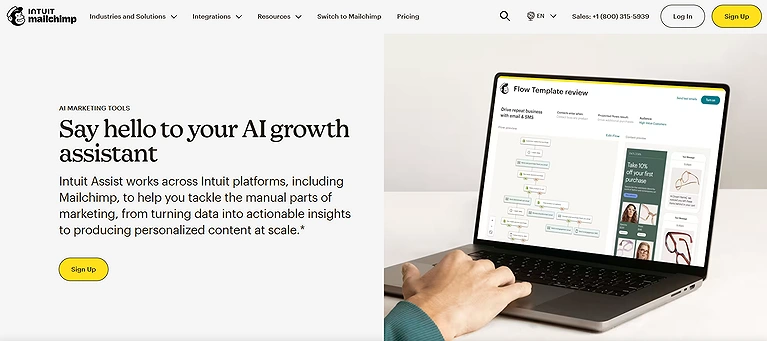
Experimenting with AI email tools, Mailchimp stands out for its intuitive design and powerful automation. It helps personalize content, optimize campaigns, and predict the best send times.With Content optimizer works much like the top free AI writing platforms, ensuring your subject lines and body copy are optimized for high open rates. With built-in analytics and audience segmentation, it’s especially useful for managing newsletters and campaigns efficiently for small teams or solo users.
Mailchimp with AI Integration
Key Features
- AI suggested send time optimization and segmentation to boost engagement.
- Assisted content suggestions with email templates and smart defaults.
- Automatically segment target audience via AI analysis of behavior.
- Track opens, clicks, and performance through built in automation and analytics.
- Integrates seamlessly with a wide range of marketing tools for richer workflows.
How to Use Mailchimp ?
Start by importing your contact list, choose or customize a
template, and use MailChimp’s AI suggested send time optimization to schedule
messages when your audience is most likely to engage. Set up segmentation rules
based on behavior, and activate automation flows for welcome sequences or
newsletters, then monitor results using built in analytics dashboards .
Pros
- Beginner friendly and user friendly UI makes setup and campaign creation smooth.
- Comprehensive all in one email marketing platform for newsletters and automation.
- Extensive third party integrations and guidance for growth.
- Advanced targeting and predictive recommendations on higher plans.
- Free tier available for small lists to test core features.
Cons
- Pricing scales sharply as your list grows, and advanced AI features are locked behind higher priced tiers.
- Support can be limited on entry plans, with email support only initially.
- Automation workflows on free/low plans are restricted.
- Higher tiers are complex and might be overkill for simple use cases.
- Some users find it harder to customize designs deeply without coding knowledge.
Pricing Plans
- Mailchimp offers flexible tiers suited to different business sizes:
- Free Plan – $0/mo, basic tools with contact and send limits.
- Essentials – Starts ~$13/mo, adds extended templates, support, and A/B testing.
- Standard – Starts ~$20/mo, boosts automation, segmentation, and insights.
- Premium – Starts ~$350+/mo, unlimited contacts and advanced analytics and priority support.
Use Cases
Small businesses, solopreneurs, and marketing teams that want a
comprehensive email marketing suite with AI email tools to help with campaign
automation, segmentation, and performance tracking without a steep technical
learning curve.
Rating
MailChimp consistently ranks highly among email marketing tools
for versatility and features, with industry ratings around 4.4+ out of 5 on platforms
like G2 and user review sites
2. ActiveCampaign
Integrating ActiveCampaign revealed its strength beyond basic email tracking. Its AI-driven predictive sending times messages when users are most likely to engage or convert, boosting performance. With advanced automation, smart content, and behavior-based recommendations, it delivers more effective, data-driven email marketing campaigns.
Key Features
• Predictive sending using AI to optimize best time for send emails and boost
open rates.
• AI based lead scoring and AI insights to prioritize high value contacts.
• Automated journey mapping and branching logic for dynamic sequences.
• Deep integrations with CRM and other systems for unified customer data.
• Support for multichannel outreach including email, workflows, and conditional
content.
How to Use ActiveCampaign
Begin by importing your contact list, set up email campaigns and automation workflows, leverage predictive sending to schedule at optimal times, and then connect your CRM to inform your segmentation strategy — monitoring performance through built in analytics.
Pros
• Powerful automation features that handle complex sequences without coding.
• Predictive AI and machine learning optimize both send times and segmentation.
• Integrated CRM support unifies marketing and sales data.
• Scales well for growing customer base and larger audience segments.
• Proven high deliverability and automation reliability for large campaigns.
Cons
• Interface can feel overwhelming at first for new users.
• Pricing tends to be expensive, especially as contacts grow.
• Lower tiers lack full AI features until you upgrade.
• Steeper learning curve than simpler email tools.
• Some advanced email copywriting tools are less intuitive than dedicated writers.
Pricing Plans
Here’s how ActiveCampaign’s tiers compare for email marketing needs (annual pricing):
• Starter – From about $15–$19/mo, basic automation and email marketing
essentials.
• Plus – Around $49/mo, adds deeper automation and CRM integration.
• Pro – Roughly $79/mo, includes predictive sending and advanced
segmentation.
• Enterprise – From about $145/mo, enterprise level support and custom
features.
Best For
ActiveCampaign is ideal for businesses and teams that want a robust automation ecosystem where email, CRM, and AI features work together to drive engagement and conversions — especially mid sized brands with complex workflows and growing lists.
Rating
ActiveCampaign holds around a 4.5 out of 5 rating on major review platforms like G2, reflecting strong user satisfaction among marketing automation tools.
3. Encharge
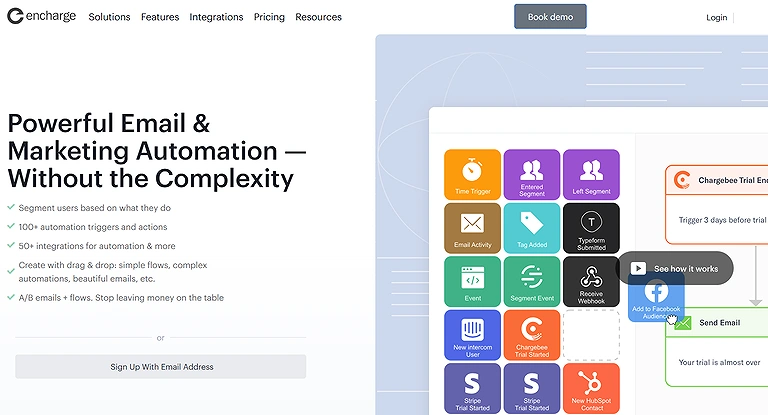
While testing AI email tools, Encharge stood out for its strong behavior-based automation, especially for SaaS and SMBs. It tracks user actions—like signups and clicks—and triggers personalized emails at the right time. With an AI-powered journey builder and deep insights, it helps create highly targeted, scalable campaigns.
Encharge
Key Features
• AI powered email platform that automates user flows based on real behavior.
• Behavior based automations that react to actions like signing up and clicking.
• Smart segmentation that groups users by plan, activity, and custom traits.
• Predictive sending to optimize the best time to send emails for higher open
rates.
• Includes an AI email subject line generator to craft unique subject lines with the
right tone.
How to Use Encharge ?
After signing up, integrate Encharge with your main platforms (like CRM or billing tools), set up behavior triggers for your key actions (e.g., sign ups, clicks), and build automatic sequences that send tailored emails based on each user’s interaction history. Use the AI subject line generator to improve open rates, and monitor performance via dashboards to refine your segmentation and timing.
Pros
• Strong AI automations for SaaS workflows and email sequences.
• Deep integrations with tools like Stripe, Intercom, and HubSpot.
• Smart segmentation makes targeting far more precise.
• Predictive send time improves engagement and retention.
• Built in AI email subject line maker for better conversions.
Cons
• Smaller template library compared to some competitors.
• Visual flow builder can feel complex to new users.
• Can be pricey for very small teams or solo users.
• Some advanced AI features like lifecycle emails or upsells require higher plans.
• Less popular than mainstream autoresponder software, meaning fewer
community resources.
Pricing Plans
Encharge’s pricing tiers are structured to scale with your business:
• Growth Plan – Core automation features ideal for startups and growing teams
with standard email sends.
• Premium Plan – Adds expanded integrations, increased contacts, and advanced
flows.
• Enterprise Plan – Custom setup with dedicated support, onboarding, and API
access for established companies.
Use Cases
Encharge is especially valuable for SaaS startups, growing teams, and established companies looking to automate complex user journeys and email sequences that truly react to customer behavior.
Rating
Encharge generally scores well in reviews, with strong praise for its AI automations and user behavior tracking, reflected in a solid G2 rating from real users.
4. HubSpot
Using HubSpot Marketing Hub enhances email marketing by integrating directly with its CRM, enabling deeper personalization based on user behavior. It uses AI for content suggestions, send-time optimization, and predictive insights. Beyond emails, it offers a complete ecosystem to manage marketing, automation, and customer relationships efficiently and also allow manage your business smarter by syncing your email automation directly with your sales pipeline and customer data.
Key Features
• AI content suggestions that help generate or improve copy.
• Smart send time optimization based on past engagement patterns.
• Email personalization driven by CRM insights and user behavior.
• Lead scoring with AI patterns to prioritize high value leads.
• Integrated marketing integration with workflows, SEO tools, and more.
How to Use HubSpot ?
Begin by syncing your contacts from your CRM, set up segmented lists based on behavior, use the AI content suggestions to craft emails, and apply smart send time optimization to schedule sends — then monitor performance using real time analytics to refine your workflows.
Pros
• Tight CRM integration unifies email marketing with customer data.
• AI features meaningfully improve personalization and send timing.
• Rich analytics that show performance across every touchpoint.
• Excellent for scaling from small campaigns to enterprise automation.
• Mature HubSpot ecosystem with tools beyond email.
Cons
• Costs can escalate quickly, especially with extra contacts or more seats.
• The HubSpot ecosystem can feel overwhelming to newcomers.
• Some advanced tools require annual billing and long term onboarding.
• Smaller teams may not need all features until later stages.
• UI complexity can slow down setup for basic email sends.
Pricing Plans
HubSpot uses tiered pricing tailored to team size and needs:
• Starter Plan – ~$20/mo per seat for core email and marketing contacts.
• Professional Plan – ~$890/mo with advanced automation, workflows, and SEO
tools.
• Enterprise Plan – ~$3,600/mo for large teams with custom objects, multi touch
revenue tracking, and detailed reporting.
Use Cases
HubSpot shines for teams of all sizes that want to unify email marketing, CRM, and broader automation under one intelligent platform, especially when personalization and engagement at scale are key priorities.
Rating
HubSpot’s email and marketing automation features consistently earn high marks on review platforms, typically around 4.5/5 for its power and depth in enterprise style workflows
5. Sender
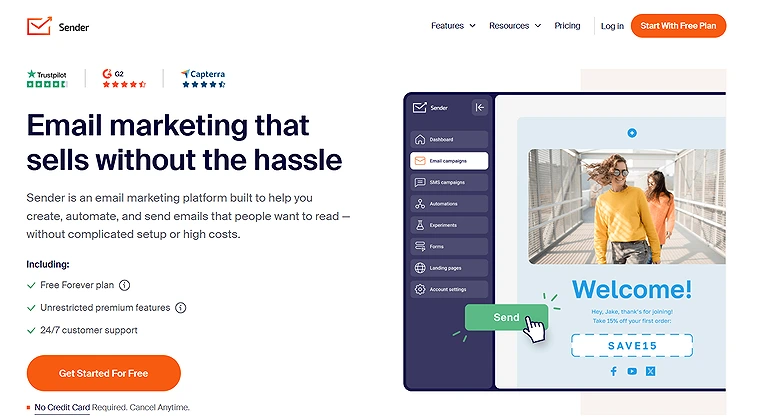
Sender.net is a simple, beginner-friendly email tool with light AI support. It improves open rates through subject line suggestions, predictive send-time optimization, and behavioral segmentation. With automation flows, it suits small teams and low-cost campaigns, though limited integrations make it less ideal for large-scale or advanced marketing needs.
Sender Official Source image
Key Features
• Predictive email delivery timing
• AI subject line scoring
• Behavioral segmentation
• Automation flow builder
How to Use Sender?
Import your contact list, choose a template, use AI features to score subject lines and schedule delivery timing, and launch your campaign while monitoring basic automation flows.
Pros
• Free plan available
• Lightweight and simple to use
• AI tools that help beginners
• Fast setup process
• Affordable for small teams
Cons
• Design tools are basic
• Not ideal for scaling businesses
• Limited integrations
• No advanced testing tools
• Sender branding on free plan
Pricing Plans
• Free Plan — Up to 2,500 subscribers & 15,000 emails/month
• Standard Plan — Removes branding, adds SMS messaging & multi user
access
• Professional Plan — Free SMS, animated countdowns, advanced automation
• Enterprise Plan — Custom pricing with unlimited emails, dedicated success
manager
Use Cases
Small teams, startups, and beginners seeking a low cost entry into AI assisted email campaigns.
Rating
Sender.net generally scores well on review platforms for ease of use and affordability.
6. MailerLite
MailerLite is a simple, creator-friendly tool for email marketing with AI features like subject line generation, predictive send timing, automation builder, and auto segmentation. It offers a clean interface for running basic automations easily. Along with newsletters, landing pages, and signup forms, it provides affordable, scalable email marketing for small businesses.
Key Features
• AI powered subject line generator
• Predictive send timing
• Smart automation builder
• Auto segmentation
How to Use MailerLite ?
Sign up, import your email list, choose templates, use the AI subject line generator and predictive send timing, and start campaigns while setting up simple automations to nurture audiences.
Pros
• Clean and simple interface
• Affordable pricing and free plan
• Great for newsletters and creators
• Easy learning curve
• Core AI tools included
Cons
• Limited advanced automation
• Basic reporting features
• Fewer integrations than competitors
• Limited design customization
• AI writing assistant not as robust
Pricing Plans
• Free Plan – Up to 1,000 subscribers & 12,000 emails/month
• Growing Business Plan – Unlimited emails, A/B testing, premium templates
• Advanced Plan – Adds enhanced automation, Facebook integration, custom
HTML, AI writing assistant
• Enterprise Plan – Custom pricing with account manager, dedicated IP,
deliverability help, and custom onboarding
Use Cases
Creators, small businesses, and teams looking for an easy, affordable AI email platform with essential automation.
Rating
MailerLite earns positive marks on review sites for its simplicity and value in AI assisted email marketing.
7. Kit
Kit (ConvertKit) is a creator-focused email tool designed for bloggers, YouTubers, and podcasters to grow and engage their audience. While it has limited AI features, it offers smart tagging, visual automation flows, and segmentation. Its simplicity helps users manage email journeys easily and build loyal communities without complex systems.
Key Features
• Automation tagging based on user behavior
• Smart segmentation of subscribers
• Visual email flow builder
• Unlimited landing pages and forms
How to Use Kit ?
Import your list, set up automation tags based on subscriber actions, use the visual dashboard to build sequences, and monitor engagement to optimize your funnels.
Pros
• Designed specifically for creators
• Easy to use with a clean interface
• Excellent for newsletters
• Smart recommendations (non AI)
• Great for digital product sales
• Creators referral earning program
Cons
• No built in AI features
• Templates limited
• Restrictive customization
• Limited reporting and analytical insights
Pricing Plans
• Newsletter Plan – Free (up to 1,000 followers) with basic email tools
• Creator Plan – ~$25/mo with unlimited automations and sequences
• Creator Pro Plan – ~$50/mo adds advanced analytics, priority support,
Facebook custom audiences, and referral system
Use Cases
Creators and digital entrepreneurs who want intuitive email sequences and workflow automation without AI complexity.
Rating
Generally positive reviews with strong marks on Capterra and G2 for creator centric ease of use.
8. Benchmark Email
Benchmark Email is a user-friendly platform known for its drag-and-drop builder and pre-made templates, making campaign creation easy for marketing teams. Its AI features include grammar and tone checking, image generation, and content suggestions for headers and buttons, helping refine email copy and visuals for more polished campaigns.
Key Features
• AI grammar checker and tone adjustments
• AI image generator
• AI based header and button text suggestions
• Content audit
How to Use Benchmark Email ?
Choose a template, refine copy with AI grammar and tone tools, add AI image suggestions, customize buttons/headers, then launch and track engagement.
Pros
• Intuitive and modern interface
• Large collection of templates
• Built in deliverability tools
• Responsive human support
• Easy track results with analytics
Cons
• Needs third party integrations for lead generation/data enrichment
• Lacks true email sequencing capabilities
• Doesn’t generate full emails with AI, only refines text
• Some AI features feel basic compared to competitors
• Fewer advanced automation options
Pricing Plans
• Free Plan — Basic features
• Essentials & Pro Plans — Starting from $37/month, offer additional templates,
automation, and analytics
Use Cases
Marketing teams and small businesses prioritizing design flexibility and intuitive campaign creation.
Rating
Benchmark Email holds solid user reviews for usability and design features among email marketing platforms.
9. Campaigner
Campaigner is a multichannel marketing tool that combines email, SMS, and call-based automation. It offers AI features like subject line generation, behavior-based triggers, and insight building. While not the most advanced, it provides reliable automation for eCommerce and service businesses needing straightforward, AI-assisted workflows.
Key Features
• AI subject line generator
• Behavior based triggers
• AI insight builder
How to Use Campaigner
Log in, create your contact list, set up behavior triggers, use the subject line generator to craft email text, and launch campaigns with SMS or calls.
Pros
• Flexible pricing
• Robust security and deliverability
• Wide workflow automation
• Includes professional services for support
• Multichannel (email, calls, SMS) capabilities
Cons
• Outdated interface
• Limited AI capabilities compared to modern tools
• Free trial requires credit card
• Less intuitive for beginners
• Lacks advanced segmentation features
Pricing Plans
• Starts from $14/month with a 30 day trial available
Use Cases
Email marketers in e commerce seeking basic AI assistance and multichannel automation.
Rating
Campaigner holds a G2 rating around 3.6/5, reflecting mixed reviews on AI depth.
10. GetResponse
GetResponse is an all-in-one marketing tool that goes beyond emails by offering landing pages and webinar hosting in a single platform. Its AI features include email content generation, predictive segmentation, smart campaign suggestions, and behavioral targeting, helping marketers create faster, more effective multichannel campaigns.
Key Features
• AI email content generator
• Predictive list segmentation
• Smart campaign suggestions
• Behavioral targeting tools
How to Use GetResponse ?
Sign up, pick a template, use AI tools to generate and optimize content, set up automation sequences with audience segments, and launch campaigns while tracking performance.
Pros
• Offers webinar tools built in
• Strong automation and AI capabilities
• Consistent brand voice across channels
• Includes email and autoresponse writer
• Responsive customer support
Cons
• Interface can feel outdated
• AI content builder is less advanced than some rivals
• Reporting feels limited compared to dedicated tools
Pricing Plans
• Free Plan – covers basic needs with limited access
• Starter Plan – unlimited emails, autoresponders, and basic segmentation
• Marketer Plan – adds autogenerated workflows, contact tagging, scoring, web
tracking
• Creator Plan – includes paid newsletters and online course creation tools
• Enterprise Plan – custom pricing for large teams with advanced automation and
support
Use Cases
Teams and marketers needing an AI assisted marketing setup that blends email, landing pages, and webinars.
Rating
GetResponse holds a solid G2 rating, reflecting strong user satisfaction for its blend of email and automation features.
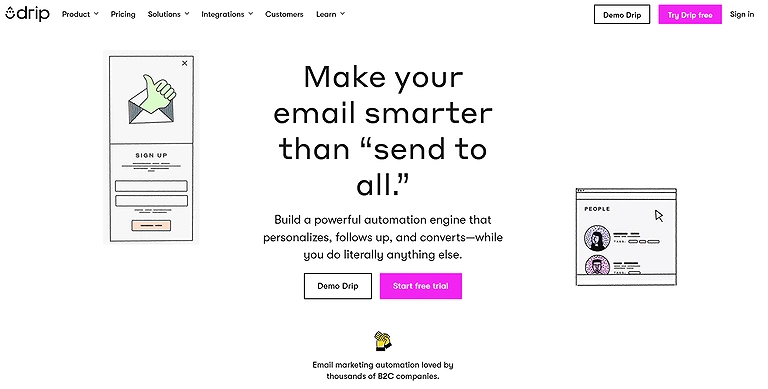
11. Drip
Drip is designed for ecommerce brands, using behavior tracking like cart activity and purchases to trigger targeted emails. Its AI features include product recommendations, predictive behavior analysis, and cart abandonment automation. With a clean workflow builder, it helps convert customer actions into sales-focused email campaigns beyond basic email blasts.
Drip Official Image
Key Features
• AI powered product recommendations
• Predictive customer behavior tracking
• Cart abandonment automation
• Workflow triggers
How to Use Drip ?
Connect your store, set triggers for behavior, build sequences, and monitor performance.
Pros
• Tailored for ecommerce businesses
• Strong smart customer tracking tools
• Dynamic segments and workflows
Cons
• Price increases with list size
• Limited CRM features
Pricing Plans
Starts at about $39/mo with a free trial and flat pricing based on contacts and email sends.
Use Cases
Online stores on Shopify or WooCommerce wanting AI driven ecommerce email strategies.
Rating
Drip earns positive marks among ecommerce marketers.
12. Zapier
Zapier is a no-code automation tool that connects email marketing apps with services like Google Sheets, Slack, and Salesforce. It helps streamline workflows and synchronize data across platforms without coding. While powerful for automation, its free plan is limited, and costs can increase as usage grows.
Key Features
• No code workflow automation connecting hundreds of tools.
• Seamless integration with 8,000+ apps (e.g., Sheets, email, Slack).
• Task based triggers and actions that automate repetitive processes.
• Conditional logic and multi step workflows for finer control.
How to Use Zapier ?
Create workflows (Zaps) that trigger when an email event happens (like a new subscriber), then link that to actions in other tools (e.g., add to CRM, send Slack alert), and monitor task usage to stay within plan limits.
Pros
• Huge library of app integrations.
• Saves time by removing manual data transfers.
• No coding needed — accessible to non technical users.
• Makes email marketing workflows more actionable.
• Clear pricing tiers with scalable task limits.
Cons
• Free plan task limits can feel restrictive.
• Pricing can escalate as automation volume grows.
• Complex, multi step logic can be hard to manage.
• Some integrations offer limited triggers/actions depth.
• Support tiers vary, with better help on higher plans.
Pricing Plans
Zapier offers a Free tier with basic automations, a Professional plan starting around $19.99/mo for multi step Zaps, a Team tier for collaborative workflows, and a Enterprise option with advanced controls and support.
Use Cases
Businesses and marketers who want to connect apps and automate email triggers without code, especially when syncing data across systems matters.
Rating
Zapier earns strong user satisfaction with ratings around 4.5 4.7/5 on major review platforms.
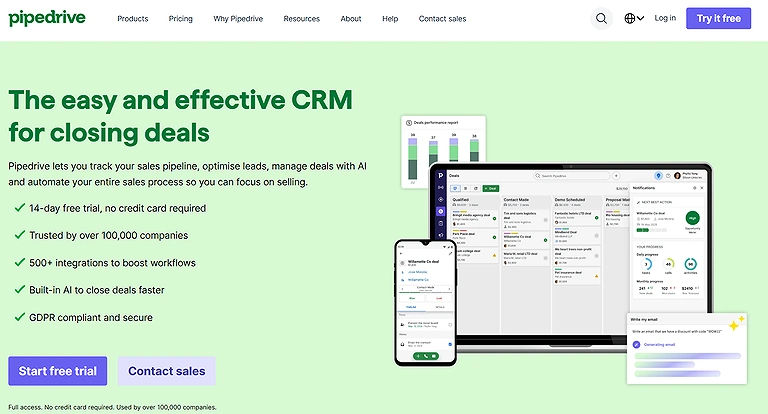
13. Pipedrive’s CRM system
Pipedrive is a CRM tool that helps manage customer interactions, track communications, and streamline sales workflows alongside email syncing and follow-ups. It provides a unified view of customer data to improve efficiency, but its built-in email marketing automation is limited unless you use the Campaigns add-on.
Pipedrive’s CRM system
Key Features
• Full email sync and smart Smart Bcc linking to deals.
• Visual pipelines for customer relationships and deal progression.
• AI powered reporting in higher plans.
• Over 500 integrations including email tools.
How to Use Pipedrive ?
Import contacts, set up pipelines, use the email sync to capture communication, and build workflow automations to follow up with leads directly from the CRM.
Pros
• Intuitive, visual pipeline management.
• Integrates CRM and email interactions for a 360° view.
• Strong analytics and reporting.
• Workflow automation reduces manual tasks.
• Easy onboarding and user friendly tools.
Cons
• Email marketing features are basic without add ons.
• No free plan beyond trial.
• Some advanced features have a steeper learning curve.
• Pricing can escalate with add ons and higher tiers.
Pricing Plans
Pipedrive offers tiered CRM plans with a Free 14 day trial and no long term commitment: Lite (~$14/seat/mo), Growth (~$39/seat/mo with email sync and automations), Premium (~$59/seat/mo), and Ultimate (~$79/seat/mo) — add ons like Campaigns for email marketing start separately.
Use Cases
Small to mid sized teams focused on sales pipeline and customer relationship management first, with some email workflow needs.
Rating
Pipedrive generally earns positive feedback with average ratings around 4.3–4.5/5 on major review platforms.
14. AWeber’s AI-Enhanced Email Marketing
AWeber is a reliable email marketing tool that uses AI to improve campaign creation and automation. Its AI writing assistant helps generate subject lines, email copy, and calls to action, reducing repetitive work. This allows marketers to focus more on strategy and creativity while maintaining efficient and consistent email workflows.
Key Features
• AI writing assistant to help craft email copy and subject lines.
• Automation tools for workflows and autoresponders.
• Subscriber management with segmentation and tagging.
• Analytics and reporting on open rates and campaign performance.
How to Use AWeber
Sign up with your list, choose templates, use the AI writing assistant to generate email copy, build automation workflows, and track performance with in platform analytics — ideal for newsletters or simple drip campaigns.
Pros
• Intuitive and user friendly interface for all skill levels.
• Strong 24/7 customer support across plans.
• High deliverability ensures emails reach inboxes.
• Effective for beginners with generous free tier.
• Includes landing pages, templates, and automation basics.
Cons
• Pricing increases rapidly as subscriber count grows.
• Advanced automation is limited vs competitors.
• Some template designs and UI feel dated.
• Lack of built in SMS or multichannel marketing.
• Analytics and segmentation tools are basic.
Pricing Plans
AWeber offers a Free Plan (up to ~500 subscribers and ~3,000 emails/month), a Lite Plan (~$19.99/mo), a Plus Plan (~$29.99/mo) with A/B testing and advanced segmentation, and an Unlimited Plan with custom pricing for very large lists or enterprise needs.
Use Cases
Small to mid sized businesses, bloggers, and entrepreneurs who want a reliable email platform with helpful AI email tools and excellent support.
Rating
AWeber generally scores around 4.2–4.5/5 in reviews for its ease of use, support, and deliverability, though advanced marketers may find deeper automation elsewhere.
15. Autopilot’s Visual Marketing Automation
When I first experimented with AI tools for email marketing, Autopilot’s visual marketing automation caught my attention because its AI driven platform lets marketers build dynamic visual workflows that automate and optimize email marketing efforts using intuitive drag and drop journey mapping, and although it shines for creating complex customer journeys and triggered campaigns, its feature depth, pricing model, and lack of built in landing page tools can be obstacles for some users.
Key Features
• Visual journey builder that maps out automation flows.
• Multi channel campaign support (email, SMS, etc.).
• Advanced segmentation and personalization.
• Trigger based automation with conditional logic.
How to Use Autopilot’s ?
Import your contact list, design automated flows using the visual journey builder, set triggers and conditions, and monitor engagement and performance across channels.
Pros
• Intuitive visual automation builder.
• Good for mapping customer journeys.
• Supports multi channel campaigns.
• Advanced segmentation and personalization.
• Flexible for small to mid businesses.
Cons
• Pricing increases with contacts and plans.
• Limited integrations vs some rivals.
• No built in landing page builder.
• Learning curve for complex workflows.
• Limited advanced features on lower tiers.
Pricing Plans
Plans typically start with a Free plan for up to ~2,000 contacts with limited journey features, then Campaign (~$29/mo), Pro (~$99/mo), Business (~$299/mo), and Enterprise with custom pricing based on contacts and advanced needs.
Use Cases
Small to mid sized companies and marketers focused on visual customer journey automation and triggered campaigns.
Rating
Autopilot generally earns positive reviews for ease of use and journey automation, though ratings vary depending on feature expectations and business size.
16. Optimove: For cross-channel marketing campaigns
When diving into AI tools for email marketing, Optimove impressed me as a customer led marketing platform that elevates campaigns by using OptiMail, an AI powered email marketing tool to build hyper personalized email campaigns, exploiting predictive analytics and automation rooted in its Customer Data Platform (CDP) that mirror the capabilities of trending AI tools for data analysis to anticipate customer churn before it happens.
Optimove: For cross-channel marketing campaigns
Key Features
• Dynamic content updates tailored by behavior.
• Automated product recommendations via AI.
• AI driven send time optimization for perfect timing.
• Intelligent customer segmentation using AI algorithms.
How to Use Optimove ?
Upload customer data into the CDP, define segmentation logic with personalization tags and conditional content, and set up multi touch campaign automation to deliver tailored messages at key customer touchpoints.
Pros
• Robust performance analytics and reporting tools.
• Deep insights into behavior and engagement.
• Strong multi channel integration across marketing channels.
• Cohesive cross channel campaign management.
• Optimove integration works without extra connectors.
Cons
• Interface can be clunky and hard to navigate.
• Advanced AI driven features have a steep learning curve.
• Not ideal for straightforward lead generation needs.
• Requires well structured customer data to shine.
• Exporting data isn’t always smooth compared to competitors.
Pricing Plans
Optimove doesn’t list fixed tiers; pricing is based on customized quotes depending on business size and stage.
Use Cases
Mid to large scale businesses that want to leverage customer data for highly converting campaigns.
Rating
Optimove receives high marks from users, with strong Capterra and G2 ratings for enterprise level personalization and analytics.
17. Rasa: For newsletters
Rasa.io is an AI-powered newsletter tool that personalizes emails based on subscriber behavior and interests. It automates content aggregation, scheduling, and delivery to keep newsletters consistent with minimal manual effort. With strong analytics and customizable templates, it helps improve engagement by sending more relevant, tailored content to each reader.
Key Features
• AI powered hyper personalization based on individual behaviors
• Content featuring with essential must reads
• Comprehensive analytics showing open rates and click through rates
• Seamless integrations with CRM and tools like Salesforce, HubSpot, Mailchimp
• For creators, tools like Kit (formerly ConvertKit) are essential for those looking to
earn money on mobile with AI by building a paid subscriber base and selling
digital products."
How to Use Rasa.io?
Import your subscriber list, configure personalization rules, use the AI to curate content, schedule sends, and monitor engagement metrics.
Pros
• Drives subscriber engagement with highly personalized content
• Strong analytic insights for performance
• Flexible customizable templates tied to brand identity
• Monetization opportunities via ad placements
Cons
• No SMTP support limits direct mail server control
• Limited documentation makes troubleshooting harder
Pricing Plans
Rasa offers Plus, Pro, and Enterprise tiers with monthly pricing based on feature depth and audience size (exact pricing via rasa.io).
Use Cases
Businesses and newsletter centric teams focused on engagement, brand authority, and lead nurturing.
Rating
User feedback shows strong ratings on platforms like Capterra and G2 for newsletter performance tools.
18. Mailmodo: For interactive emails
Mailmodo is an AI-powered email marketing tool that enables interactive emails, allowing users to complete actions like forms, surveys, and bookings directly inside the email. Its drag-and-drop editor, templates, automation, AI copywriting, smart segmentation, and real-time analytics help improve engagement and conversions through frictionless, high-performing campaigns.Mailmodo allows you to embed interactive forms directly in the inbox, a great feature for those using AI tools for physics students to collect and analyze research data from peers.
Key Features
• Interactive AMP emails that let users take action
• Time saving automation with prebuilt workflows and smart triggers
• AI generated email copy and personalization for subject lines
How to Use Mailmodo
Import your contact list, choose interactive templates, customize workflows with smart triggers, add AI generated email copy, and monitor open and response rates through analytics.
Pros
• Exceptional customer engagement and conversions
• Streamlines email campaigns with interactive experiences
• Seamless integrations with CRMs and automation platforms
Cons
• Occasional failed deliveries, bad renders, or wrong reports
• STMP documentation is technical for beginners
• Writing AI support feels limited compared to specialist tools
Pricing Plans
Mailmodo’s pricing includes Lite, Pro, and Max tiers based on contacts/month when billed annually; no fully free plan but flexible paid options for different scales.
Use Cases
Marketers, eCommerce brands, and SaaS businesses that want to create interactive advanced email experiences without coding.
Rating
Mailmodo earns positive feedback on G2 and Capterra for its innovation in interactive email automation.
19. Zeta: For omnichannel customer acquisition campaigns
When evaluating AI tools for email marketing, I found Zeta’s AI driven marketing platform refreshingly ambitious for businesses aiming to personalize omnichannel experiences — it’s built not just to automate email content but to analyze customer behavior with real time data and predictive analytics, enabling teams to optimize send times, tailor email content and subject lines, and improve conversion rates across mobile, social, paid media and email for a truly seamless customer experience that supports acquisition, revenue growth, retention and overall marketing efficiency.
Key Features
• AI powered personalization using real time behavioral data
• Advanced audience segmentation for high value customer groups
• Machine learning predictive analytics to anticipate actions
• Automated content generation including dynamic copy and recommendations
How to Use Zeta’s ?
Upload customer data, configure behavioral segments, set rules for automation, and let predictive analytics guide campaign timing and content decisions.
Pros
• Strong omnichannel orchestration for consistent branding
• Deep segmentation based on intent, purchase history, engagement patterns
• Predictive analytics that improve engagement timing
• Dynamic content creation enhances relevance
Cons
• Preview sometimes doesn’t match final email format
• Significant onboarding and training required to fully utilize
• Less suitable for businesses with minimal data infrastructure
Pricing Plans
Zeta doesn’t list fixed tiers publicly; pricing is custom quotation based on business size and needs.
Use Cases
Large enterprises and data driven marketers looking to leverage AI for high impact email marketing and cross channel orchestration.
Rating
Zeta earns solid user feedback on platforms like G2 and Capterra for its robust personalization and analytics.
20. Klaviyo
Klaviyo is designed for online stores, using AI to predict buying behavior and optimize personalized product emails. It offers predictive lifetime value modeling, product recommendations, smart segmentation, and send-time optimization. With support for email, SMS, and analytics, it enables data-driven, multi-channel marketing automation for ecommerce businesses.
Klaviyo Verified Source Image
Key Features
• Predictive lifetime value modeling
• AI driven product recommendations
• Smart segmentation by purchase behavior
• Send time optimization
How to Use Klaviyo ?
Connect your store, import customer data, set segmentation and flows, use AI recommendations, and activate automations.
Pros
• Strong Shopify integration
• Deep AI personalization for product emails
• Multi channel (email, SMS) support
• Detailed dashboards and reporting
• Excellent for ecommerce brands and online sellers
Cons
• Learning curve for new users
• Pricing gets expensive as list size grows
• Limited support on lower plans
• AI content sometimes needs editing
• No consistent free plan beyond small tiers
Pricing Plans
Klaviyo offers Email Plan (tiered by contacts/month), Email + SMS Plan with SMS credits, and Custom pricing for enterprise profiles and high SMS volume.
Use Cases
Ecommerce businesses and online sellers needing strong AI email and SMS automation.
Rating
Klaviyo earns high marks on review platforms for ecommerce email performance.
FAQs
1. Which AI email marketing tools are best for ecommerce businesses?
Tools like Klaviyo, Drip, Mailmodo, Ortto, and GetResponse are particularly effective for ecommerce because they use AI for predictive product recommendations, segmentation, and automation workflows.
2. Can AI tools improve email deliverability and engagement?
Yes, AI features like send-time optimization, behavior-based segmentation, and predictive analytics help target the right audience at the right time, increasing open rates, click-throughs, and conversions.
3. Are AI email tools suitable for beginners?
Some tools, like Instantly Copilot and AWeber, offer simple, user-friendly interfaces suitable for beginners, while more advanced platforms like Optimove and Zeta may require technical expertise to fully leverage AI capabilities.
4. Do these tools support multi-channel marketing or only email?
Many AI tools, including Ortto, GetResponse, Zeta, and Klaviyo, support multi-channel campaigns including SMS, push notifications, landing pages, and social media, allowing for cohesive marketing strategies.
Conclusion
AI tools for email marketing have transformed how businesses engage with audiences. From predictive analytics and hyper-personalized campaigns to multi-channel automation and behavior-based segmentation, these platforms help businesses save time, improve engagement, and drive revenue. Choosing the right tool depends on your business size, technical expertise, and marketing goals, but with AI-driven automation, any business can create targeted, data-driven email campaigns that convert effectively. Once you've automated your inbox, make sure your writing is sharp by exploring the top free AI writing platforms to keep your subscribers engaged.