.webp)
How to Fix Slow Video Production and Reduce Turnaround Time by 80% Using AI Automated Editors
Creating videos regularly while keeping the quality high is difficult for many businesses, creators, and marketing teams. Traditional editing takes a lot of time because every clip must be reviewed, trimmed, and adjusted manually. This slows down content production and makes it harder to publish videos quickly or respond to trending topics. Using AI tools can simplify this process and create a faster, more organized production workflow.
Most delays happen during editing, not while recording. Editors spend hours removing mistakes, cutting filler words, syncing audio, switching camera angles, adding captions, and resizing videos for different platforms. AI automation handles these repetitive tasks in minutes, allowing editors to focus on creativity instead of manual work. As a result, teams can reduce turnaround time by up to 80%, produce more content, and scale their video production efficiently.

 July 11, 2026 | 9 min read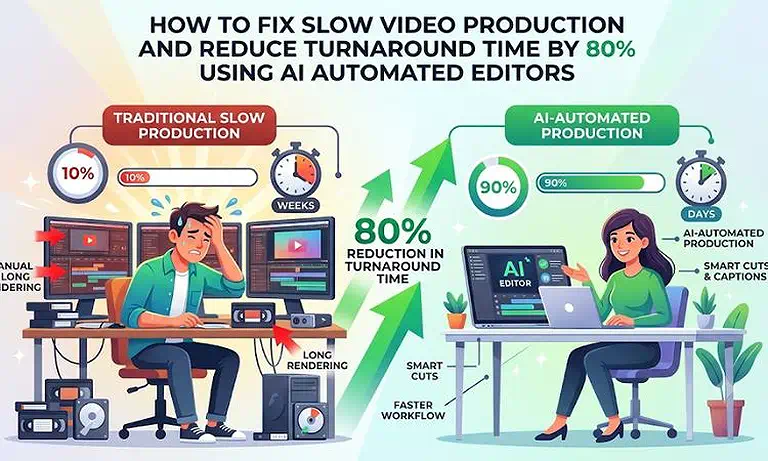
Cover Photo How to Fix Slow Video Production and Reduce Turnaround Time by 80% Using AI Automated Editors
AI Video Production Workflow at a Glance
| Workflow Overview | Details |
| AI Tools Required | 3–4 specialized AI tools for recording, AI editing, video enhancement, and multi-platform publishing. |
| Recommended Workflow | Riverside.fm → Descript → VEED.io → FlexClip |
| Production Time | Reduce production time from 6 hours to around 45 minutes, saving up to 80%. |
| Biggest Advantage | Automates repetitive editing tasks, allowing editors to focus on creativity instead of manual timeline work. |
| Best For | Content creators, YouTubers, agencies, marketing teams, educators, and businesses producing videos at scale. |
Who Is This Guide For?
This guide is designed for anyone who wants to produce high-quality videos faster while reducing manual editing work, including:
Digital Content Creators & YouTubers who need to publish videos consistently without spending hours on editing.
Marketing & Social Media Agencies looking to scale client projects while maintaining quality and meeting tight deadlines.
Enterprise Teams & Brand Managers creating marketing, product, and internal communication videos across multiple regions and languages.
HR & Learning & Development (L&D) Departments producing onboarding, training, and compliance videos with a faster, more efficient workflow.
High-Volume Video Editors who want to automate repetitive editing tasks and focus more on creative storytelling and final production quality.
The Biggest Causes of Slow Video Production
Slow video production is usually caused by manual editing, not video recording. After filming, editors must review raw footage, remove mistakes and filler words, trim long pauses, synchronize audio, add captions, insert B-roll, and prepare the final video. These repetitive tasks often consume most of the production time, leaving less time for creative work such as storytelling, branding, and visual enhancements.
The workload increases even further when the same video needs to be published on YouTube, Instagram, TikTok, LinkedIn, and other platforms. Each platform requires different aspect ratios, layouts, and caption placements, forcing editors to repeat similar editing tasks for every version. As content production grows, this traditional workflow becomes difficult to manage, leading to longer turnaround times, higher production costs, and inconsistent publishing schedules. AI automated editors solve these bottlenecks by completing many of these repetitive tasks in minutes instead of hours.
Why an AI-Powered Video Workflow Makes a Difference
| Without an AI Workflow | With an AI-Powered Workflow |
| Hours spent reviewing and trimming raw footage manually | AI creates rough cuts and removes filler words in minutes. |
| Manual caption creation and formatting | AI generates captions and applies consistent styling automatically. |
| Separate edits for every platform | One master video is automatically optimized for YouTube, TikTok, Instagram, LinkedIn, and other platforms. |
| Most editing time spent on repetitive tasks | More time dedicated to storytelling, branding, and creative improvements. |
| Frequent revisions and slower team collaboration | Faster collaboration with streamlined reviews and approvals. |
| Difficult to scale content production | Produce more videos without increasing the editing workload. |
| Longer turnaround times and higher production costs | Faster delivery, lower costs, and more consistent publishing. |
The Best AI Workflow to Reduce Video Production Time
Reducing video production time isn't about relying on a single AI editor. The biggest time savings come from following a structured workflow where AI video creation tools automate repetitive editing tasks at every stage. By organizing your production process from recording to final publishing, you can eliminate bottlenecks, reduce manual effort, improve consistency, and cut turnaround time by up to 80% without compromising video quality.
Workflow Overview:
Capture Content → Create an AI Rough Cut → Enhance the Video → Optimize for Multiple Platforms → Review & Publish
Step 1: Capture High-Quality Content
Start with clear video and high-quality audio to reduce editing issues later in the process. Organize your recordings, scripts, and project files from the beginning so every stage of production runs smoothly. A well-prepared project creates the foundation for faster editing and fewer revisions.
Step 2: Create an AI-Powered Rough Cut
Generate the first draft by automatically removing filler words, long pauses, repeated sentences, and unwanted sections. Instead of spending hours reviewing raw footage manually, AI quickly prepares a clean rough cut, allowing editors to move directly to refining the content.
Step 3: Enhance and Polish the Video
Improve the rough cut by adding captions, enhancing audio, inserting supporting visuals, applying branding, and refining transitions. Automating these production tasks reduces repetitive work and allows editors to focus on storytelling, pacing, and the overall viewing experience.
Step 4: Optimize for Every Platform
Prepare the finished video for YouTube, TikTok, Instagram Reels, LinkedIn, Facebook, and other platforms by creating versions with the appropriate aspect ratios, layouts, and caption placements. Automating this process eliminates the need to manually edit each version, making large-scale content distribution much more efficient.
Step 5: Review, Export, and Publish
Complete the workflow with a final quality review to verify captions, branding, audio, and visual consistency before exporting the required formats. Since AI has already handled most repetitive editing tasks, the final review is faster and focuses on creative quality, helping you publish polished videos on a consistent schedule.
Recommended AI Platforms & Tools
Riverside.fm — Best for Recording and Content Capture
Riverside.fm is the ideal starting point for this workflow because it records high-quality video and audio while automatically generating transcripts and organizing project files in the cloud. Starting with clean recordings reduces editing issues later, shortens production time, and creates a reliable foundation for the rest of your AI-powered workflow. Explore our detailed Riverside.fm review
to learn more.
Descript — Best for AI-Powered Rough Cuts
Descript is the best choice for creating the first draft of your video because it replaces traditional timeline editing with a text-based workflow. It automatically removes filler words, long pauses, and unwanted sections, allowing editors to produce a clean rough cut in minutes instead of spending hours reviewing raw footage. Learn more in our comprehensive Descript review.
VEED.io — Best for Video Enhancement and Branding
VEED.io is an excellent solution for refining your rough cut into a professional-quality video. It simplifies tasks such as generating captions, improving audio, adding branding elements, inserting B-roll, and enhancing the overall presentation. By automating these repetitive production tasks, it helps editors complete polished videos much faster. Read our complete VEED.io review for a detailed evaluation.
FlexClip — Best for Multi-Platform Publishing
FlexClip is the ideal tool for preparing videos for YouTube, TikTok, Instagram Reels, LinkedIn, Facebook, and other platforms. It simplifies the repurposing process by creating platform-specific versions with the appropriate layouts and aspect ratios, allowing you to publish consistent content across multiple channels without repeating the same editing work. Discover its full capabilities in our FlexClip review.
Mistakes That Can Slow Down Your AI Video Workflow
Building an AI-powered workflow is only the first step. To consistently reduce production time and maintain high-quality results, follow these best practices throughout your editing process.
1. Start Every Project with a Clear Plan
Define your script, target audience, and video structure before recording or editing. A well-planned project minimizes revisions, helps AI tools generate more accurate results, and keeps the production process organized from start to finish.
2. Use Clean, High-Quality Source Files
Record clear audio and high-resolution video whenever possible. Better source files improve AI transcription, audio enhancement, caption generation, and automated editing, reducing the amount of manual correction required later.
3. Standardize Your Editing Templates
Create reusable templates for captions, fonts, colors, logos, intros, outros, and branding elements. Using the same templates across every project speeds up editing, ensures visual consistency, and allows teams to produce content more efficiently.
4. Review AI Output Before Publishing
AI can automate repetitive tasks, but it may occasionally misinterpret names, technical terms, or industry-specific language. Always review captions, transcripts, and visual elements before exporting to ensure your final video is accurate and professional.
5. Let AI Handle Repetitive Tasks, Not Creative Decisions
Use AI to automate rough cuts, filler-word removal, caption generation, audio enhancement, and video resizing. Reserve manual editing for storytelling, pacing, branding, and final creative refinements, where human expertise has the greatest impact.
FAQ
Can AI automated editors completely replace professional human video editors?
No, AI tools are designed to take over the repetitive, low-leverage mechanical tasks like cutting out pauses and generating captions, freeing up human editors to focus entirely on creative storytelling, narrative pacing, and emotional impact.
Will text-based video editing software affect the overall visual quality of my footage?
Not at all. Text-based editing platforms only manipulate the timeline cut points based on the transcript; they do not alter the native resolution, color space, or baseline frame rate of your imported source files.
How accurate are automated AI video captioning tools with non-native accents?
Modern cloud transcription engines deliver roughly 92% to 98% accuracy for major global dialects, though you should always do a fast manual proofreading pass to fix unique names or niche industry terms.
Is it safe to upload proprietary internal company footage to cloud video tools?
Most tier-one AI video platforms offer enterprise-grade data encryption and clear privacy boundaries that guarantee your uploaded content is never used to train public models, but you should verify your platform's specific compliance terms.
How does the smart auto-framing feature handle videos with multiple people on screen?
The software uses facial recognition and audio tracking to identify who is actively speaking, automatically panning and centering the camera crop frame onto the current speaker.
Do these AI video editors support high-resolution 4K timeline exports?
Yes, platforms like Veed.io, Riverside, and Descript fully support 4K exports on their premium tiers, though processing and rendering times will scale based on the size of your files.
What happens if the AI cuts out a pause that I actually wanted to keep for dramatic effect?
You can easily restore any auto-deleted section at any time because AI text-based editing platforms operate using non-destructive timelines, allowing you to drag the clip edges back out manually.
Can I save custom brand presets across these different platforms?
Yes, these platforms feature dedicated brand kit dashboards where you can upload and lock in your company's official logos, exact color palettes, specific fonts, and transition files.
Conclusion
Slow video production is often caused by repetitive manual editing rather than the creative process itself. By adopting a structured AI-powered workflow, you can automate time-consuming tasks, streamline post-production, and reduce turnaround time while maintaining consistent, professional-quality results.
The most effective approach is to assign each stage of the workflow to the right AI solution instead of relying on a single tool for everything. As your content volume grows, this method makes it easier to produce more videos, publish consistently across multiple platforms, and focus your time on creativity rather than repetitive editing.