.webp)
Best AI Video Avatars for Enterprise Training, HR, and Business Teams
Corporate learning and development (L&D), human resources, and internal communications are changing quickly. Instead of hiring expensive video production agencies, renting studios, or asking busy executives to appear on camera, many companies now use AI-powered tools to create professional videos faster, reduce costs, and keep communication consistent across teams.
AI video avatar platforms turn documents and scripts into presenter-style videos in just a few minutes. They use realistic AI avatars that speak multiple languages, maintain consistent branding, and simplify large-scale content creation. This guide explains how organizations use Colossyan and DeepBrain AI to improve employee training, simplify internal communications, and scale video production efficiently.

 Updated: July 09, 2026 | 12 min read
Cover Photo Best AI Video Avatars for Enterprise Training, HR, and Business Teams
Why This Use Case Matters
Creating, updating, and sharing training materials for employees in different locations can be difficult. Text documents and presentation slides often fail to keep employees engaged, while traditional video production takes too much time and money. AI video avatar platforms solve these problems by making training videos faster, easier to update, and more engaging through powerful enterprise features.
Create Presenter Videos Without a Studio: Turn text into professional presenter-style videos without using cameras, microphones, lighting, or editing software. This saves time, lowers production costs, and makes it easy to create high-quality training content.
Translate Videos into Multiple Languages: Convert one training script into videos in more than 80 languages with natural voices and regional accents. This helps global teams deliver clear, consistent training while reducing the time and effort needed for localization.
Update Videos in Minutes: Edit the script whenever company policies, products, or compliance rules change, then generate a new version of the video within minutes. There's no need to record presenters again or start the production process from scratch.
Connect Easily with Learning Platforms: Integrate videos with your Learning Management System (LMS) using SCORM support. Track employee progress, quiz results, and course completion automatically, making training management simpler and more organized.
🎯 The Quick Verdict Table
| Tool | Quick Verdict |
| Colossyan | Ideal for L&D teams and HR departments that need branching scenarios, quizzes, SCORM export, and engaging compliance or employee training modules. |
| DeepBrain AI | Perfect for corporate communications and training teams that want to quickly convert PowerPoint or PDF presentations into professional AI avatar videos at scale. |
Who Should Read This Guide
Ideal For
HR Professionals & Compliance Officers: Ideal for administrators tasked with standardizing complex employee onboarding paths, security practices, and legal compliance courses across regional entities.
L&D Managers & Instructional Designers: Perfect for curriculum development specialists who want to build high-retention micro-learning libraries, interactive assessments, and skills training modules.
Internal Communications Teams: Designed for corporate communication managers who need to push rapid executive announcements, product updates, and policy alignments to thousands of employees simultaneously.
Not Ideal For
Creative Film Production Teams: These tools are optimized for structured business presentations, software guides, and instructional modules. They are not engineered to generate cinematic storytelling, complex physical stunt choreography, or highly stylized visual effects.
Casual Hobbyists: The advanced feature suites, administrative seat architectures, data handling parameters, and pricing frameworks are tailored for corporate budgets and institutional scaling.
How We Tested Every Platform
To provide a balanced evaluation optimized for strict enterprise procurement pipelines, we executed a rigorous series of scenario-driven operational tests on both platforms:
Slide Deck Conversion and Layout Test: We uploaded a complex, 30-slide enterprise data security PowerPoint presentation containing technical charts and heavy text to evaluate layout conversion accuracy and script generation speed.
Multilingual Localization Assessment: We processed an onboarding module through the platform translation engines into German, Japanese, and Brazilian Portuguese, grading the spoken phonetic accuracy, lip-sync alignment, and regional accent naturalism.
LMS Package Deployment Test: We embedded interactive multiple-choice questions within the video timeline, exported the container as a SCORM package, and deployed it within an enterprise LMS to verify tracking metrics, pass/fail grading, and data synchronization.
Operational Agile Modification Test: We simulated a last-minute regulatory policy update by altering numerical data points directly inside a pre-rendered video script, tracking total processing queue turnaround and rendering speeds.
Evaluation Criteria
Our analysis maps directly to five critical requirements foundational to enterprise operational environments:
Avatar Realism & Behavior Dynamics: The visual fidelity, micro-expressions, conversational pacing, gestures, and naturalism of the digital actors.
Document-to-Video Automation (AI Agents): The software’s capability to parse unstructured files, text handbooks, or slide files and systematically generate a structured video framework.
Instructional Interactivity & Branching Logic: Features that shift user engagement from passive video streaming to active learning via interactive milestones and adaptive paths.
Enterprise Administration & System Security: Compliance with strict corporate data handling parameters, including SOC 2 Type II certification, SAML Single Sign-On (SSO), custom user permissions, and robust data isolation.
LMS Compatibility & SCORM Compliance: Technical interoperability with legacy and modern learning frameworks to allow deep analytics reporting.
At-a-Glance Operational Matrix
| Criteria | Colossyan | DeepBrain AI |
| Primary Structural Focus | Interactive e-learning and scenario-based training | Slide deck automation and fast AI video rendering |
| Stock Avatar Library | 170+ premium and custom avatars | 100+ professional AI presenters |
| AI Content Creation | Cora AI creates modular training videos from documents | AI Studios converts PPT, PDFs, text, and URLs into videos |
| Languages & Voices | 100+ languages with automatic localization | 140+ languages with neural AI voices |
| Built-in Interactivity | ✅ Quizzes, branching scenarios, and clickable interactions | ❌ No native interactivity (requires external LMS or authoring tools) |
| SCORM Export | ✅ SCORM 1.2 and SCORM 2004 (4th Edition) | ❌ MP4 export only (SCORM requires third-party tools) |
| Enterprise Security | SOC 2 Type II, GDPR, SAML SSO, custom user roles | Enterprise encryption, secure cloud storage, SSO integration |
| Rendering Speed | Balanced rendering with expressive avatars | Extremely fast for large-scale video generation |
| Ease of Use | 9/10 | 9.5/10 |
| Best For | Interactive corporate training, compliance, onboarding | Presentation-based training, internal communications, product explainers |
| Overall Rating | 9.5/10 | 9.3/10 |
Rating Source: The ratings above combine our hands-on evaluation with user feedback from G2. Colossyan holds approximately 4.7/5, while DeepBrain AI scores around 4.6/5 on G2. Overall scores reflect enterprise training capabilities, ease of use, and features, but ratings may vary depending on specific workflows, business needs, and future platform updates.
Operational Scenarios: Where Each Tool Shines
Scenario 1: Interactive Compliance and Soft Skills Training (Colossyan)
Make Training More Engaging: Traditional training videos are often passive, making it difficult for employees to stay focused. Colossyan improves learning by adding interactive questions and decision-based scenarios throughout the training.
Learn Through Real Situations: Employees can choose answers during workplace scenarios, and the AI avatar immediately explains whether the choice is correct or incorrect before moving to the next lesson.
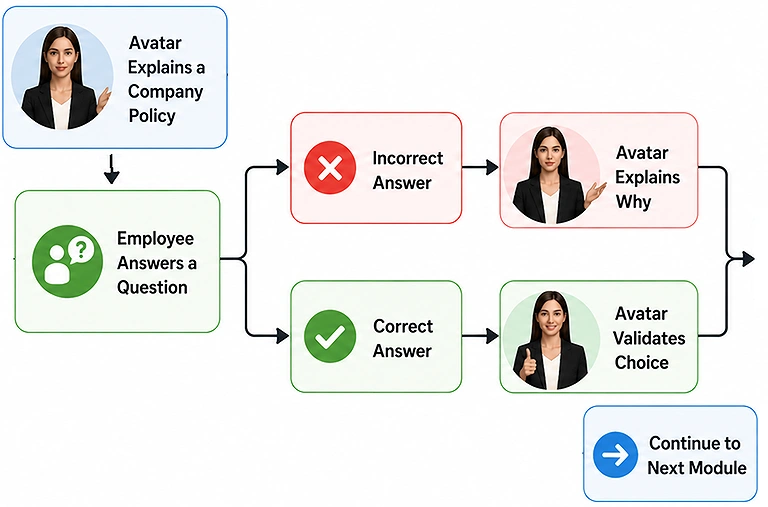
Source Image for Interactive Compliance and Soft Skills Training (Colossyan)
Create Real Conversations: Colossyan supports multiple AI avatars in one scene, making it useful for leadership training, workplace harassment prevention, customer service, and sales role-play exercises.
Track Employee Progress: Training modules can be exported as SCORM 1.2 or SCORM 2004 files and uploaded to LMS platforms like Docebo, Cornerstone, and Moodle to track quiz scores, course completion, and learner progress.
Scenario 2: Employee Onboarding and Slide-to-Video Conversion (DeepBrain AI)
Turn Presentations into Videos: DeepBrain AI converts PowerPoint presentations and PDF files into professional AI presenter videos, helping organizations save hours of manual video production.
Automatic Video Creation: The platform imports presentation slides, converts speaker notes into natural narration, and automatically adds an AI presenter to deliver the content.
Speed Up Employee Onboarding: HR teams can quickly transform employee handbooks, company policies, SOPs, and training presentations into engaging onboarding videos without rebuilding content from scratch.
Update Training Faster: DeepBrain AI renders videos within minutes, allowing organizations to quickly update training materials whenever company policies, products, or procedures change. It is ideal for businesses with large or rapidly growing workforces.
In-Depth Use Case Deep Dives
Colossyan – Best for Interactive Learning Design
Colossyan is built for corporate learning teams that need interactive AI avatar training. It enables scenario-based learning, compliance courses, and multilingual content from one platform. Its AI assistant, Cora, converts raw training materials into structured lessons, reducing development time while improving learner engagement and training consistency across organizations.
Key Capabilities
AI Course Generation: Cora converts PDFs, Word documents, company policies, webpages, and raw text into structured training modules with learning objectives, scripts, and scene recommendations.
Interactive Learning: Add quizzes, branching scenarios, knowledge checks, and decision-based interactions directly inside videos, making training more engaging than traditional linear presentations.
Global Localization: Translate AI avatars, voiceovers, subtitles, and on-screen text into multiple languages while maintaining consistent branding and messaging across global teams.
Advanced Voice Customization: Control pronunciation through phonetic spelling, adjust speaking pace, insert pauses, and fine-tune delivery styles to ensure accurate pronunciation of technical terms and brand names.
Enterprise Collaboration: Includes shared workspaces, role-based access controls, approval workflows, centralized brand kits, and SOC 2 Type II compliance for secure enterprise content creation.
Limitations
Focused on Learning Content: While excellent for corporate training, Colossyan is less suitable for marketing videos, social media content, or highly cinematic productions.
Interactive Features Require Planning: Branching scenarios and interactive courses offer significant value but require more instructional design effort than standard presenter videos.
Deep Review: Read our complete Colossyan Review for an in-depth look at AI course creation, interactive learning, localization, enterprise collaboration, pricing, and overall performance to determine whether it fits your corporate training requirements.
DeepBrain AI – Best for Presentation-Based Enterprise Training
DeepBrain AI is designed for organizations that build training with PowerPoint or Google Slides. It converts presentation decks into professional AI presenter videos, making it ideal for onboarding, product training, executive communications, and internal updates. Its familiar slide-based workflow enables business teams to create polished training videos quickly with minimal editing expertise.
Key Capabilities
PowerPoint-to-Video Conversion: Import existing presentation slides and convert them into narrated AI avatar videos without recreating training content from scratch.
Presentation-Based Editor: Uses a familiar slide editing interface that makes video creation easy for trainers, HR teams, and business professionals.
Professional AI Avatars: Offers a large library of business-focused avatars suitable for corporate, healthcare, finance, education, retail, and industrial training.
Scalable Video Production: Cloud-based rendering enables multiple videos to be generated simultaneously, making large-scale localization and enterprise production more efficient.
Enterprise Security: Supports Single Sign-On (SSO), user permissions, enterprise collaboration, and secure data handling for corporate environments.
Limitations
Limited Interactive Learning: DeepBrain AI focuses primarily on presentation-based video delivery rather than branching scenarios, quizzes, or interactive learning experiences.
Basic Video Editing: The platform is optimized for slide presentations and AI presenters, offering fewer advanced editing capabilities than dedicated AI video editors.
Deep Review: Want a complete breakdown of presentation workflows, AI avatars, enterprise features, pricing, localization capabilities, and overall performance? Read our comprehensive DeepBrain AI Review to see whether it fits your organization's training and communication needs.
Things to Check Before Choosing an AI Avatar Platform
Before finalizing an enterprise procurement agreement for AI video generation software, security teams, HR leaders, and IT directors must carefully evaluate three key structural factors:
LMS Compatibility Requirements: If your organization relies on structured training completion data, confirm whether your team needs native SCORM export files directly from the video editor (Colossyan), or if you already use an external authoring suite (like Articulate Storyline or Adobe Captivate) that can wrap standard MP4 video outputs (DeepBrain AI).
AI Data Privacy & Model Isolation: Verify that the vendor provides clear contractual guarantees that your uploaded proprietary operational documents, executive voice models, and sensitive HR handbooks are completely isolated and never used to train public generative models.
Consumption Allocation Metrics: Enterprise subscription levels calculate volume differently. Audit whether your monthly usage is tracked via total minutes of rendered video content, individual translation actions, or active concurrent editor seats to avoid unexpected costs during large rollouts.
Understanding the Total Cost of Ownership (TCO)
Evaluating an AI avatar platform requires analyzing hidden workflow variables beyond the baseline per-seat software fee:
Custom Avatar and Voice Provisioning: Building an exact digital twin of a company executive or a designated internal trainer requires professional studio recordings. These custom avatars typically involve fixed annual licensing add-on fees.
Localization Ingestion Fees: While standard translation utilities are built into advanced pricing tiers, rendering separate localized versions of a 20-minute master training module across 15 distinct languages will consume video production minutes for each generated variation.
Administrative Management Layers: Setting up independent, segregated team workspaces for separate departments (e.g., separating legal compliance assets from product marketing collateral) with custom single sign-on parameters usually requires migrating from generic business tiers up to specialized corporate contracts.
FAQ
What is the main difference between Colossyan and DeepBrain AI?
Colossyan is built for interactive employee training with quizzes, branching scenarios, and SCORM support. DeepBrain AI focuses on quickly converting PowerPoint and PDF presentations into professional AI presenter videos for business communication.
Which platform is better for corporate training?
Colossyan is better for structured employee training because it includes interactive quizzes, multiple AI avatars, and LMS-ready SCORM exports. DeepBrain AI is better for presentation-based training, onboarding, and company announcements.
Can these platforms work with our Learning Management System (LMS)?
Yes. Colossyan exports SCORM packages that integrate directly with most LMS platforms. DeepBrain AI exports MP4 videos that can be uploaded into an LMS or combined with external e-learning authoring tools.
Are Colossyan and DeepBrain AI secure for business use?
Both platforms provide enterprise-grade security with encrypted data handling and privacy controls. Colossyan also offers SOC 2 Type II compliance and enterprise authentication features to help protect sensitive business information.
Can we create a custom AI avatar of our CEO or HR manager?
Both platforms support custom AI avatars created from a short, high-quality video recording. Organizations can then use these private avatars to produce professional training and internal communication videos.
Do I need video editing skills to use these platforms?
Both tools are designed for business users with no video editing experience. Enter a script or upload a presentation, choose an AI avatar, and generate professional videos using a simple interface.
Which platform is better for employee onboarding?
DeepBrain AI is ideal for onboarding because it quickly converts presentations, policies, and employee handbooks into AI presenter videos. Colossyan is better when onboarding includes quizzes, assessments, and interactive learning.
Can we update training videos after company policies change?
Both platforms let teams edit the original script or presentation instead of recording a new video. This makes updating training content much faster, easier, and more cost-effective for growing organizations.
Conclusion
Choosing the right AI avatar platform depends on how your organization delivers training. Colossyan is the better choice for interactive corporate learning because it supports quizzes, branching scenarios, multiple AI avatars, and SCORM integration for tracking employee progress. DeepBrain AI is ideal for organizations that need to quickly convert PowerPoint presentations, PDFs, and employee handbooks into professional AI presenter videos. Both platforms help HR, L&D, and internal communication teams create consistent, multilingual training content faster while reducing production costs and simplifying updates.