.webp)
Best AI Tools for Creating 1980s Videos from Photos (Tested in 2026)
The 1980s remain one of the most iconic decades, known for bold fashion, neon-lit streets, arcade games, vintage cars, and distinctive cinematic visuals. Thanks to modern AI video generators, users can now transform a single photo into a short 1980s-style video using simple text prompts. These tools can add retro clothing, period-inspired environments, vintage vehicles, and realistic motion without requiring any video editing skills.
To find the best option, we tested several popular AI video generators using the same image and prompt. Each tool was evaluated on 80s visual authenticity, character consistency, scene details, motion quality, camera stability, prompt accuracy, video quality, and free-plan limitations. The results below highlight how well each tool recreated an authentic 1980s atmosphere and what users can expect from their free plans.

 Updated: September 19, 2026 | 16 min read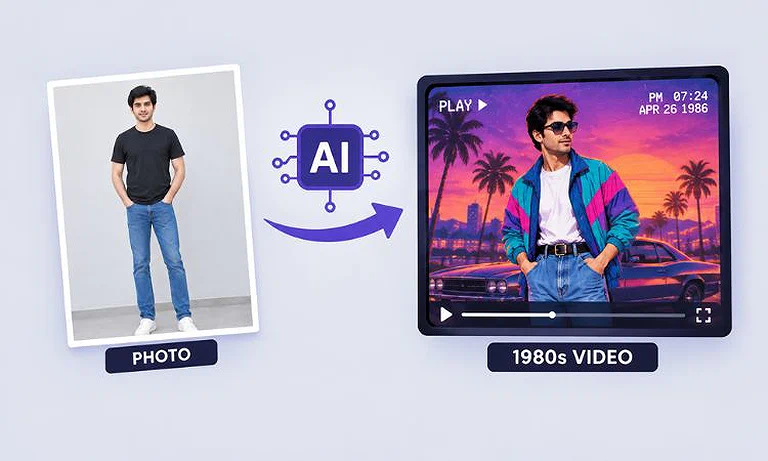
Cover Photo Best AI Tools for Creating 1980s Videos from Photos (Tested in 2026)
Quick Overview: Best AI 1980s Video Generators
| Tool | 80s Authenticity | Free Video Quality | Free Plan Length | Watermark |
| CapCut | Excellent | 1080p | 8-second video with audio | No |
| Kling AI | Very Good | 720p | 5-second video with audio | Yes |
| Noiz AI | Excellent | 768p | 5-second video | No |
| Vidu AI | Very Good | 1080p | 8-second video | No |
| Pika | Good | 480p | 5-second video without audio | No |
Who Should Read This Guide?
If you want to turn modern photos into realistic 1980s-style videos, this guide is for you. We tested multiple AI video generators using the same image and prompt to help you find the tool that best matches your needs, budget, and quality expectations. Before creating your video, you can also explore AI tools for 80s outfits to transform modern clothing into authentic retro looks.
This guide is especially useful for:
- Content creators making retro-themed videos for YouTube, TikTok, Instagram, and other social media platforms.
- Digital marketers creating nostalgic advertisements, promotions, and brand campaigns.
- Video editors and filmmakers looking for a fast way to generate 1980s-inspired scenes and visual concepts.
- Bloggers and website owners who want engaging retro video content for articles and online projects.
- AI enthusiasts interested in comparing the latest image-to-video generation tools.
- Fans of 1980s culture who want to recreate vintage fashion, neon-lit streets, classic cars, and retro city environments from modern photos.
How I Tested AI Tools for 1980s Video Generation
To ensure a fair comparison, I tested each AI video generator using the same source image and the same 1980s-themed prompt. Every tool was evaluated on how accurately it recreated a realistic 1980s environment, preserved the subject's appearance, generated natural motion, followed the prompt, and performed within its free-plan limitations.
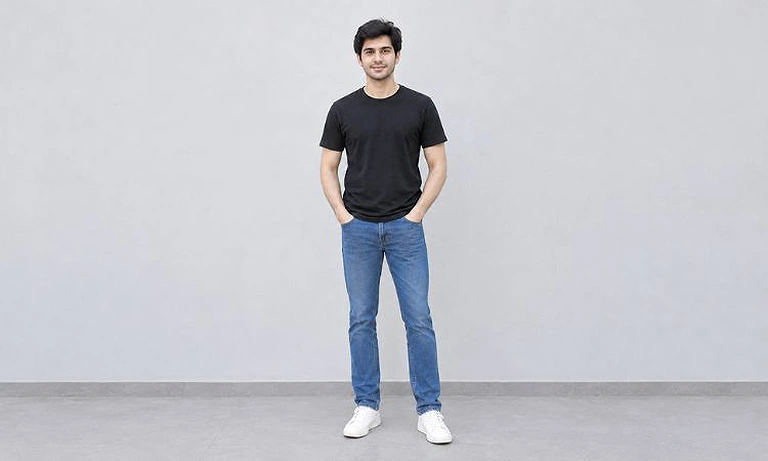
Input photo used to test AI tools for transforming modern outfits into authentic 1980s-style videos
Testing Criteria:
- 80s Visual Authenticity
- Fashion and Character Consistency
- 80s Cars and Scene Details
- Natural Human and Object Motion
- Camera Movement and Stability
- Prompt Accuracy and Scene Control
- Video Quality and Download Options
- Free Usage Limits
- Overall Limitations and Restrictions
Prompt
Create a realistic 1980s-style video of a young man walking through a busy American city street. Give him authentic 1980s clothing, hairstyle, and accessories. Add vintage cars, neon signs, arcade-style storefronts, analog film grain, slightly faded colors, VHS-inspired texture, natural movement, and a cinematic tracking-camera shot.
CapCut
CapCut is an AI video generator that converts images into animated videos using text prompts. For this test, it transformed a modern photo into a 1980s-style city scene featuring retro fashion, vintage vehicles, cinematic lighting, and realistic motion.
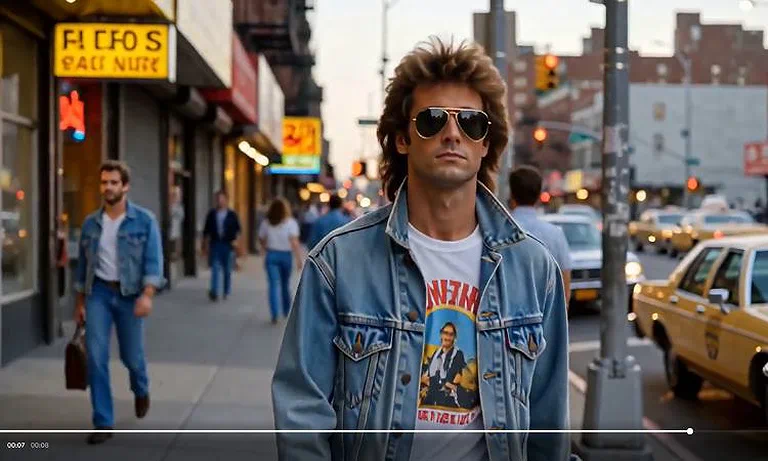
CapCut-generated 1980s-style video with retro fashion, vintage cars, and cinematic motion.
How to Use CapCut for 80s Video Creation
- Sign up or log in to CapCut.
- Open the AI Video Generator or Image-to-Video tool.
- Upload your photo.
- Enter an 80s-themed prompt describing the setting, fashion, cars, lighting, and camera movement.
- Choose your preferred video settings and aspect ratio.
- Click Generate.
- Review the generated video and adjust the prompt if needed.
- Download the completed video directly from the editor.
CapCut Testing Results
1. 80s Visual Authenticity
CapCut created a convincing 1980s atmosphere with period-inspired fashion, vintage-style cars, retro storefronts, warm cinematic lighting, and subtle film-like styling. The overall scene strongly reflected the requested decade.
2. Fashion and Character Consistency
The subject maintained a consistent appearance throughout the video. The hairstyle, sunglasses, denim jacket, facial features, and body proportions remained stable without noticeable changes between frames.
3. 80s Cars and Scene Details
The scene included multiple vintage-looking vehicles, retro-style shop signs, and urban street details that matched the 1980s theme. The environment felt cohesive and supported the period setting well.
4. Natural Human and Object Motion
The walking animation appeared smooth and realistic. Background pedestrians, vehicles, and environmental elements moved naturally, creating a believable sense of motion without obvious distortions.
5. Camera Movement and Stability
CapCut maintained stable camera tracking while keeping the subject centered in the frame. Camera movement remained smooth and cinematic without shaking, abrupt transitions, or framing issues.
6. Prompt Accuracy and Scene Control
The generated video closely followed the prompt by placing the subject in a busy retro city street with vintage vehicles, authentic 1980s fashion, and cinematic movement. Most requested visual elements were successfully included.
7. Video Quality and Download Options
The generated video was sharp and visually detailed, with consistent frame quality throughout the clip. CapCut allowed the completed video to be downloaded easily, making exporting simple and convenient.
8. Free Usage Limits
CapCut generated an 8-second video in 1080p resolution for free, including audio and no watermark in the final output. The platform also allowed easy downloading of the generated video. However, access to additional generation options, advanced features, and more video creations required a paid subscription.
Kling AI
Kling AI is an AI video generator that transforms images into short animated videos using text prompts. For this test, it converted a modern photo into an 1980s-style city street scene featuring retro fashion, vintage cars, neon signs, realistic motion, and cinematic camera tracking.
How to Use Kling AI for 80s Video Creation
- Sign up or log in to Kling AI.
- Open the Image-to-Video tool.
- Upload your photo.
- Enter an 80s-themed prompt describing the fashion, vehicles, environment, lighting, and camera movement.
- Select your preferred aspect ratio (16:9, 1:1, or 9:16).
- Click Generate.
- Review the generated video and refine the prompt if needed.
- Download the completed video.
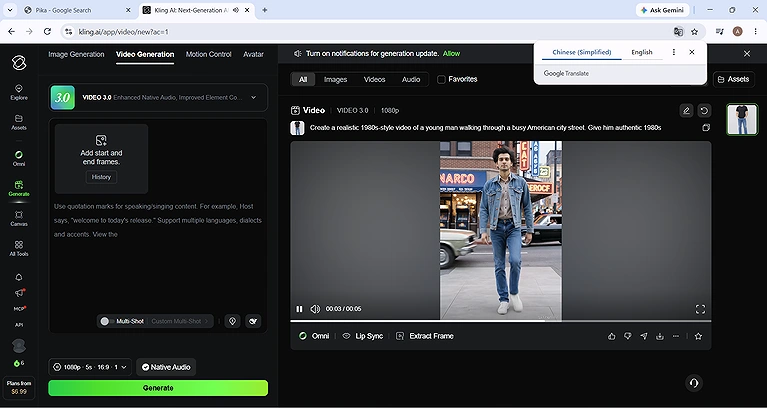
Kling AI-generated 1980s-style video featuring retro fashion, vintage cars, and realistic street motion
Kling AI Testing and Results
1. 80s Visual Authenticity
Kling AI created a convincing 1980s atmosphere with vintage-style clothing, retro storefronts, older vehicles, and neon-inspired signage. The overall environment closely matched the requested 1980s city street setting.
2. Fashion and Character Consistency
The subject's face, hairstyle, body proportions, and clothing remained consistent throughout the video. Character identity was preserved well, with no noticeable changes during movement.
3. 80s Cars and Scene Details
The video included period-appropriate vehicles, retro shop signs, and urban street elements that supported the 1980s theme. The background details blended naturally with the overall scene and helped reinforce the period setting.
4. Natural Human and Object Motion
Walking animation was smooth and realistic, with natural body movement and believable interaction between the subject and surrounding environment. Vehicle movement and background activity also appeared fluid.
5. Camera Movement and Stability
Kling AI maintained stable camera tracking while keeping the subject centered in the frame. The camera movement felt cinematic and smooth without distracting shakes or abrupt transitions.
6. Prompt Accuracy and Scene Control
The generated video closely followed the prompt by creating a young man walking through a busy retro city street with vintage cars, classic fashion, and period-inspired visual details. Most requested elements were successfully included.
7. Video Quality and Download Options
The video maintained good visual quality with clear details and smooth frame consistency. Kling AI allowed the completed video to be downloaded easily after generation, making the export process straightforward.
8. Free Usage Limits
Kling AI's free plan generated a 5-second video at 720p resolution with a visible watermark. The free output also included original environmental audio, such as car and street noise. Multiple aspect ratios were available, including 16:9, 1:1, and 9:16, while additional credits and premium features required a paid subscription.
Pika
Pika is an AI video generator that turns images into short animated videos using text prompts. For this test, it transformed a modern photo into a 1980s-inspired street scene with retro fashion, vintage cars, and smooth cinematic motion.
How to Use Pika for 80s Video Creation
- Sign up or log in to Pika.
- Select Image-to-Video.
- Upload your photo.
- Enter an 80s-themed prompt describing the scene, fashion, cars, and camera movement.
- Choose an aspect ratio (16:9, 1:1, or 9:16).
- Click Generate.
- Review the result and refine the prompt if needed.
- Download the video with one click.
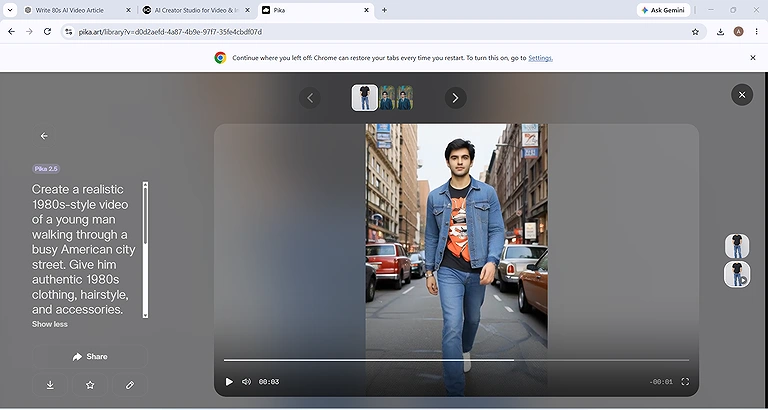
Pika-generated 1980s-style video featuring retro fashion, vintage cars, and a cinematic city street scene.
Pika Testing Results
1. 80s Visual Authenticity
Pika created a recognizable retro atmosphere by combining vintage-inspired fashion, older-style vehicles, and cinematic city-street visuals. However, several buildings, signs, and environmental details remained modern, preventing the scene from fully replicating an authentic 1980s setting.
2. Fashion and Character Consistency
The tool preserved the subject's face, body proportions, hairstyle, and overall appearance throughout the video. Character identity remained consistent during movement, with no noticeable changes to facial features or clothing.
3. 80s Cars and Scene Details
Pika included vehicles that matched the intended time period and helped establish a retro feel. However, some storefronts, architecture, and street elements appeared contemporary, reducing the overall historical accuracy of the scene.
4. Natural Human and Object Motion
Walking animation was smooth and realistic, with natural body movement and stable motion throughout the clip. No major distortions, flickering, or unnatural movements were observed during generation.
5. Camera Movement and Stability
The camera followed the subject smoothly while maintaining stable framing. There was no noticeable shaking, sudden camera jumps, unwanted cropping, or distracting movement that affected the viewing experience.
6. Prompt Accuracy and Scene Control
Pika successfully followed the main prompt by placing the subject in a city street environment and applying retro-inspired styling. The generated video captured the intended concept, although the final scene was only partially authentic to the 1980s period.
7. Video Quality and Download Options
The generated video maintained good sharpness and frame consistency throughout the clip. Visual quality remained stable, and Pika allowed the final video to be downloaded with a single click, making the export process quick and convenient.
8. Free Usage Limits
Pika's free plan allowed the creation of videos up to 5 seconds in length at 480p resolution and supported three aspect ratios: 16:9, 1:1, and 9:16. Free-generated videos did not include audio, while higher resolutions, longer video durations, audio support, and additional features required paid credits or a subscription.
Noiz AI
Noiz AI is an AI video generator that transforms images into short animated videos using text prompts. For this test, it converted a modern photo into a vibrant 1980s-inspired city scene featuring neon signs, arcade storefronts, vintage vehicles, and cinematic motion.
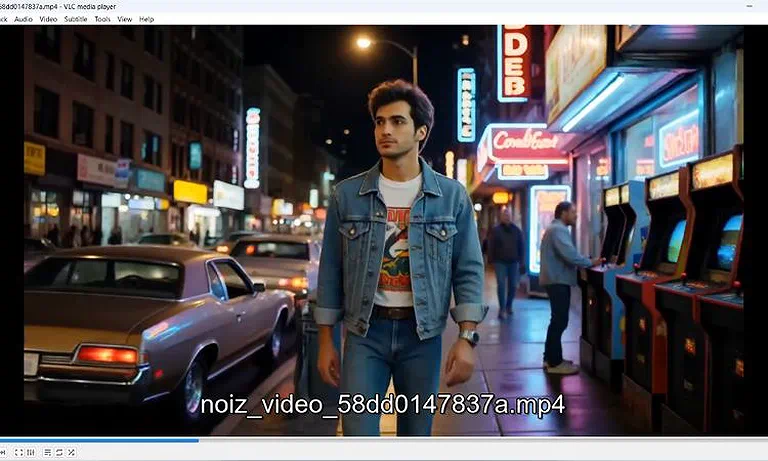
Noiz AI-generated 1980s-style video featuring neon-lit streets, retro fashion, and vintage city details.
How to Use Noiz AI for 80s Video Creation
- Sign up or log in to Noiz AI.
- Open the Image-to-Video tool.
- Upload your photo.
- Enter an 80s-themed prompt describing the fashion, vehicles, lighting, and environment.
- Select your preferred aspect ratio and generation settings.
- Click Generate.
- Review the generated video and adjust the prompt if needed.
- Download the completed video.
Noiz AI Testing Results
1. 80s Visual Authenticity
Noiz AI created a strong 1980s atmosphere with neon-lit streets, arcade machines, vintage-style vehicles, and retro storefronts. The combination of lighting, fashion, and environment closely matched the requested 1980s aesthetic.
2. Fashion and Character Consistency
The subject's face, hairstyle, body proportions, and clothing remained consistent throughout the video. The tool preserved the original identity well while adapting the scene to the retro setting.
3. 80s Cars and Scene Details
The generated scene included classic-looking vehicles, arcade cabinets, neon signs, and period-inspired storefronts. These details worked together to create a convincing retro city environment with minimal modern distractions.
4. Natural Human and Object Motion
Walking animation remained smooth and believable throughout the clip. Environmental elements such as vehicles, lighting, and background activity moved naturally without major visual distortions.
5. Camera Movement and Stability
Noiz AI maintained stable camera tracking while keeping the subject properly framed. Camera motion was smooth and cinematic, helping create an immersive street-walking sequence.
6. Prompt Accuracy and Scene Control
The tool followed the prompt closely by generating a retro city street with neon signage, arcade-style storefronts, vintage vehicles, and authentic 1980s visual elements. Most requested details were successfully incorporated into the final video.
7. Video Quality and Download Options
The generated video was sharp and visually detailed, with good frame consistency and vibrant lighting effects. The final video could be downloaded easily after generation without a visible watermark.
8. Free Usage Limits
Noiz AI's free plan generated a 5-second video at 768p resolution without adding a visible watermark. Additional generations, advanced features, premium models, and extended capabilities required a paid subscription.
Vidu AI
Vidu AI is an AI video generator that transforms images into animated videos using text prompts. For this test, it converted a modern photo into a 1980s-style city street scene featuring retro fashion, vintage vehicles, realistic motion, and cinematic camera movement.
How to Use Vidu AI for 80s Video Creation
- Sign up or log in to Vidu AI.
- Open the Image-to-Video tool.
- Upload your photo.
- Enter an 80s-themed prompt describing the fashion, vehicles, environment, lighting, and camera movement.
- Select your preferred aspect ratio and generation settings.
- Click Generate.
- Review the generated video and adjust the prompt if needed.
- Download the completed video.
Vidu AI Testing Results
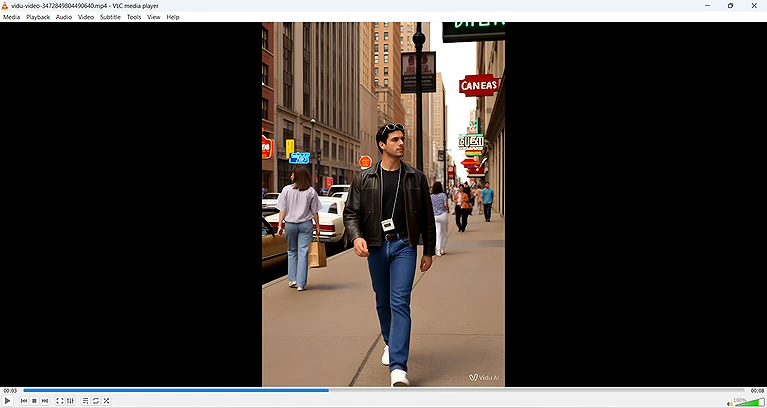
Vidu AI-generated 1980s-style video featuring retro fashion, vintage cars, and city street scene.
1. 80s Visual Authenticity
Vidu AI successfully created a retro city atmosphere with vintage-style clothing, older vehicles, neon-inspired signage, and urban street details. The overall scene captured the feel of an 1980s city environment effectively.
2. Fashion and Character Consistency
The subject's clothing, body proportions, and overall appearance remained consistent throughout the video. Identity preservation was generally good, although some facial details appeared slightly stylized compared to the original image.
3. 80s Cars and Scene Details
The generated scene included classic-looking vehicles, retro storefronts, and period-inspired street elements that supported the 1980s theme. Background details remained coherent and matched the overall setting.
4. Natural Human and Object Motion
Walking animation was smooth and stable, with natural movement from both the subject and surrounding elements. No major motion artifacts, flickering, or unrealistic movements were noticeable.
5. Camera Movement and Stability
Vidu AI maintained smooth camera tracking and kept the subject properly framed throughout the clip. Camera movement felt stable and cinematic without sudden shifts or unwanted cropping.
6. Prompt Accuracy and Scene Control
The tool followed the prompt well by generating a busy city street with retro-inspired fashion, vintage vehicles, and period-themed environmental details. Most requested elements were incorporated into the final result.
7. Video Quality and Download Options
The generated video was clear and detailed, with strong sharpness and consistent frame quality. Vidu AI allowed easy downloading of the completed video after generation.
8. Free Usage Limits
Vidu AI's free plan generated an 8-second video at 1080p resolution. The platform provided high-quality output and allowed users to download generated videos without requiring additional payment for basic exports. Premium features and additional generations required a subscription.
Common Mistakes to Avoid When Creating 1980s AI Videos
Even with a good AI video generator, the quality of your results depends heavily on the prompt and source image. Avoid these common mistakes to create more convincing 1980s-style videos:
- Using vague prompts instead of clearly describing the fashion, vehicles, lighting, and environment you want.
- Forgetting to specify the 1980s era, which can cause the AI to generate modern-looking scenes.
- Ignoring period-appropriate details such as vintage cars, neon signs, arcade storefronts, and retro clothing.
- Using low-quality source images, which can reduce facial consistency and overall video quality.
- Requesting too many actions at once, which can make the video look unnatural or inconsistent.
- Not mentioning camera movement, resulting in static or less cinematic videos.
- Overlooking character consistency, which may lead to changes in facial features, clothing, or body proportions.
- Skipping test generations, as small prompt adjustments often produce significantly better results.
- Relying only on visual style, rather than describing authentic 1980s elements and scene details.
- Ignoring free-plan limitations, such as video length, resolution, watermarks, and audio restrictions, before choosing a tool.
FAQs
Can AI video generators create 1980s videos from a single photo?
Yes. Most modern AI video generators can animate a single image and transform it into a short 1980s-style video by adding retro fashion, vintage environments, realistic motion, and cinematic camera effects.
Do I need video editing experience to create 1980s AI videos?
No. Most AI video generators are designed for beginners. You simply upload an image, enter a prompt, generate the video, and download the result without advanced editing skills.
Which aspect ratio is best for 1980s AI videos?
The best aspect ratio depends on where you plan to publish the video. Landscape works well for YouTube, square for general social media, and vertical for TikTok and Instagram Reels.
Can AI add vintage cars and retro city scenes automatically?
Yes. If you clearly describe vintage vehicles, neon signs, retro storefronts, and period-specific environments in your prompt, many AI tools can generate those elements automatically.
Why do some AI-generated 1980s videos still look modern?
AI models may include modern buildings, signs, or vehicles when prompts lack detail. Adding specific references to 1980s architecture, fashion, transportation, and street scenes usually improves authenticity.
Does a better source image improve video quality?
Yes. High-resolution images with clear facial details and good lighting generally produce better identity preservation, smoother motion, and more realistic video outputs than low-quality photos.
Can AI-generated 1980s videos be used on social media?
Yes. Most AI-generated videos can be downloaded and shared on platforms such as YouTube, TikTok, Instagram, Facebook, and X, subject to each tool's terms of use.
How long does it take to generate an 1980s AI video?
Generation times vary by platform and server load. Most tools create short videos within a few seconds to a few minutes, depending on video length and quality settings.
Can AI generate different 1980s styles from the same image?
Yes. You can create multiple variations by changing the prompt. For example, you can generate 1980s street fashion, arcade scenes, sportswear, nightlife, business attire, or punk-inspired looks.
What makes an AI-generated 1980s video feel authentic?
Authenticity usually comes from a combination of period-correct fashion, vintage vehicles, neon lighting, retro storefronts, film-like textures, natural motion, and strong prompt guidance that matches the era.
Conclusion
AI video generators can now turn a single photo into a convincing 1980s-style video, adding retro fashion, vintage cars, neon-lit streets, and cinematic motion. In our testing, each tool showed different strengths in visual authenticity, video quality, free-plan features, and ease of use. You can also explore our guide to AI tools for 80s image generation to create matching retro visuals before turning them into videos.
If you want the best free video quality, CapCut and Vidu AI are strong choices. For the most authentic 1980s atmosphere, Noiz AI and Kling AI performed particularly well. Meanwhile, Pika offers a simple and beginner-friendly experience for quick retro video creation. Ultimately, the right tool depends on your priorities, but all of the options in this guide can help transform modern photos into engaging 1980s-inspired videos.