.webp)
Best AI 1980s Photo Generators: Tested and Compared in 2026
Turning a modern photo into a realistic 1980s image has become a popular AI image trend in 2026, with users transforming current photos into retro versions inspired by the fashion, hairstyles, colors, surroundings, and photographic style of the decade. AI makes this possible without manually editing each part of a photo, allowing users to see how a person or scene could look in a convincing 1980s setting. This can be useful for recreating family memories, creating nostalgic content, exploring retro styles, or simply seeing how a modern photo might have looked in the 1980s.

 Updated: September 13, 2026 | 11 min read
Cover Photo Best AI 1980s Photo Generators: Tested and Compared in 2026
Who Should Read This Guide?
Retro Photo Enthusiasts: For people who enjoy 1980s fashion, hairstyles, colors, and vintage photography.
AI Image Users: For anyone who wants to transform modern photos into convincing 1980s-style images using AI.
Content Creators: For creators making nostalgic posts, videos, thumbnails, social media content, or retro-themed campaigns.
Family History Creators: For people who want to recreate older-looking versions of family photos or visualize relatives in a different era.
Social Media Users: For anyone interested in trying the growing 1980s photo transformation trend and sharing retro versions of their pictures.
Graphic Designers: For designers who need realistic 1980s-style visuals for posters, websites, presentations, or creative projects.
Photographers: For photographers interested in experimenting with AI-based vintage transformations without manually recreating the entire look.
Bloggers and Website Owners: For publishers who need original retro visuals for articles, stories, or other online content.
AI Tool Researchers: For users comparing different AI image generators based on transformation quality, realism, and ease of use.
Anyone Exploring the 1980s Look: For people who simply want to see how a modern photo could look with authentic 1980s styling.
What to Look for in AI 1980s Photo Generators
Facial Identity Preservation: The AI should keep the person recognizable while transforming the photo.
1980s Style Accuracy: The result should include authentic 1980s fashion, hairstyles, colors, accessories, and visual characteristics.
Clothing and Hairstyle Transformation: The tool should make noticeable, period-appropriate changes to clothing and hairstyles.
Background Transformation: Modern surroundings should be replaced with believable 1980s environments and period details.
Photo Realism: The final image should look like a natural photograph with realistic lighting, textures, and vintage effects.
Prompt Following: The AI should accurately follow instructions about the decade, person, clothing, hairstyle, and background.
Generation Speed: Faster generation makes it easier to test prompts and create multiple variations.
Free Use Limit: Check the number of free generations and any restrictions on resolution, downloads, or other features.
How I Tested These AI Image Transformation Tools
To make the comparison fair, I used the same original image and 1980s transformation prompt with every AI tool. I kept the instructions consistent and compared each result for facial identity, 1980s style, clothing and hairstyle changes, background transformation, realism, prompt accuracy, generation speed, and free use limits. This helped identify which tools produced the strongest 1980s transformation while keeping the original person recognizable.

Input Image: The original photo used as the reference for transforming the subject into a 1980s style.
Prompt
Transform the provided photo into an authentic 1980s photograph while keeping the person's face and identity clearly recognizable. Change the clothing, hairstyle, accessories, and overall appearance to match realistic 1980s fashion.
Completely transform the surroundings into a believable 1980s setting. Change the background, cars, signs, buildings, people, colors, and other visible elements to remove modern details. Add subtle film grain, natural film softness, vintage colors, and realistic 1980s photography characteristics.
Best AI Tools for 1980s Image Transformation
Several AI tools can transform modern photos into convincing 1980s-style images. I tested popular options to compare their transformation quality, realism, identity preservation, and overall results. You can also explore other AI tools for image creation.
ChatGPT
ChatGPT can transform modern photos into convincing 1980s images while preserving the subject’s identity. It can change clothing, hairstyles, colors, backgrounds, and photographic characteristics through simple prompts.
How to Use ChatGPT for Image Transformation
- Upload the original image to ChatGPT.
- Describe the 1980s transformation you want.
- Specify changes to clothing, hairstyle, colors, and background.
- Ask ChatGPT to keep the person recognizable.
- Include realistic lighting, textures, and vintage photographic details.
- Generate the transformed image.
- Review the result and refine the prompt if needed.
ChatGPT Test and Results
Facial Identity Preservation: ChatGPT preserved the person’s facial identity well. The key facial features remained recognizable after the transformation.
1980s Style Accuracy: The result showed a strong 1980s appearance through retro hairstyles, denim clothing, vintage colors, film grain, and a softer photographic look.
Clothing and Hairstyle Transformation: ChatGPT noticeably changed the clothing and hairstyle to match the decade. The overall styling looked appropriate for the 1980s.
Background Transformation: The modern background was replaced with a believable 1980s street scene. Period cars, buildings, signs, and pedestrians helped create a convincing setting.
Photo Realism: The generated image looked natural and reasonably photorealistic. Lighting, textures, film softness, and grain blended well with the transformed scene.
Prompt Following: ChatGPT followed the transformation instructions accurately. It changed the appearance and surroundings while keeping the subject recognizable.
Generation Speed: Generation took a reasonable amount of time during testing. The speed was suitable for creating and testing multiple image variations.
Free Use Limit: During testing, ChatGPT provided three free image generations per day. Free users should also check current limits for resolution, downloads, and other image features.
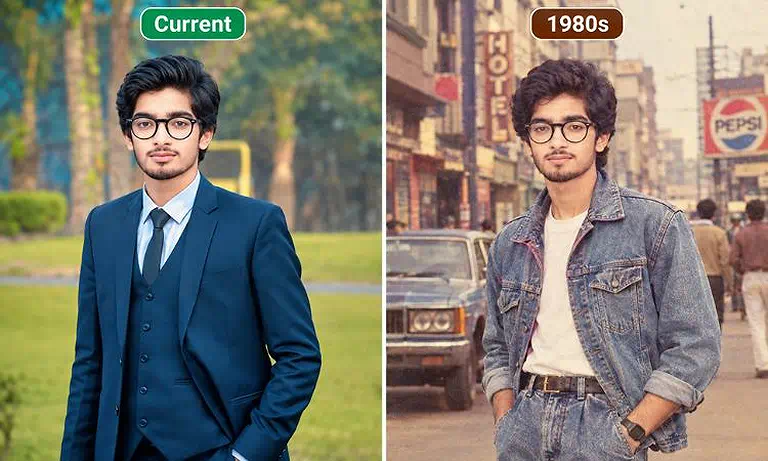
Original photo alongside the ChatGPT generated 1980s style transformation.
Grok
Grok can turn modern photos into retro 1980s images while preserving facial identity. Its results focus on realistic styling, period backgrounds, and subtle changes to the original appearance.
How to Use Grok for Image Transformation
- Upload the original photo to Grok.
- Enter a detailed prompt describing the 1980s transformation.
- Specify the desired clothing, hairstyle, colors, and background.
- Ask Grok to keep the person’s facial identity recognizable.
- Include realistic photographic details such as lighting and film characteristics.
- Generate the transformed image.
- Review the result and refine the prompt if necessary.
Grok Test and Results
Facial Identity Preservation: Grok preserved the person’s facial identity very well. However, the strong identity preservation made the modern and 1980s versions look quite similar.
1980s Style Accuracy: The image included several 1980s elements, including fuller hair, a wider suit, and a burgundy tie. However, the overall transformation was relatively subtle.
Clothing and Hairstyle Transformation: Grok changed the clothing to a darker oversized suit with broader lapels and a wider tie. The hairstyle became fuller and swept back, but the changes remained modest.
Background Transformation: The background changed noticeably and included vintage cars and an older residential setting. The surroundings showed a stronger 1980s transformation than the person.
Photo Realism: The result was realistic and well composed. However, it looked more like a digitally generated modern photograph than an authentic 1980s photograph.
Prompt Following: Grok followed the main transformation instructions but focused more on preserving the original appearance than creating a dramatic 1980s transformation.
Generation Speed: Grok generated the image within a reasonable time during testing, making it practical for trying different transformation prompts.
Free Use Limit: During testing, Grok provided three free image generations per day. Free users should also check current limits and restrictions before relying on this allowance.
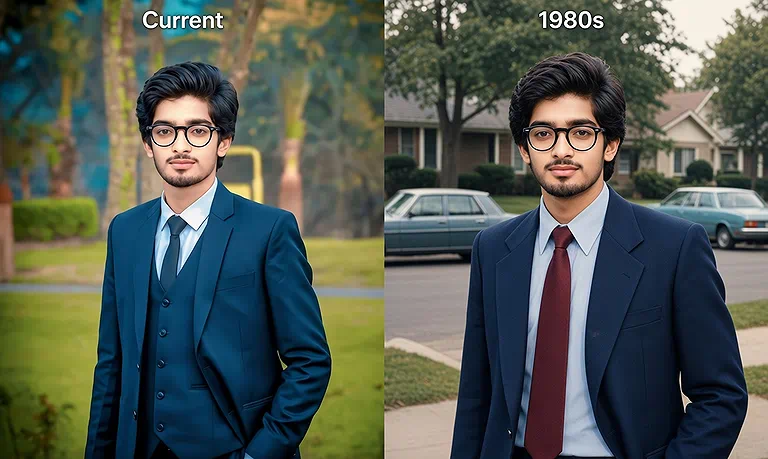
Modern suit on the left, fully restyled in authentic 1980s fashion, hair, and setting on the right
Gemini
Gemini can transform modern photos into convincing 1980s scenes with period clothing, hairstyles, backgrounds, and photographic details. However, preserving the original person’s facial identity can be challenging.
How to Use Gemini for Image Transformation
- Upload the original photo to Gemini.
- Describe the desired 1980s transformation in detail.
- Specify period-appropriate clothing and hairstyle changes.
- Ask Gemini to replace the modern background with a 1980s setting.
- Tell it to preserve the person’s facial identity and recognizable features.
- Include realistic lighting, textures, and vintage photographic effects.
- Generate the transformed image.
- Check the facial identity and overall transformation carefully.
Gemini Test and Results
Facial Identity Preservation: Facial identity was Gemini’s biggest weakness during testing. The generated person looked noticeably different from the original, making the subject less recognizable.
1980s Style Accuracy: Gemini created a convincing 1980s appearance. The clothing, hairstyle, glasses, and other retro details matched the requested period well.
Clothing and Hairstyle Transformation: Gemini made clear changes to the clothing and hairstyle. The resulting appearance included appropriate 1980s fashion and period-specific styling.
Background Transformation: The background was effectively transformed into a believable 1980s setting. The surroundings supported the retro appearance of the final image.
Photo Realism: The result looked realistic overall, with natural lighting, textures, and vintage effects that helped create a convincing photograph.
Prompt Following: Gemini followed most of the transformation instructions, particularly those related to the 1980s appearance and background. However, it struggled to maintain the original facial identity.
Generation Speed: Gemini generated the transformed image quickly during testing, making it convenient for creating and testing multiple variations.
Free Use Limit: During testing, Gemini provided up to three free image generations per day. Free availability and image limits can change, so current account restrictions should be checked.
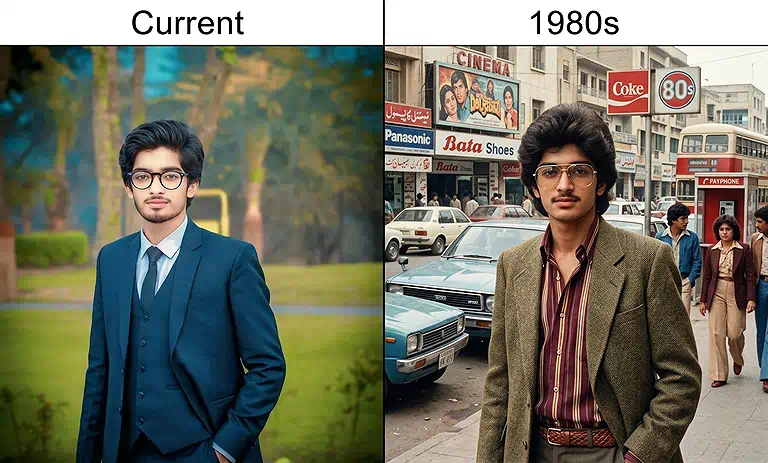
Gemini transformed the image into an 1980s style, but changed the person’s face significantly
Common Mistakes to Avoid
Using a Low Quality Photo: Start with a clear, well-lit photo where the face and clothing are easy to see. Poor-quality images can produce weaker transformations.
Writing a Vague Prompt: Clearly describe the 1980s clothing, hairstyle, background, colors, and photographic style you want.
Changing Too Many Things at Once: Give the AI clear priorities instead of adding unnecessary instructions. Focus on the changes that matter most to your desired result.
Not Mentioning Facial Identity: If you want to remain recognizable, specifically ask the AI to preserve your facial features and identity.
Ignoring the Background: A modern background can make the result feel less authentic. Ask for period-appropriate surroundings, vehicles, buildings, signs, and other details.
Using Modern Details: Avoid requesting elements that don't fit the 1980s. Modern clothing, smartphones, cars, or contemporary buildings can reduce the retro effect.
Expecting Every Detail to Be Perfect: AI may occasionally create small inaccuracies in faces, hands, clothing, or background elements. Review the result before using it.
Stopping After One Attempt: If the first result isn't right, refine the prompt and try again. Small prompt changes can produce noticeably different results.
Overdoing the Vintage Effect: Too much grain, blur, fading, or color distortion can make the image look artificial. Keep the vintage effect natural and photographic.
Using an Unclear Reference Photo: A front-facing or well-positioned subject usually gives the AI more useful information for creating a convincing transformation.
FAQs
Can AI make a photo look like it was actually taken in the 1980s?
Yes. AI can recreate period-appropriate photography by combining older color tones, film grain, softer detail, lighting, clothing, and environmental elements. The result can closely resemble an authentic 1980s photograph.
Can I transform a group photo into an 1980s image?
Yes. AI can transform group photos while applying period styling to multiple people. However, complex images may produce inconsistent faces, clothing, or body details, so clearer group photos usually produce better results.
Can I choose a specific year from the 1980s?
Yes. You can mention a specific year such as 1982 or 1989 in your prompt. This can help guide fashion, hairstyles, technology, vehicles, and other period-specific visual details.
Can AI transform old black and white photos into 1980s color photos?
Yes. AI can add color and modernize certain visual elements while applying an 1980s photographic style. Results depend on the original image quality and how accurately the tool interprets missing details.
Can I transform a childhood photo into an 1980s style?
Yes. AI can apply 1980s fashion, hairstyles, colors, and surroundings to childhood photos. For the most natural result, use a clear original image with the person's facial features visible.
Can I create different 1980s locations with the same person?
Yes. You can reuse the same reference photo and request different settings, such as a shopping mall, bedroom, street, school, or family home, while keeping the overall retro appearance consistent.
Can AI change the season while creating a 1980s photo?
Yes. You can combine the 1980s transformation with seasonal details. For example, specify summer clothing, autumn colors, winter coats, or spring surroundings to create a more specific period scene.
Can I use an AI transformed 1980s photo commercially?
Usage rights depend on the AI tool, your source image, and its current terms. Before commercial use, check the tool's licensing rules and ensure you have permission to use the original photo.
Why do some AI generated 1980s photos look too modern?
This usually happens when modern visual elements remain in the image. Stronger period instructions for clothing, architecture, vehicles, lighting, colors, and photographic characteristics can help create a more convincing result.
Can I create a specific 1980s photography style?
Yes. You can describe the photographic appearance you want, such as family-camera photography, studio portraits, school photos, or casual snapshots. Adding details about lighting and film appearance can improve the result.
Conclusion
ChatGPT, Grok, and Gemini all produced 1980s style images, but ChatGPT delivered the strongest overall result. It preserved facial identity well while creating noticeable changes to clothing, hairstyle, background, and photographic style. Grok preserved identity strongly but made subtler changes, while Gemini created convincing retro styling but changed the face noticeably.