.webp)
Why Your Faceless AI Videos Don't Rank—and How to Fix Them with Advanced AI Workflows
Every day, thousands of faceless AI videos are uploaded to YouTube. Most disappear without a trace. They aren't failing because AI is the problem—they're failing because they all look, sound, and feel the same. Robotic voices, recycled stock footage, generic scripts, and predictable editing have created an endless stream of content that viewers scroll past in seconds. It's the digital equivalent of photocopying a photocopy: each version loses a little more originality until nothing stands out.
Here's what many creators don't realize: YouTube doesn't reward content simply because it was published quickly. Its rewards videos that keep people watching, deliver genuine value, and feel unique. The fastest-growing faceless AI channels aren't relying on a single tool—they're building advanced AI production workflows that transform an idea into engaging, polished videos at scale. In this guide, you'll discover why so many AI-generated videos struggle to rank, how to avoid the "low-quality" trap, and the script-to-video pipeline that helps creators produce content viewers actually want to watch.

 July 14, 2026 | 10 min read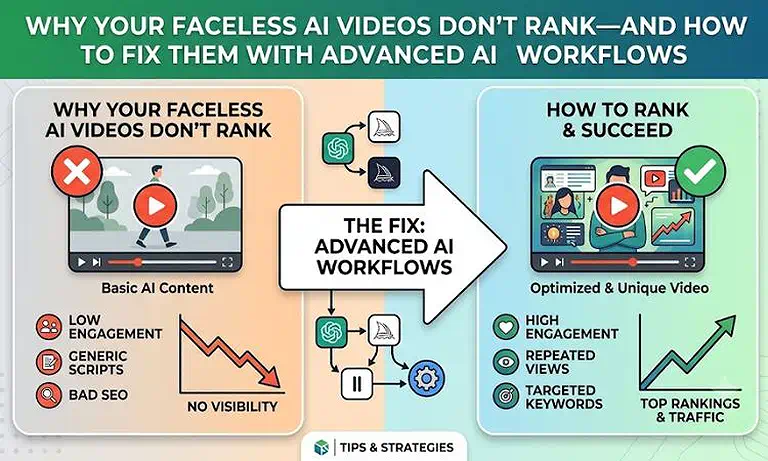
Cover Photo Why Your Faceless AI Videos Don't Rank—and How to Fix Them with Advanced AI Workflows
AI Video Production Workflow at a Glance
| Section | Details |
| AI Production Stack | 4 specialized AI tools, each handling a dedicated stage of the script-to-video workflow. |
| Recommended Workflow | InVideo AI (script) → Pictory (scene generation) → FlexClip (editing and branding) → Google Veo (cinematic AI B-roll). |
| Content Quality Focus | Delivers original visuals, natural pacing, branded edits, and AI-generated scenes instead of relying on stock footage. |
| Production Speed | Automates scripting, voiceovers, scene matching, subtitles, and editing to cut production time from hours to minutes. |
| Key Benefit | Produces engaging, professional faceless AI videos with stronger audience retention and a consistent visual style. |
Who Should Read This Guide?
If you've ever wondered why your faceless AI videos receive few views despite publishing consistently, you're not alone. Many creators assume the solution is to upload more videos, but the real challenge is building a workflow that produces content viewers actually want to watch. This guide is for creators who want to replace generic AI videos with a scalable production process that improves quality, originality, and long-term channel growth.
You'll benefit the most if you are:
- Faceless YouTube Creators struggling with low impressions, poor audience retention, or videos that fail to gain traction despite consistent uploads.
- Cash-Cow Channel Owners managing multiple AI-powered channels who need a repeatable workflow that scales production without making every video feel identical.
- Affiliate Marketers creating educational or review videos that generate qualified traffic and convert viewers without investing in an expensive production team.
- Niche Website Publishers looking to turn high-performing articles into engaging AI videos that expand their reach across YouTube and other video discovery platforms.
- Content Agencies and Freelancers producing AI videos for multiple clients while maintaining consistent quality, brand identity, and efficient turnaround times.
- Social Media Managers who need a streamlined AI workflow to create distinctive short-form and long-form videos without relying on repetitive templates.
Why Faceless AI Videos Often Struggle to Rank
The biggest misconception about faceless AI videos is that AI itself limits their reach. It doesn't. What limits performance is a poor viewing experience. When videos rely on generic scripts, repetitive visuals, robotic narration, or slow pacing, viewers lose interest quickly. Lower watch time, weaker audience retention, and fewer positive engagement signals reduce the likelihood that the recommendation system will continue showing the video to new audiences.
The real challenge is content saturation. As AI tools become widely accessible, thousands of creators produce videos using the same prompts, templates, stock footage, and voice models, making much of the content feel interchangeable. In this environment, simply publishing more videos is unlikely to improve results. Sustainable growth comes from building an advanced AI script-to-video workflow that combines automation with original storytelling, relevant visuals, natural narration, and polished editing—creating videos that are distinctive enough to capture attention and keep viewers watching.
How an Advanced AI Workflow Improves Faceless Video Quality
| Workflow Stage | Purpose | Outcome |
| Script Development | Generate a structured script with clear hooks, logical flow, and engaging storytelling. | Higher audience retention and stronger viewer engagement. |
| Scene Generation | Transform the script into context-aware scenes with relevant AI visuals. | Better visual consistency and reduced dependence on stock footage. |
| Cinematic B-Roll | Create custom AI-generated B-roll that enhances key moments and storytelling. | More original, immersive, and visually distinctive videos. |
| Editing & Branding | Refine the video with captions, motion graphics, transitions, and brand elements. | A polished, professional video with a consistent visual identity. |
| Quality Review | Review pacing, visuals, narration, and branding before publishing. | Higher-quality content with fewer errors and better overall performance. |
The Best AI Workflow to Create High-Performing Faceless AI Videos
Creating successful faceless AI videos isn't about generating content faster—it's about producing videos that viewers genuinely want to watch. Many creators depend on one-click AI workflows that generate generic scripts, repetitive visuals, and predictable editing, making it difficult to stand out in a competitive space. A structured script-to-video workflow solves this by improving every stage of production, helping you create videos that are more engaging, visually distinctive, and easier to scale consistently.
AI Workflow at a Glance
Research the Topic → Write a High-Retention Script → Build the Video → Enhance the Viewing Experience → Review & Publish
Step 1: Research Topics with Clear Search Intent
Choose topics that answer specific questions, solve real problems, or explain trending subjects your audience is actively searching for. A focused topic creates stronger content than trying to cover a broad subject in a single video.
Step 2: Write a Script That Keeps Viewers Watching
Capture attention with a compelling hook, deliver value early, and organize your content into short, logical sections. A well-paced script improves storytelling and gives viewers a reason to stay until the end.
Step 3: Build a Video That Supports the Story
Transform your script into a video where every scene reinforces the narration. Use relevant visuals instead of generic filler so that each shot helps explain, demonstrate, or strengthen your message.
Step 4: Improve the Viewing Experience
Refine your video with smooth transitions, readable captions, motion graphics, background music, and consistent branding. These elements improve clarity, maintain viewer attention, and make your content feel more polished and professional.
Step 5: Review Before You Publish
Watch the completed video from start to finish, checking that the narration, visuals, captions, pacing, and transitions work together naturally. A final review helps eliminate small issues and ensures every upload meets a consistent quality standard.
Best AI Tools for Creating High-Quality Faceless AI Videos
No single AI platform can optimize every stage of faceless video production. The most effective creators combine specialized tools to handle scripting, video generation, editing, branding, and AI-generated visuals, creating a workflow that produces higher-quality results with greater efficiency. If you're exploring more solutions, check out our complete guide to AI tools for video creation to compare the best platforms for different production needs.
InVideo AI — Best for Script-to-Video Generation
A well-structured first draft lays the foundation for every successful faceless AI video. InVideo AI accelerates this stage by converting ideas into complete video drafts that include AI-generated scripts, scene sequencing, voiceovers, and initial visual layouts. Instead of starting with a blank timeline, creators receive a structured framework that can be refined and customized before publication. This makes it an excellent choice for YouTube creators, affiliate marketers, and businesses that need to produce high-quality videos quickly without sacrificing consistency. To explore its features, pricing, strengths, and limitations, read our complete InVideo AI review.
Pictory — Best for Article-to-Video Conversion
If your content strategy revolves around blogs, tutorials, or educational resources, Pictory provides one of the fastest ways to transform written content into engaging videos. It automatically identifies the most important ideas, organizes them into logical scenes, and matches them with supporting visuals, significantly reducing manual editing. This workflow is particularly valuable for niche publishers, educators, and content marketers who want to expand their reach through video without recreating content from scratch. Learn how it performs in real-world workflows in our detailed Pictory review.
FlexClip — Best for Professional Editing and Branding
Even the best AI-generated video benefits from thoughtful editing and consistent branding. FlexClip helps creators refine their projects with animated captions, transitions, motion graphics, background music, and customizable brand elements such as logos, fonts, and colors. These enhancements improve the viewing experience while creating a recognizable visual identity across every upload. It's especially useful for creators who want their videos to look polished and professionally edited without investing in complex editing software. Discover everything it offers in our comprehensive FlexClip review.
Google Veo — Best for Cinematic AI-Generated Visuals
Generic stock footage is one of the most common reasons faceless AI videos feel repetitive. Google Veo addresses this challenge by generating cinematic, AI-created video clips from detailed prompts, allowing creators to produce visuals that align more closely with their narrative. Whether illustrating abstract concepts, creating realistic environments, or replacing overused stock assets, Veo gives creators greater creative flexibility while making each video feel more distinctive. See how it compares with other AI video generators in our in-depth Google Veo review.
Why This Combination Works
Each platform focuses on a different stage of the production process, allowing you to build a workflow that balances automation with creative control. By combining specialized tools instead of relying on a single all-in-one solution, you can produce faceless AI videos that are more engaging, visually distinctive, and easier to scale while maintaining consistent quality.
FAQ
Can YouTube monetize faceless AI videos?
YouTube can monetize faceless AI videos when they provide original value, meaningful editing, and engaging storytelling. AI-generated content is allowed, but repetitive, low-effort, or mass-produced videos may struggle to meet monetization standards.
Does YouTube penalize AI-generated videos?
YouTube evaluates AI-generated videos based on content quality, originality, and viewer satisfaction rather than AI usage itself. Videos with generic scripts, repetitive visuals, or minimal human input often struggle because they fail to engage audiences.
How do I make faceless AI videos that don't look AI-generated?
Create more authentic faceless AI videos by combining original scripts, natural narration, relevant visuals, custom editing, and consistent branding. Avoid default templates and repetitive assets that make videos feel automated or interchangeable.
Why are my AI videos getting no views?
AI videos often receive low views because of weak hooks, poor audience targeting, repetitive visuals, or limited storytelling. Improving topic selection, retention-focused scripts, and overall production quality can significantly increase viewer engagement.
Can I use AI voiceovers for YouTube videos?
AI voiceovers are suitable for YouTube videos when they sound natural and support strong storytelling. Realistic pacing, proper pronunciation, and emotional variation help maintain viewer attention compared with flat, robotic narration.
Do I need to disclose AI-generated content on YouTube?
AI-generated content may require disclosure when it includes realistic synthetic media that could mislead viewers. Creators should follow platform guidelines when using AI-generated people, events, or altered realistic footage in their videos.
What is the best AI workflow for creating faceless YouTube videos?
A strong AI workflow combines topic research, script development, visual creation, editing, branding, and quality review. Using specialized tools for each stage helps creators produce higher-quality videos while maintaining consistency and scalability.
How can I scale a faceless YouTube channel with AI?
Scale a faceless YouTube channel by building a repeatable AI workflow that automates time-consuming tasks while preserving creative control. Efficient systems improve production speed, consistency, and quality across multiple video uploads.
Are AI-generated YouTube channels still profitable in 2026?
AI-generated YouTube channels can remain profitable when they focus on valuable content, strong audience targeting, and high-quality production. Success depends less on automation and more on creating videos viewers find useful or entertaining.
What are the best AI tools for creating faceless videos?
The best AI tools depend on your production needs, including scripting, video generation, editing, branding, and visual creation. A combination of specialized platforms usually delivers better results than relying on a single AI generator.
Conclusion
The success of faceless AI videos doesn't come from generating more content—it comes from creating content that viewers actually want to watch. Many AI channels struggle because they rely on generic scripts, repetitive visuals, robotic narration, and basic automation workflows that make videos feel interchangeable. The solution isn't avoiding AI; it's using it strategically to improve storytelling, visual quality, editing, and overall viewer experience.
A powerful AI script-to-video workflow combines topic research, retention-focused scripting, custom visuals, professional editing, consistent branding, and human quality control to create videos that are more engaging and scalable. The creators who succeed will not be those who simply publish the most AI-generated videos, but those who build efficient systems that balance automation with originality, creativity, and audience value.