.webp)
CapCut vs Opus Clip: Which Is Better for Short-Form Video Creation?
Choosing the wrong video tool can spike your editing time, lead to poor AI automation, and balloon subscription costs. While both platforms excel at short-form video creation, their core workflows are completely different. CapCut serves as a timeline-driven editor built for precise, manual creator control, whereas Opus Clip is a hands-free AI platform built to turn long-form videos into viral clips. Let's compare both platforms before you subscribe to ensure you get the best value for your production workflow.

 Updated: June 28, 2026 | 9 min read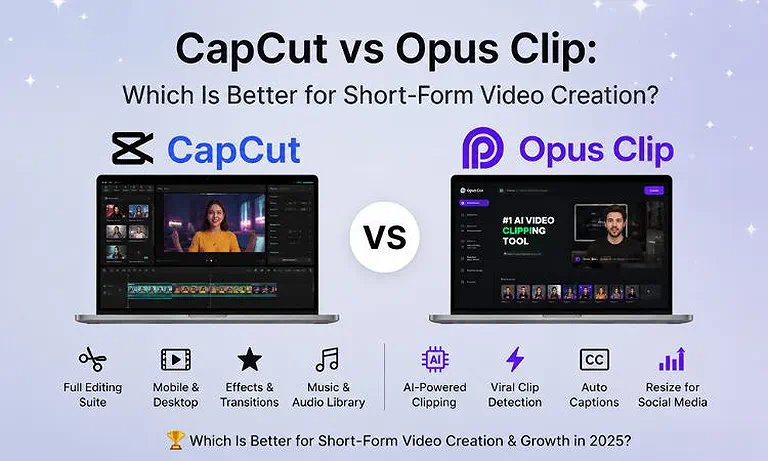
Cover Photo CapCut vs Opus Clip: Which Is Better for Short-Form Video Creation?
Quick Comparison Table
| Feature | CapCut | Opus Clip |
| Primary Workflow | Timeline-Based Manual Editing | Hands-Free AI Clipping & Repurposing |
| Best Use Case | TikTok, Reels & Advanced Social Edits | Podcasts, Webinars & Interview Highlights |
| AI Script Generation | ✅ Yes (AI Script-to-Video Creator) | ❌ No (Focuses on Input Video Transcripts) |
| Blog-to-Video Support | ✅ Yes | ❌ No |
| Auto Captions | ✅ Yes (Dynamic & Animated Templates) | ✅ Yes (AI-Generated with Emoji Overlays) |
| Stock Media Library | Massive Built-in Audio, Effects & Video Library | Limited (AI B-Roll Generation + Basic Stock Assets) |
| Brand Kit | ✅ Yes (Pro & Team Plans) | ✅ Yes (Starter & Pro Plans) |
| Collaboration | ✅ Yes (CapCut Team Spaces) | ✅ Yes (Pro & Business Plans) |
| Maximum Export Quality | 4K at 60 FPS / HDR | 4K Resolution |
| API Availability | ✅ Yes (Team Plan Only) | ✅ Yes (Custom Business Plan Only) |
| Commercial Usage | Commercial Assets Clearly Marked in Library | Licensed B-Roll & Music Cleared for Commercial Use |
| Starting Price | Free (Pro: $9.99–$19.99/month) | Free (Starter: $15/month) |
| Overall Rating | ⭐ 9.2/10 | ⭐ 8.8/10 |
Rating Source: Overall ratings are based on our independent editorial evaluation using weighted criteria, including AI capabilities, editing workflow, ease of use, creative tools, collaboration, export quality, pricing, and G2 user reviews (FlexClip: 4.4/5; VEED.io: 4.6/5).
What is CapCut?
CapCut is a powerhouse, timeline-driven video editor owned by ByteDance, natively optimized for high-engagement platforms like TikTok. Its core workflow centers around user-controlled timeline editing, heavily augmented by AI-assisted asset matching, smart trimming, and vocal isolation. Sized for independent creators, agencies, and social media managers, CapCut’s biggest strength is its massive, trending library of filters, templates, transitions, and audio tracks. It holds a dominant market position as the ultimate flexible creator tool. Read the Full CapCut Review
What is Opus Clip?
Opus Clip is a specialized generative AI video repurposing platform designed to slice long-form talking-head footage into snappy shorts. Its core automated workflow uses natural language processing to transcribe video, detect hooks, extract key context, and rank clips using a data-driven virality score. Sized perfectly for podcasters, stream clippers, and corporate content teams, its biggest strength is hands-free, high-volume multi-clip generation. It occupies a premium market position as a pure social media automation pipeline. For a deeper analysis, read our complete Opus Clip Review.
Quick Verdict Table
| Decision | Choose |
| Best Overall | 🏆 CapCut |
| Best for Beginners | 🎯 Opus Clip |
| Best for Bloggers | ✍️ CapCut |
| Best for Small Businesses | 💼 Opus Clip |
| Best AI Automation | 🤖 Opus Clip |
| Best Manual Editing Control | 🎬 CapCut |
| Best Value for Money | 💰 CapCut |
Feature-by-Feature Workflow Comparison
1. AI Content Repurposing & Automation
CapCut: Requires creators to manually import long-form timelines, identify compelling moments, and chop clips themselves, though its script-to-video tool effectively builds fresh videos from raw text articles.
Opus Clip: Automates the entire process by analyzing full-length YouTube links or uploads, instantly generating a dozen optimized, contextual short clips complete with hooks, summaries, and face-tracked cropping layouts.
Section Winner: Opus Clip dominates content repurposing with true hands-free, single-click automated clip extraction from long talking-head footage.
2. Editing Workflow & Ease of Use
CapCut: Features a highly intuitive, multi-track desktop and mobile timeline editor with drag-and-drop mechanics, offering a smooth learning curve for frame-by-frame asset tuning.
Opus Clip: Utilizes a text-based transcription editor where deleting words trims corresponding video frames, running responsively inside web browsers but offering very minimal advanced multi-track layout control.
Section Winner: CapCut wins for overall editing flexibility, providing a complete traditional multi-track setup that handles sophisticated creative projects.
3. AI Editing Features
CapCut: Offers intelligent background removal, flawless vocal isolation, video flicker fixing, eye-contact correction, and fast auto-captions that handle global languages with high timing precision.
Opus Clip: Features robust highlight detection, predictive virality scoring, multi-speaker face tracking, automatic filler-word silence removal, and smart context-aware AI visual B-roll overlay placement.
Section Winner: Opus Clip takes this for automation, while CapCut wins if you require precise manual cleanup tools.
4. Templates & Brand Customization
CapCut: Delivers thousands of community-driven, trending social media layout templates alongside robust font libraries, color pickers, and creative intro/outro asset configurations for rapid rendering.
Opus Clip: Features unified brand kits that store custom fonts, logos, and specific hex colors, automatically applying preset animated caption styles to keep brand aesthetics perfectly consistent.
Section Winner: CapCut wins due to its unbeatable scale of cultural, trending templates that dominate modern social feeds.
5. Social Media Optimization
CapCut: Built with direct, native publishing pipelines to TikTok and YouTube, featuring explicit aspect ratio presets and mobile-first formats optimized for maximum user engagement.
Opus Clip: Automatically reframes landscape footage into vertical 9:16 aspect ratios using active screen face-tracking, generating optimized titles, description copy, and direct platform scheduling.
Section Winner: Opus Clip wins for publishing automation; CapCut wins for direct-to-app trending asset integration.
6. Collaboration & Business Workflow
CapCut: Provides robust Team Spaces where multiple creators can share media assets, review timelines, track version histories, and share real-time feedback comments.
Opus Clip: Restricts advanced multi-seat collaboration workspaces, cloud file storage management, and agency approval pipelines behind its top-tier Pro and custom Business subscription plans.
Section Winner: CapCut offers smoother team media asset collaboration architectures across its accessible, affordable pricing structures.
7. Export Quality & Performance
CapCut: Renders complex visual projects exceptionally fast on local desktop hardware, supporting crisp 4K resolutions at 60 FPS along with advanced high-dynamic-range (HDR) profiles.
Opus Clip: Relies entirely on cloud-based server queues that can throttle rendering speeds during peak hours, limiting standard platform exports to a maximum of 4K resolution.
Section Winner: CapCut wins by providing faster, more stable, hardware-accelerated local rendering setups for high-resolution 4K video exports.
Real-World Workflow Assessment
Assessment 1: Long-Form Content to Video Conversion
CapCut: Manual Editing Workflow – Requires you to trim content, arrange scenes, add audio, and assemble videos manually.
Opus Clip: AI-Powered Automation – Automatically transcribes videos, identifies key moments, removes filler, and generates context-aware scenes and titles.
Assessment Result: Opus Clip is vastly superior for turning lengthy podcasts or raw talking-head files into structured, short-form summaries with zero manual timeline scrubbing.
Assessment 2: Short-Form Content Production Speed
CapCut: Template-Based Editing – Speeds up creation with pre-made templates, but manual captions and custom hooks still require significant editing time.
Opus Clip: Bulk AI Repurposing – Automatically extracts, captions, reframes, and formats up to 20 short videos from a single long-form video within minutes.
Assessment Result: Opus Clip wins purely on speed for high-volume content pipelines, while CapCut remains faster for custom, stylized, single-clip social edits.
Where CapCut Dominates
Complete Creative Control: You enjoy standard, frame-by-frame, multi-track timeline layers for fine-tuning sound design, transitions, visual effects, and customized pacing.
Trending Asset Library: Direct parent-company integration grants you instant access to viral TikTok audio tracks, sticker animations, and community-designed video templates.
Cost Efficiency: The free version provides unlimited rendering capacity and unrestricted access to professional video editing tools without mandatory watermarks.
Where Opus Clip Dominates
Hands-Free Clip Selection: The platform uses natural language processing to isolate interesting talking hooks, completely saving you from hunting through hours of raw podcast footage.
Smart Reframing (Face Tracking): Keeps moving speakers perfectly centered in vertical 9:16 boxes automatically, eliminating manual keyframing work.
AI B-Roll Generation: Automatically drops relevant context-based stock footage or generated images on top of narrative dead spaces to boost viewer retention scores.
Pricing & Cost Analysis
| Plan | Monthly Price | AI Limits | Export Limits | Commercial Rights | Best For |
| CapCut Free | $0.00 | Basic AI tools (limited usage) | Standard exports (up to platform limits) | Personal use; some assets restricted | Casual social creators |
| CapCut Pro | $9.99–$19.99 | AI credits/points (varies by region and subscription) | High-resolution exports (up to 4K on supported plans) | Commercial use for eligible premium assets | Professional solo editors |
| Opus Clip Free | $0.00 | 60 processing credits/minutes per month | 1080p, watermarked, exports expire after 3 days | Yes (watermarked content) | Testing the platform |
| Opus Clip Starter | $15.00 | 150 processing credits per month | Watermark-free exports | Full commercial rights | Regular podcasters & creators |
| Opus Clip Pro | $29.00 | 300 processing credits per month (3,600 annually when billed yearly) | Unlimited watermark-free exports, priority processing | Full commercial rights | Professional creators, agencies & teams |
Note: Pricing, plan features, and free-tier limits may change over time. Subscription costs can also vary by region, currency, taxes, and promotional offers. Before purchasing, always verify the latest pricing on the official CapCut Pricing page and the official Opus Clip Pricing page.
The Value Verdict
Long-Term Investment Value: CapCut delivers significantly higher long-term value for multi-purpose video creators.
Rendering Capacity: CapCut's pricing plans grant you unlimited raw rendering volume.
Pricing Structure: Opus Clip locks its features behind a rigid, consumption-based credit system that charges for every minute of input footage parsed by the AI.
Best Use Cases (Selection Matrix)
Choose CapCut If You Need:
- Advanced timeline controls to splice distinct, customized social advertisements from multi-camera footage.
- A massive, integrated selection of daily trending pop-culture music tracks and complex visual filters.
- Unrestricted, high-volume video exports without monthly recurring credit consumption limits.
Choose Opus Clip If You Need:
- An automated engine to turn long solo podcasts or interview shows into a weekly calendar of short clips.
- Hands-free, AI-generated captions layered with colorful, automated emoji graphics to boost viewer retention.
- Automated aspect ratio face-tracking to keep moving video speakers framed correctly inside standard vertical layouts.
Better Alternatives Worth Considering
We selected these alternatives because they excel in AI-powered video creation beyond CapCut and Opus Clip. VEED.io delivers a comprehensive browser-based editing experience, while Descript specializes in transcript-driven editing, podcast production, and efficient long-form content workflows.
| Alternative | Best For | When to Choose It |
| VEED.io | Browser-Based AI Video Editing | Choose this if you want a fully web-based editor with AI subtitles, screen recording, voice dubbing, background removal, and social media editing instead of CapCut's desktop/mobile workflow or Opus Clip's AI clipping focus. |
| Descript | Transcript-Based Video & Podcast Editing | Choose this if your workflow centers on editing videos by modifying text transcripts, removing filler words, enhancing audio, recording podcasts, and producing long-form content more efficiently than traditional timeline editors. |
Looking beyond these platforms? Explore our complete AI Video Tools Directory to compare leading AI video generators, editors, avatar platforms, and automation tools, helping you choose the best solution for your content workflow.
FAQ
Which tool is better for converting blog posts into videos?
CapCut is much better for this task. It contains a dedicated text-to-video script generator that builds visual timelines from raw text articles, whereas Opus Clip only processes pre-existing long-form video files.
Which editor is easier for beginners?
Opus Clip is easier for pure beginners who want instant results. You simply paste a video link and receive finished social media clips, completely removing the need to learn traditional timeline editing systems.
Which platform creates better AI captions?
CapCut delivers better custom caption flexibility with diverse artistic text styles and trending templates, though Opus Clip excels at automated keyword highlighting and matching context-relevant emojis to vocal expressions.
Which tool is best for YouTube Shorts?
Opus Clip wins if you are clipping down talking-head videos or podcasts into volume chunks. However, CapCut is superior for building highly stylized, custom standalone YouTube Shorts from scratch.
Which platform offers the largest stock media library?
CapCut offers a vastly superior stock media library. It grants you direct access to millions of trending audio tracks, sound effects, stickers, video transitions, and pre-made graphical templates out of the box.
Which editor is better for small business marketing?
Opus Clip is ideal for small businesses needing to turn webinars or product explainers into social clips quickly. Choose CapCut if you want to create highly specific, tailored commercial video advertisements.
Which platform exports without watermarks?
CapCut allows free watermark-free exports on standard project timelines. Opus Clip applies a mandatory rendering watermark on its free tier, requiring a paid Starter or Pro subscription plan upgrade to remove it.
Which tool provides better value for money?
CapCut provides better overall long-term financial value. It offers an incredibly powerful free tier and predictable monthly pricing with unlimited video rendering, avoiding Opus Clip’s restrictive per-minute cloud credit drain.
Conclusion
Both CapCut and Opus Clip are exceptional video creation platforms, but they serve entirely different production needs. CapCut provides unmatched creative flexibility through its timeline editor and viral asset library, making it ideal for standard social media creators who need precise manual control over their edits. Opus Clip delivers powerful automated efficiency with its algorithmic hook detection and face tracking, making it the perfect platform for podcasters who want to turn long videos into short clips instantly. Align your choice with your workflow demands to build a highly optimized social media pipeline.